iOS 26.1 Beta 4 Adds Toggle to Turn Off Lock Screen Camera Swipe
The fourth beta of iOS 26.1 includes an option to turn off the Lock Screen swipe that activates the camera, a feature that iPhone users have been wanting for years.
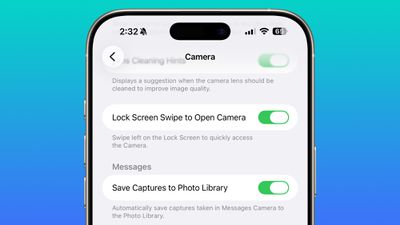
In the Camera section of the Settings app, there's a Lock Screen Swipe to Open Camera setting, and turning it off disables the feature where you can swipe left to open the camera.
The iPhone has long allowed users to open the Camera app directly from the Lock Screen with a swipe, but it can be a setting that's easy to activate, and it provides a way for someone that gets ahold of an iPhone to use it to take unwanted photos.
There was previously no way to turn off Lock Screen camera activation without disabling the camera app entirely.
Popular Stories
Alongside iOS 27, Apple today released iOS 26.7, an update to the existing iOS 26 software. Users who check for new software will see iOS 26.7 as the default update, with iOS 27 listed as an option at the bottom of the Software Update interface.
According to Apple's release notes, iOS 26.7 includes security fixes, but it does not have any other features.
Apple will eventually show iOS 27 ...
Today's iOS 27 update addresses over 100 security vulnerabilities, which is a good reason to install the new software.
If you don't want to update to iOS 27 yet, Apple also released iOS 26.7 with over 80 security fixes. 75 of the fixes are shared across both updates, so iOS 26.7 addresses many of the same issues.
There are multiple kernel fixes, including one that could allow a malicious...
Starting today, iPhone users still running iOS 26 will see iOS 27.0.1 as the prominent software update in the Settings app under General → Software Update, with iOS 26.7.1 now relegated to a smaller "Also Available" section at the bottom.
iOS 27 was released on September 14, but until now that update and later iOS 27.0.1 were shown under the "Also Available" section, with iOS 26.7 and...