

Everything New in iOS 26.1 Beta 2

Apple released the second beta of iOS 26.1 and iPadOS 26.1, introducing useful changes to alarms, multitasking on the iPad, and more. There are also subtle tweaks to some of the Liquid Glass design elements as Apple continues to refine iOS 26.
iOS 26

Alarms and Timers

Alarms set using the Clock app now have a slide to stop button rather than a tap to stop button on the Lock Screen. To snooze an alarm, you can tap, but to turn it off from the Lock Screen, you need to use a slide gesture.

ios 26 1 slide to stop
The change makes it much harder to dismiss an alarm when you're trying to tap on the snooze button. Slide to Stop is also used for timers.

Background Security Improvements

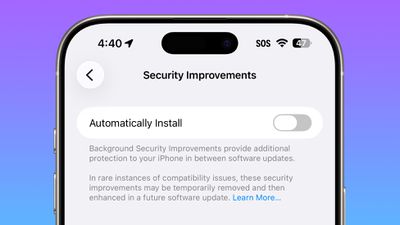
The Privacy and Security section of the Settings app now has a toggle to automatically download and install security improvements. It's a revamp of the prior Rapid Security Responses feature.
ios 26 1 security improvements

Fitness App

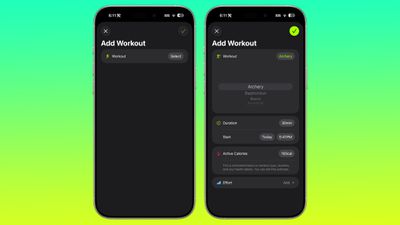
You can now create custom workouts in the Fitness app on iPhone. There are options for selecting workout type, estimated Active Calories, effort, duration, and start time.
ios 26 1 custom workout

Settings App

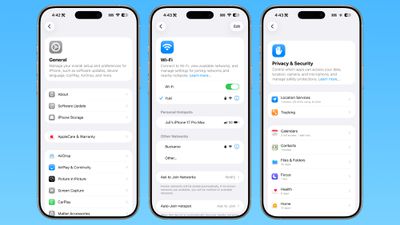
Apple changed the alignment of icons and text in the Settings app. All settings with headers that feature text now have that text aligned to the left instead of center aligned.
ios 26 1 left aligned settings
This includes General, Bluetooth, Wi-Fi, Cellular, Personal Hotspot, Accessibility, and more.

Display Settings

The Display section of the Settings app now has iOS 26-themed wallpaper instead of iOS 18 wallpaper.
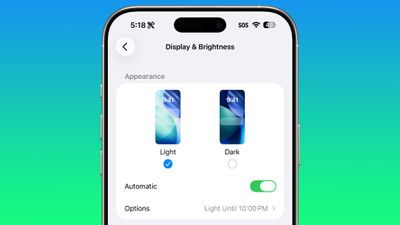
display brightness setting ios 26 1

Home Screen Folders

When you tap into a folder on the Home Screen, the name of the folder at the top is left aligned instead of center aligned.
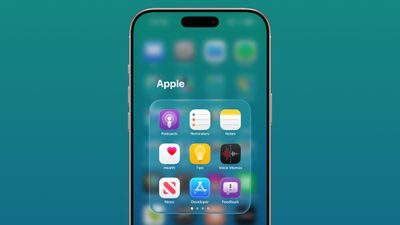
ios 26 1 folder alignment

iPadOS 26.1 Slide Over

With iPadOS 26.1 beta 2, Apple reintroduced Slide Over. Slide Over works alongside the window-based iPadOS 26 multitasking functionality, so you can have multiple windows open and still swipe over to quickly access a Slide Over app.

ipados 26 1 slide over
You can only have one Slide Over app at a time in iPadOS 26.1, and you can use the feature by tapping on the green window resizing button and
toggling on Enter Slide Over.

External Microphones on iPad

There's now an option to adjust input gain on the ‌iPad‌ when using an external microphone.

Liquid Glass

The light refraction effect around apps is now more subtle with darker icon colors and background colors.

Wallpaper

When setting a wallpaper on the Lock Screen, instructions like Pinch to Crop show up momentarily and then disappear, rather than being shown all the time.
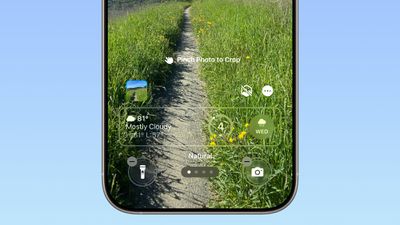
ios 26 1 wallpaper crop

Display Accessibility

Under the Display and Text Size section in the Accessibility settings, there is a new "Display Borders" toggle. It adds a border to all buttons, and replaces the prior "Button Shapes" setting.

Calendar

The Calendar app change that showed events with a full color background in iOS 26.1 beta 1 has been removed.

Photos App

The interface for managing multiple photos that you've selected has been tweaked slightly. Play as Slideshow, Favorite, and Hide are now at the top of the menu.
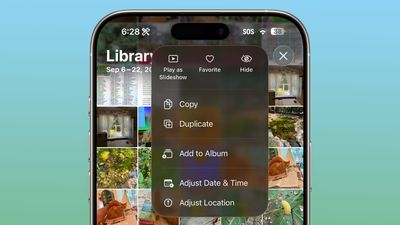
ios 26 1 photos app

More Features

Know of something new in iOS 26.1 that we missed? Let us know in the comments below.

Related Roundups: iOS 26, iPadOS 26
Related Forum: iOS 26

Popular Stories

2024 iPhone Boxes Feature

Apple Adjusts Trade-In Values for iPhones, iPads, Macs, and More

Thursday November 6, 2025 11:12 am PST by
Apple today updated its trade-in values for select iPhone, iPad, Mac, and Apple Watch models. Trade-ins can be completed on Apple's website, or at an Apple Store. The charts below provide an overview of Apple's current and previous trade-in values in the U.S., according to its website. Maximum values for most devices either decreased or saw no change, but the iPad Air received a slight bump. ...
Liquid Glass General Feature

Apple Shares Liquid Glass Design Gallery

Thursday November 6, 2025 2:45 pm PST by
Apple is promoting the new Liquid Glass design in iOS 26, showing off the ways that third-party developers are embracing the aesthetic in their apps. On its developer website, Apple is featuring a visual gallery that demonstrates how "teams of all sizes" are creating Liquid Glass experiences. The gallery features examples of Liquid Glass in apps for iPhone, iPad, Apple Watch, and Mac. Apple...
airtag purple

Apple's Website Lists AirTag 4-Pack at Shockingly Low Price [Updated]

Friday November 7, 2025 6:40 am PST by
Apple's online store in the U.S. is suddenly offering a pack of four AirTags for just $29, which is the same price as a single AirTag. This is likely a pricing error, and it is unclear if orders will be fulfilled. Apple has not discounted the AirTag four-pack in any other countries that we checked. Delivery estimates are already pushing into late November to early December, suggesting...
Early Black Friday Deals 1

The Best Early Black Friday Apple Deals on AirPods, Apple Watch, iPad, and More

Saturday November 8, 2025 6:16 am PST by
We're officially in the month of Black Friday, which will take place on Friday, November 28 in 2025. As always, this will be the best time of the year to shop for great deals, including popular Apple products like AirPods, iPad, Apple Watch, and more. In this article, the majority of the discounts will be found on Amazon. Note: MacRumors is an affiliate partner with some of these vendors. When ...
iOS 26

iOS 26.1 Available Now With These 8 New Features

Monday November 3, 2025 5:54 am PST by
Following more than a month of beta testing, Apple released iOS 26.1 on Monday, November 3. The update includes a handful of new features and changes, including the ability to adjust the look of Liquid Glass and more. Below, we outline iOS 26.1's key new features. Liquid Glass Toggle iOS 26.1 lets you choose your preferred look for Liquid Glass. In the Settings app, under Display...
ikea smart home devices

IKEA Debuts 21 HomeKit-Compatible Smart Bulbs, Sensors, and Controls

Thursday November 6, 2025 4:08 pm PST by
IKEA today announced the upcoming launch of 21 new Matter-compatible smart home products that will be able to interface with HomeKit and the Apple Home app. There are sensors, lights, and control options, all of which will be reasonably priced. Some of the products are new, while some are updates to existing lines that IKEA previously offered. There are a series of new smart bulbs that are...
Apple fitness plus feature

Future of Apple Fitness+ 'Under Review'

Sunday November 9, 2025 5:30 am PST by
The future of Apple Fitness+ is "under review" amid a reorganization of the service, according to Bloomberg's Mark Gurman. In the latest edition of his "Power On" newsletter, Gurman said that Apple Fitness+ remains one of the company's "weakest digital offerings." The service apparently suffers from high churn and little revenue. Nevertheless, Fitness+ has a small, loyal fanbase that...
maxresdefault

In-Depth iPhone Battery Experiment Pits Slow Charging Against Fast Charging

Friday November 7, 2025 1:19 pm PST by
HTX Studio this week shared the results from a six-month battery test that compared how fast charging and slow charging can affect battery life over time. Using six iPhone 12 models, the channel set up a system to drain the batteries from five percent and charge them to 100 percent over and over again. Three were fast charged, and three were slow charged. Another set of iPhones underwent...
apple watch se 3 always on

Apple to Remove iPhone-Apple Watch Wi-Fi Sync in EU With iOS 26.2

Thursday November 6, 2025 4:37 am PST by
Apple in iOS 26.2 will disable automatic Wi-Fi network syncing between iPhone and Apple Watch in the European Union to comply with the bloc's regulations, suggests a new report. Normally, when an iPhone connects to a new Wi-Fi network, it automatically shares the network credentials with the paired Apple Watch. This allows the watch to connect to the same network independently – for...

Top Rated Comments

ossifer Avatar
5 weeks ago
I’ve been waiting for years for the folder name alignment thing. This is why I never bought an iPhone until now.

Score: 23 Votes (Like | Disagree)
swrobel Avatar
5 weeks ago
“Revamp of the Rapid Security Response feature they never used”
Score: 22 Votes (Like | Disagree)
What_Is_George Avatar
5 weeks ago
The fact the wallpaper wasn’t updated in display settings is actually disappointing for Apple standards
Score: 10 Votes (Like | Disagree)
sxbino Avatar
5 weeks ago
The left alignment on texts is actually hideous. Whoever approved that is not a designer for sure.

Score: 10 Votes (Like | Disagree)
dreamerstree Avatar
5 weeks ago
Too bad about the calendar change. I actually liked it the way it was before.
Score: 7 Votes (Like | Disagree)
eoblaed Avatar
5 weeks ago

That's because Apple doesn't beta test anything anymore.
Of course they do. A lot. But given that iOS is one of their few schedule driven release cycles, they frequently have to make decisions on which bugs get resolved before release and which will be fixed over time.

Visual adjustments are going to be lower priority than functional issues... and with complete UX overhauls like we saw with iOS 7 and iOS 26, there are going to be lingering visual tweaks.
Score: 6 Votes (Like | Disagree)








































