Apple Releases HomePod Software 26 With Crossfade and AirPlay Improvements - MacRumors
Skip to Content

Apple Releases HomePod Software 26 With Crossfade and AirPlay Improvements

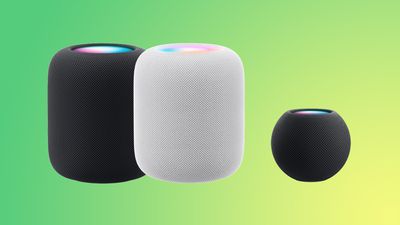
Along with iOS 26, iPadOS 26, and macOS Tahoe, Apple today released new HomePod 26 software for the ‌HomePod‌ and HomePod mini.

homepod green
‌HomePod‌ Software 26 adds support for crossfade, a feature that's designed to more smoothly transition between songs. It also includes AirPlay improvements, with Apple's release notes available below.

Software version 26 includes support for crossfade with Apple Music and AirPlay improvements. This update also includes bug fixes and stability improvements.

- Crossfade on HomePod smoothly transitions between songs by fading out the currently playing song while fading in the next so the music never stops.
- When using AirPlay to play audio on HomePod, you can now ask Siri on HomePod to play to another HomePod speaker in your home.

‌‌HomePod‌‌‌‌‌‌‌‌ software is installed automatically on the ‌‌‌‌‌‌‌‌HomePod‌‌‌‌ unless the feature is disabled‌‌‌‌, but the ‌‌‌‌‌‌‌‌HomePod‌‌‌‌‌‌‌‌ can also be manually updated in the Home app on iPhone, iPad, or Mac by tapping on the More button, choosing Home Settings, and then selecting the Software Update option.

Related Roundups: HomePod, HomePod mini

Popular Stories

HomePod 2 and Mini feature 1

Apple Releases HomePod Software 26.5

Monday May 11, 2026 9:59 am PDT by
Alongside iOS 26.5, iPadOS 26.5, and macOS Tahoe 26.5, Apple has released new HomePod 26.5 software for the HomePod and the HomePod mini. The update comes a little over a month after Apple released HomePod Software 26.4. According to Apple's release notes, HomePod Software 26.5 includes performance and stability improvements. ‌HomePod‌‌‌‌‌‌‌ software is installed...

Four iPhone 18 Pro Colors Mock Feature

iPhone 18 Pro Launching Later This Year With These 10 New Features

Tuesday May 26, 2026 6:32 am PDT by
While the iPhone 18 Pro and iPhone 18 Pro Max are not launching until September, there are already plenty of rumors about the devices. It was initially reported that the iPhone 18 Pro models would have fully under-screen Face ID, with only a front camera visible in the top-left corner of the screen. However, the latest rumors indicate that only one Face ID component will be moved under the...

apple wallet drivers license feature iPhone 15 pro

Apple Just Expanded iPhone Driver's License Feature to Arkansas

Wednesday May 27, 2026 9:41 am PDT by
In select U.S. states, residents can add their driver's license or state ID to the Apple Wallet app on the iPhone and Apple Watch, and then use it to display proof of identity or age at select airports and businesses, and in select apps. Starting today, the feature is available in Arkansas, which is the 14th state to offer it. However, it may take some time to roll out to all users. To...

Top Rated Comments

9 months ago

How do we turn off Crossfade for HonePods as I don’t see the option.
I do see it in the Music app settings - does this setting apply to music requested on the HomePod?
Home app - … - settings - user - apple music - crossfade
Score: 2 Votes (Like | Disagree)
9 months ago

Does this apply to the original HomePod too?
Yes
Score: 2 Votes (Like | Disagree)
dustin_ Avatar
9 months ago
thankful for crossfade, but it’s ridiculous it took this long.
Score: 2 Votes (Like | Disagree)
kagharaht Avatar
9 months ago

I'm hesitant to update in our office, as we have over 20 HomePods (some single, some stereo paired and connected to Apple TVs), 18.6 has been really stable, we have it starting music through a HomeKit scene when we open up the office, it starts on all speakers, music plays with only the very occasional cutout, etc. I don't want the new software to take a backwards step. IYO, does it seem like all is good here or even improved?
I'll try to remember to let you know it this thread when they auto update. I let them do it on their own.
Score: 1 Votes (Like | Disagree)
9 months ago

This thing is almost there. It can now play on all 10 of my HP if I ask it too or use scenes. Now the only thing left is the synch drifting on random speakers. Eventually it fixes itself. It stops playing for a min or more than plays again in sync... Ever since version 15 that screwed it all up, it's taken all this time and updates to fix it...
I'm hesitant to update in our office, as we have over 20 HomePods (some single, some stereo paired and connected to Apple TVs), 18.6 has been really stable, we have it starting music through a HomeKit scene when we open up the office, it starts on all speakers, music plays with only the very occasional cutout, etc. I don't want the new software to take a backwards step. IYO, does it seem like all is good here or even improved?
Score: 1 Votes (Like | Disagree)
9 months ago
Does this apply to the original HomePod too?
Score: 1 Votes (Like | Disagree)