iOS 26 Will Let You Match Your Home Screen Icons to Your iPhone Case
The release candidate version of iOS 26 includes a new feature that lets you set an icon tint color that matches your iPhone case or your iPhone.
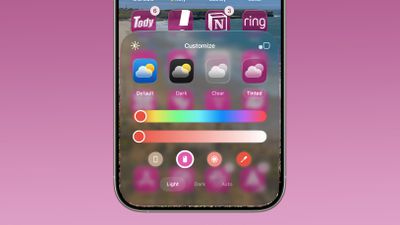
When you long press on the Home Screen and then choose the customize option, there's a new iPhone case icon at the bottom of the "Tinted" menu. Tapping it will automatically change the color of Home Screen icons to the color of the case that you're using.
Of course, this requires a MagSafe case that the iPhone recognizes, so it is essentially a feature designed to work with Apple cases. If you don't see a colorful MagSafe ring that matches your case color when you put your case on your iPhone, it's probably not going to work with icon tinting. You can also opt to change your icon colors to the color of your iPhone by tapping on the iPhone icon.
Tinted icons in iOS 26 have a new Liquid Glass look with added translucency. Tints are applied to all icons and widgets on the Home Screen.
You can still manually change the color of the tint, or choose a color from your wallpaper. iOS 26 is set to come out on Monday, September 15.
Popular Stories
Update 10:04 a.m.: iOS 27 is rolling out now, though it may take a bit for all users to see it, so keep checking!
Apple is about to release iOS 27, which will finally deliver more advanced Siri AI capabilities as well as a variety of other refinements, improvements, and new features to iPhones. It's Apple's biggest software update of the year, and Apple announced at Wednesday's iPhone event...
As noted by Nicolas Lellouche, who writes for the French tech website Numerama, Apple has updated its tech specs pages for the iPhone 18 Pro and iPhone 18 Pro Max to clarify which models are equipped with its new C2 cellular modem and where.
Apple now says the iPhone 18 Pro has a C2 modem worldwide, while the iPhone 18 Pro Max uses the chip in every country except for the U.S.
According...
Production theater company IMAX has responded in a mixed way to Apple's embrace of a 1:1.4 aspect ratio on the iPhone Duo's inner and outer displays. The boxier ratio happens to be very close to the classic "full-frame" IMAX 1.43:1 aspect ratio, which comes from the geometry of the company's original 15-perforation/70mm film system.
In response to an X post from someone wondering if we'll see...