Parallels Desktop 26 Adds Support for macOS Tahoe and Windows 11 2025 Update

Parallels Desktop 26 for Mac has just been released, bringing new features and performance enhancements to the virtualization software, including full support for Apple's forthcoming macOS Tahoe operating system.
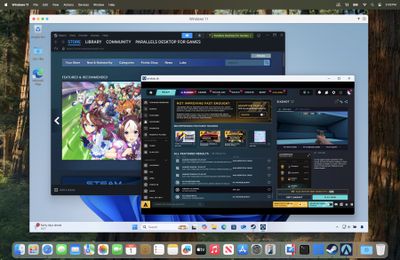
Parallels Desktop 26 for Mac Steam running in Windows 11 VM
In an effort to reduce user confusion, Parallels Desktop 26 now follows the same new versioning practice that Apple's operating systems have adopted this year. This release also provides full support for background process changes Apple has made in macOS 26 Tahoe, ensuring setup routines and Coherence mode run smoothly.

As well as full macOS Tahoe support, this version provides full compatibility with Windows 11 25H2. Windows VMs can now also view the actual available disk space on the Mac host, giving users better control over storage and helping to prevent freezes, slowdowns, and crashes during large installations or disk-heavy operations.

For businesses and IT teams, there are new centralized controls via the Parallels Desktop Enterprise Management Portal that allow IT admins to enforce settings like shared folders, USB access, clipboard sharing, and network modes across all users, ensuring virtual machines comply with organization security requirements.

Meanwhile, IT admins can now monitor and manage Windows OS updates inside VMs using Jamf Pro or other mobile device management (MDM) platforms. Scripts available from Parallels' GitHub also enable IT admins to check update status and initiate scans or installations directly from the management console.

This latest update builds on new features steadily introduced over the past year, including support for Apple Intelligence's Writing Tools, x86 emulation preview to support legacy apps, OBS Camera integration for enhanced video workflows, and support for applications like Dragon Medical One to meet specialized industry needs.

Parallels Desktop 26 for Mac is available in Standard, Pro, Business, and Enterprise editions, and can be purchased or upgraded to at parallels.com/desktop or from authorized resellers. For more information, including the option to download a free trial, see the Parallels website.

Popular Stories

iPhone Top Left Hole Punch Face ID Feature Purple

iPhone 18 Pro Launching Later This Year With These 12 New Features

Thursday January 15, 2026 10:56 am PST by
While the iPhone 18 Pro and iPhone 18 Pro Max are not expected to launch for another eight months, there are already plenty of rumors about the devices. Below, we have recapped 12 features rumored for the iPhone 18 Pro models, as of January 2026: The same overall design is expected, with 6.3-inch and 6.9-inch display sizes, and a "plateau" housing three rear cameras Under-screen Face ID...
iPhone Top Left Hole Punch Face ID Feature Purple

New Leak Reveals iPhone 18 Pro Display Sizes, Under-Screen Face ID, and More

Wednesday January 14, 2026 7:09 am PST by
While the iPhone 18 Pro models are still around eight months away, a leaker has shared some alleged details about the devices. In a post on Chinese social media platform Weibo this week, the account Digital Chat Station said the iPhone 18 Pro and iPhone 18 Pro Max will have the same 6.3-inch and 6.9-inch display sizes as the iPhone 17 Pro and iPhone 17 Pro Max. Consistent with previous...
2024 iPhone Boxes Feature

Apple Adjusts Trade-In Values for iPhones, Macs, and More

Thursday January 15, 2026 11:19 am PST by
Apple today updated its trade-in values for select iPhone, iPad, Mac, and Apple Watch models. Trade-ins can be completed on Apple's website, or at an Apple Store. The charts below provide an overview of Apple's current and previous trade-in values in the United States, according to the company's website. Most of the values declined slightly, but some of the Mac values increased. iPhone ...

Apple MacBook Pro M4 hero

These 5 Apple Products Will Reportedly Be Upgraded With OLED Displays

Friday January 16, 2026 7:07 pm PST by
Apple plans to upgrade the iPad mini, MacBook Pro, iPad Air, iMac, and MacBook Air with OLED displays between 2026 and 2028, according to DigiTimes. Bloomberg's Mark Gurman previously reported that the iPad mini and MacBook Pro will receive an OLED display as early as this year, but he does not expect the MacBook Air to adopt the technology until 2028 at the earliest. A new iPad Air is...
Verizon New

Verizon Offering $20 Credit After Major Outage, Here's How to Get It

Thursday January 15, 2026 7:37 am PST by
Verizon today announced it will be offering customers a $20 account credit after a major outage on Wednesday, and action is required to receive it. The carrier said affected customers can accept the credit by logging into the My Verizon app, but it might take some time before this option shows up in the app. Affected customers will receive a text message when the credit is available. On...

Top Rated Comments

Kylo83 Avatar
21 weeks ago
Every year they milk it when a new macOS comes out, let the updates be free. I wish we had bootcamp back like the old days
Score: 41 Votes (Like | Disagree)
Newfiebill Avatar
21 weeks ago
Last year I said I had enough of this company. Every year they want more money to update a crippled system. I went to my friends at Amazon and picked up a mini Intel computer with 256gb HD and 16gb Ram pre-installed Windows 11 for 235CAN tax in. I am good now for at least 5/6 years. Stick it Parallels.
Score: 27 Votes (Like | Disagree)
Valen1 Avatar
21 weeks ago

Last year I said I had enough of this company. Every year they want more money to update a crippled system. I went to my friends at Amazon and picked up a mini Intel computer with 256gb HD and 16gb Ram pre-installed Windows 11 for 235CAN tax in. I am good now for at least 5/6 years. Stick it Parallels.
OR you could just use VMware Fusion, which is free for personal use, and Windows 11 arm.
Score: 17 Votes (Like | Disagree)
Siggo Avatar
21 weeks ago
Cool! So they can charge 50$ again for practically no update. As if the old one wouldn't (technically) work on Tahoe...Their businessmodell is just sad.

Score: 13 Votes (Like | Disagree)
Valen1 Avatar
21 weeks ago
Tired of the annual payment from Parallels, try VMware Fusion which is free for personal use. I've been running Fusion for 10 years with any issues and not having to pay the annual fee that keeps getting jacked each year.


Score: 13 Votes (Like | Disagree)
AgeOfSpiracles Avatar
21 weeks ago

Just use VMware Fusion for free.
For the low price of free, VMWare is pretty good. But it's not as good as Parallels in terms of smoothness and stability, in my experience. Not sure I would pay for it for personal use, but for work Parallels is the easy choice. And that's before you get into the abomination that VMWare the company has become under Broadcom's management.
Score: 11 Votes (Like | Disagree)