

Apple Releases Fourth Public Betas of iOS 26 and More

Apple today released the fourth public betas of iOS 26, iPadOS 26, and macOS 26, allowing the public to test the updates ahead of their September launch. The fourth public betas come a week after the third public betas, and the updates correspond with the seventh developer betas that were released earlier today.
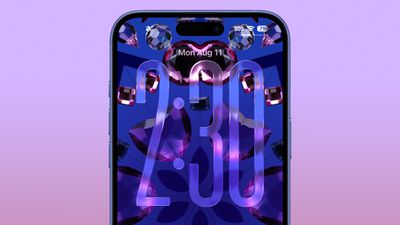
ios 26 liquid glass lock screen beta 6
Public beta testers that have registered on Apple's website can download the latest iOS 26, iPadOS 26, and macOS 26 public betas by opening the Settings or System Settings app, going to the General section, tapping on Software Update, and choosing the iOS 26, iPadOS 26, or macOS 26 Public Beta options.

iOS 26 and iPadOS 26 feature Apple's Liquid Glass design, with a visual aesthetic that focuses on transparency. Icons, menu buttons, navigation bars, and more reflect and refract light with subtle animations. There are pop-out menus in some areas, tab bars shrink down, and everything has a more rounded look.
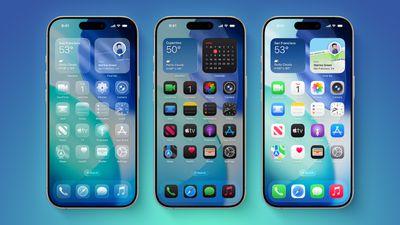
iOS 26 on Three iPhones
There are new Apple Intelligence features like Visual Intelligence for screenshots, updated order tracking in the Wallet app, new features in Reminders, and Live Translation for the Messages, Phone, and FaceTime apps. Image Playground has ChatGPT style options, and Genmoji supports mixing two or more emoji characters to make something new.
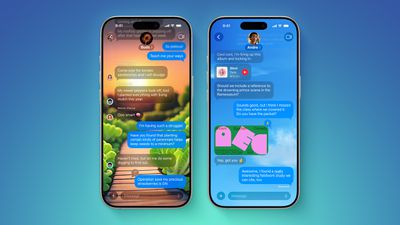
ten messages features
2D photos have a more 3D look with a Spatial Scene feature, and Safari has updated navigation. In the Phone app, there are new Call Screening and Hold Assist features that will save you time, while the Messages app supports customizable backgrounds and polls. Apple Music has a DJ-like AutoMix feature, CarPlay has an overhauled interface, there's a new Apple Games app, and Preview has come to the iPhone for the first time.
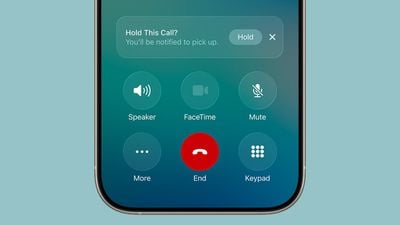
ios 26 call holding
macOS Tahoe has the same Liquid Glass design as iOS 26, and it extends to app icons, folders, the Dock, in-app navigation, menus, the Control Center, and the Menu Bar. The Control Center and the Menu Bar are customizable, and you're also able to customize folders, app icons, and widgets.
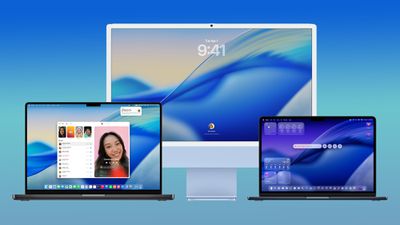
macos tahoe design
Safari has an updated tab design and a redesigned sidebar, and Apple has brought the Phone app to the Mac for making phone calls through Wi-Fi Calling. The Phone app supports the new Call Screening and Hold Assist features.

Spotlight has been overhauled with improved search and the ability to execute hundreds of actions without opening up an app. There's a new Games app with a Game Overlay feature, and developers have access to Metal 4.

More on what's new can be found in our iOS 26, iPadOS 26, and macOS Tahoe roundups.

Related Roundups: iOS 26, iPadOS 26
Related Forum: iOS 26

Popular Stories

iphone 17 models

No iPhone 18 Launch This Year, Reports Suggest

Thursday January 1, 2026 8:43 am PST by
Apple is not expected to release a standard iPhone 18 model this year, according to a growing number of reports that suggest the company is planning a significant change to its long-standing annual iPhone launch cycle. Despite the immense success of the iPhone 17 in 2025, the iPhone 18 is not expected to arrive until the spring of 2027, leaving the iPhone 17 in the lineup as the latest...
duolingo ad live activity

Duolingo Used iPhone's Dynamic Island to Display Ads, Violating Apple Design Guidelines

Friday January 2, 2026 1:36 pm PST by
Language learning app Duolingo has apparently been using the iPhone's Live Activity feature to display ads on the Lock Screen and the Dynamic Island, which violates Apple's design guidelines. According to multiple reports on Reddit, the Duolingo app has been displaying an ad for a "Super offer," which is Duolingo's paid subscription option. Apple's guidelines for Live Activity state that...


Clicks Communicator Feature

'Clicks Communicator' Unveiled — Will You Carry This With Your iPhone?

Friday January 2, 2026 6:35 am PST by
The company behind the BlackBerry-like Clicks Keyboard accessory for the iPhone today unveiled a new Android 16 smartphone called the Clicks Communicator. The purpose-built device is designed to be used as a second phone alongside your iPhone, with the intended focus being communication over content consumption. It runs a custom Android launcher that offers a curated selection of messaging...
apple intelligence black

Report: Apple's AI Strategy Could Finally Pay Off in 2026

Tuesday December 30, 2025 9:01 am PST by
Apple's restrained artificial intelligence strategy may pay off in 2026 amid the arrival of a revamped Siri and concerns around the AI market "bubble" bursting, The Information argues. The speculative report notes that Apple has taken a restrained approach with AI innovations compared with peers such as OpenAI, Google, and Meta, which are investing hundreds of billions of dollars in data...
apple fitness 2026 1

Apple Teases 'Something Big' Coming Soon to Apple Fitness+

Tuesday December 30, 2025 2:11 pm PST by
The Apple Fitness+ Instagram account today teased that the service has "big plans" for 2026. In a video, several Apple Fitness+ trainers are shown holding up newspapers with headlines related to Apple Fitness+. What's Apple Fitness+ Planning for the New Year? Something Big is Coming to Apple Fitness+ The Countdown Begins. Apple Fitness+ 2026 is Almost Here 2026 Plans Still Under ...
Mac Pro Feature Blue

What's Happening With the Mac Pro?

Wednesday December 31, 2025 9:59 am PST by
Apple hasn't updated the Mac Pro since 2023, and according to recent rumors, there's no update coming in the near future. In fact, Apple might be finished with the Mac Pro. Bloomberg recently said that the Mac Pro is "on the back burner" and has been "largely written off" by Apple. Apple apparently views the more compact Mac Studio as the ideal high-end pro-level desktop, and it has almost...
macbook air march 2020

Apple Says Final Intel MacBook Air and Apple Watch Series 5 Now 'Vintage'

Wednesday December 31, 2025 8:39 am PST by
Apple today added the final 13-inch MacBook Air powered by Intel processors, the Apple Watch Series 5, and additional products to its vintage products list. The iPhone 11 Pro was also added to the list after the iPhone 11 Pro Max was added back in September. The full list of products added to Apple's vintage and obsolete list today: MacBook Air (Retina, 13-inch, 2020) iPhone 8 Plus 128GB ...
Low Cost MacBook Feature A18 Pro

Low-Price 12.9-Inch MacBook With A18 Pro Chip Reportedly Launching Early This Year

Friday January 2, 2026 9:08 am PST by
Apple plans to introduce a 12.9-inch MacBook in spring 2026, according to TrendForce. In a press release this week, the Taiwanese research firm said this MacBook will be aimed at the entry-level to mid-range market, with "competitive pricing." TrendForce did not share any further details about this MacBook, but the information that it shared lines up with several rumors about a more...

Top Rated Comments

MothJab Avatar
20 weeks ago
Ios26 is so ugly. Literally bad windows vista and aero.

Wouldn’t be so bad if the icons weren’t made to look like candy crush
Score: 11 Votes (Like | Disagree)
beant0wn Avatar
20 weeks ago

A lot of bad padding around several UI elements. You’d think they would work on that after several betas, where I’m sure they got plenty of feedback on that. Embarrassing stuff.
The days of good designers at Apple are gone. The new generation working on UI and software are really lost, nothing is intuitive at all, aesthetics slipping…sigh.
Score: 9 Votes (Like | Disagree)
djinn Avatar
20 weeks ago

Frosting…defrosting…frosting…defrosting. Apple really playing with beta testers’ emotions when it comes to liquid glass effect ??
We call that Apple OS Global Warming
Score: 8 Votes (Like | Disagree)
Robert.Walter Avatar
20 weeks ago

strictly speaking, 4 days later (PB3 was released last week Thursday).
I am enjoying iPadOS 26 on my M2 iPad Air, no real complaints thus far
I’m not a fan of the rounded text boxes, they make things feel cramped.

Also who needs a prominent search box everywhere? Pull down was better bc it didn’t displace critical functions (some two taps down) into fussy menus.

I have a problem with safari reader freezing the And Wallet didn’t populate with info from my safari autofill. When I started manually putting it into wallet, it overwrote one if my descriptions. So I deleted all cards from Apple Pay, on phone & watch, and repopulated with a wallet drawing from my autofill data.

Looking forward to my passport into wallet. This will be great.

I do like minor passwords upgrade (will be very helpful for many folks).

But so many seeming style changes for change’s sake. I would rather have had more functionality than cosmetic schnik-schnak.
Score: 8 Votes (Like | Disagree)
Havalo Avatar
20 weeks ago
Frosting…defrosting…frosting…defrosting. Apple really playing with beta testers’ emotions when it comes to liquid glass effect ??
Score: 7 Votes (Like | Disagree)
jz0309 Avatar
20 weeks ago

The fourth public betas come a week after the third public betas, and the updates correspond with the seventh developer betas.
strictly speaking, 4 days later (PB3 was released last week Thursday).
I am enjoying iPadOS 26 on my M2 iPad Air, no real complaints thus far
Score: 7 Votes (Like | Disagree)









































