iOS 26 Public Beta: Check Out What's New on Your iPhone Lock Screen

With the iOS 26 public beta now out, you may have chosen to give the new software update a try ahead of its general release in the fall. If that's the case, Apple has made some changes and feature additions to the iPhone Lock Screen that you may want to check out.
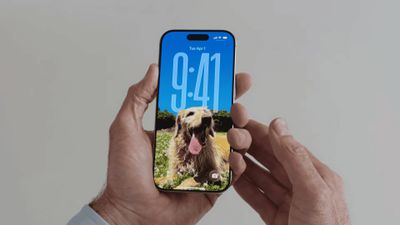
new iphone lockscreen ios 26
To download the iOS 26 public beta to your iPhone, go to Settings ➝ General ➝ Software Update, then tap Beta Updates and choose iOS 26 Public Beta from the checklist. Tap Back, and wait for the update screen to appear, then hit Update Now.

Things can always change before the software makes its way to the general iPhone-owning public, but here are five new things iOS 26 can do on the Lock Screen as of the current developer beta.

Widgets Top or Bottom
ios 26 bottom widgets lock screen
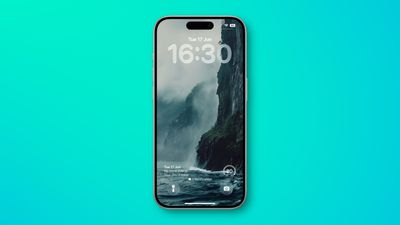
In iOS 18, the row of widgets on your Lock Screen is literally locked in place right below the clock. In iOS 26, however, Customize mode lets you drag them down to the bottom of the screen, so that they hover just above the two quick actions (assuming you have any). The new optional positioning makes tapping a widget during one-handed use a lot easier. Note: to customize your Lock Screen, long press on it, then tap Customize.

Make the Time Bigger
ios 26 lock screen time
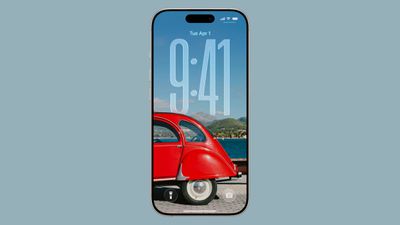
In iOS 26, Apple has made it so that the clock on the Lock Screen can be expanded to fill more of the display, making it easier to read. This can be done in Customize mode thanks to a new drag handle on the bottom-right corner of the selection frame around the time.

You can make the digits take up half of the screen, though if you have any widgets, they will slide down to the bottom of the display. In addition, if you have a depth effect applied to a photo and pinch to crop, the time will automatically adjust to accommodate the subject. Bear in mind that the ability to expand the time seems to depend on the selected photo – if there's no space above the photo's subject, the drag handle won't appear.

Quicker Photo Access
show photo in library lock screen
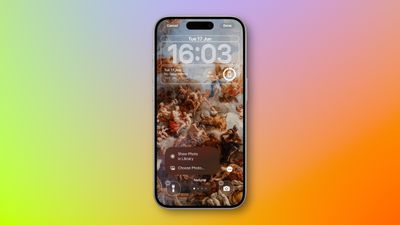
The Lock Screen in iOS 26 has a different Photos selection button in Customize mode that appears as a miniature version of the currently displayed photo. If you tap it, you now have an option to Show Photo in Library, making it easier to find the picture, or you can take the existing route and tap Choose Photo to pick another image.

Spatial Scenes

spatial scenes 1
The iPhone 15 Pro and newer models can take Spatial Photos, and while the 3D photos have a realistic depth to them, they're best viewed on Apple's Vision Pro. In iOS 26, however, the Photos app has inherited the Vision Pro's ability to convert 2D images into a 3D Spatial Scene. Not all photos work with the spatial feature, but if you create a new Lock Screen wallpaper, iOS will automatically serve up compatible photos with the feature already applied and ready to be viewed.

The feature is hard to appreciate with a still image, but the results are impressive as the image animates when you move your device. Spatial Scenes use machine learning rather than Apple Intelligence, which means the feature is available on iPhone 12 and newer devices.

Music Album Animations
liquid glass music lock screen
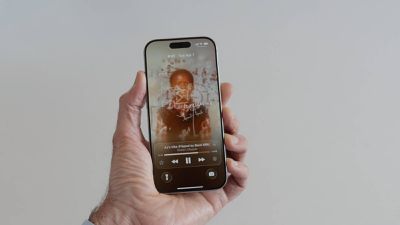
iOS 26 introduces full-screen animated album art on the iPhone Lock Screen for select Apple Music tracks. By tapping the album art in the Lock Screen music player, the artwork expands and animates, creating a more immersive listening experience. While animated album art has been available within the Apple Music app for some time, this marks its first appearance on the Lock Screen. Not all songs support it yet, but the number is steadily increasing. Apple is also opening the Animated Album Art feature to third‑party developers, so expect it to work with apps like Spotify and YouTube Music soon.


Popular Stories

M3 iPad Air

Apple's Next Two Products Are Coming Soon

Thursday February 12, 2026 11:17 am PST by
Apple plans to release an iPhone 17e and an iPad Air with an M4 chip "in the coming weeks," according to the latest word from Bloomberg's Mark Gurman. "Apple retail employees say that inventory of the iPhone 16e has basically dried out and the iPad Air is seeing shortages as well," said Gurman. "I've been expecting new versions of both (iPhone 17e and M4 iPad Air) in the coming weeks."...
Apple Sales Coach App

Apple Launching New 'Sales Coach' App

Friday February 13, 2026 2:01 pm PST by
Apple plans to launch a rebranded "Sales Coach" app on the iPhone and iPad later this month, according to a source familiar with the matter. "Sales Coach" will arrive as an update to Apple's existing "SEED" app, and it will continue to provide sales tips and training resources to Apple Store and Apple Authorized Reseller employees around the world. For example, there are articles and videos...
m5 macbook pro deal

Why You Shouldn't Buy the Next MacBook Pro

Tuesday February 10, 2026 4:27 pm PST by
Apple is planning to launch new MacBook Pro models as soon as early March, but if you can, this is one generation you should skip because there's something much better in the works. We're waiting on 14-inch and 16-inch MacBook Pro models with M5 Pro and M5 Max chips, with few changes other than the processor upgrade. There won't be any tweaks to the design or the display, but later this...
Coffee Burgundy and Purple iPhone 18 Pro Mock

Five iPhone 18 Pro Features Revealed in New Report

Friday February 13, 2026 8:43 am PST by
While the iPhone 18 Pro and iPhone 18 Pro Max are still seven months away, an analyst has revealed five new features the devices will allegedly have. Rumored color options for the iPhone 18 Pro models In a research note with investment firm GF Securities on Thursday, analyst Jeff Pu outlined the following upgrades for the iPhone 18 Pro models: Smaller Dynamic Island: It has been rumored...
macbook air prime day 2025

M5 MacBook Air: Release Date, Features, and Performance Predictions

Wednesday February 11, 2026 3:36 am PST by
The MacBook Air is Apple's most popular laptop – a thin, fanless machine that wields quiet power thanks to the efficiency of Apple silicon. While the M4 model isn't exactly old, attention is already turning to its successor. Apple doesn't telegraph new product launches ahead of time, but we can draw a surprisingly clear picture of what to expect by looking at Apple's silicon roadmap,...
Top Rated Comments

7 months ago
Whilst I'm not a fan of OS26 in general I will give credit to the lock screen team for knocking it out of the park again. The scaling clock that shrinks as you get notifications with the layered wallpaper is very, very clever and looks great.

Score: 6 Votes (Like | Disagree)
Cesar Battistini Avatar
7 months ago
The music Lock Screen iPad is insanely good.
Score: 2 Votes (Like | Disagree)
carswell Avatar
7 months ago
YMMV but I don't find that elongated time display easier to read. The opposite actually.
Score: 1 Votes (Like | Disagree)
7 months ago
Good to see the various changes. Not yet installed the beta but want to try out Spatial scenes.
Score: 1 Votes (Like | Disagree)
dustin_ Avatar
7 months ago
really happy w lockscreen updates this year. well done.
Score: 1 Votes (Like | Disagree)
martin2345uk Avatar
7 months ago
Spatial photos is not working on the iPad 10th generation; at least not a single photo gives the option on mine!
Score: 1 Votes (Like | Disagree)