

New Apple Watch Gesture in watchOS 26 Limited to Newer Models - MacRumors
Skip to Content

New Apple Watch Gesture in watchOS 26 Limited to Newer Models

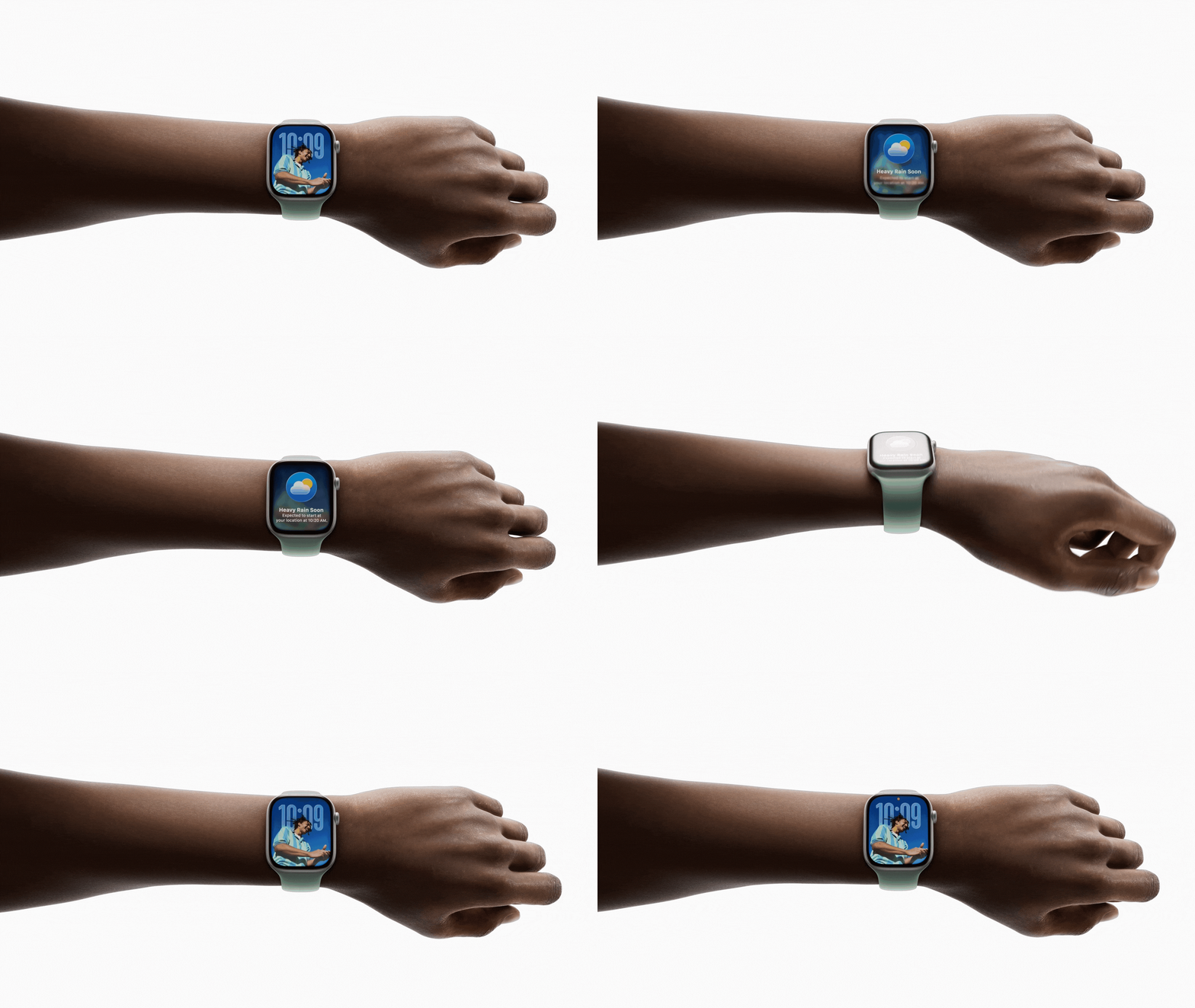
You may have missed it, but select Apple Watch models are gaining a new Wrist Flick gesture in watchOS 26 that allows users to dismiss notifications and return to their watch face with a simple wrist movement.
watchos 26 gradient light
The gesture works by turning your wrist over and back, using the accelerometer and gyroscope to detect the motion. With the gesture, you can dismiss incoming notifications, mute calls, silence alarms and alerts, and return to the watch face without needing to use your other hand.

Wrist Flick joins the existing Double Tap gesture as another one-handed control option for Apple Watch users. The feature can be toggled on or off in Settings ➝ Gestures ➝ Wrist Flick.

The new gesture is only available on Apple Watch Series 9, Apple Watch 10, and Apple Watch Ultra 2 – the same models that support the Double Tap gesture.

Apple doesn't say exactly why older models don't support the feature, despite having the same sensors, but it does use a new machine learning model, suggesting that only the newer chips found in recent Apple Watch models are powerful enough to handle it.
wrist flick watchos 26
The watchOS 26 beta is currently available through the Apple Developer Program, with a public beta coming later this month, followed by a general release in the fall.


Popular Stories

Apple Event Logo

Apple to Launch These 15+ New Products Later This Year

Friday March 27, 2026 2:03 pm PDT by
March has been an incredibly busy month for Apple, with the company unveiling more than 10 new products and accessories. We said hello to the MacBook Neo at the start of the month, and we bid farewell to the Mac Pro at the end of it. Nevertheless, there is still a lot more to come this year. Beyond the usual annual updates to iPhones and Apple Watches, Apple's all-new smart home hub is...
iOS 26

iOS 26.4 Adds Two New Features to CarPlay

Tuesday March 24, 2026 1:55 pm PDT by
iOS 26.4 was released today, and it includes a couple of new features for CarPlay: an Ambient Music widget and support for voice-based chatbot apps. To update your iPhone 11 or newer to iOS 26.4, open the Settings app and tap on General → Software Update. CarPlay will automatically offer the new features so long as the iPhone connected to your vehicle is running iOS 26.4 or later....
Mac Pro Feature Teal

Apple Confirms Mac Pro Is Dead, No Future Models Planned

Thursday March 26, 2026 2:04 pm PDT by
Apple has discontinued the Mac Pro and has removed the machine from its website, reports 9to5Mac. Apple said it does not plan to design a new version of the Mac Pro, and no new model will be coming in the future. The Mac Pro was last updated in 2023, which was when Apple added an M2 Ultra Apple silicon chip, but the chassis has not been refreshed since 2019. Apple redesigned the Mac Pro to...

Top Rated Comments

9 months ago
Dear Apple, this won’t encourage people to upgrade their watches. New health sensors will.
Score: 30 Votes (Like | Disagree)
9 months ago
So any watch can detect whether your whole body is standing, but only special watches can determine whether the watch itself was just quickly rotated. 🤔
Score: 20 Votes (Like | Disagree)
Channan Avatar
9 months ago

it does use a new machine learning model, suggesting that only the newer chips found in recent Apple Watch models are powerful enough to handle it.
Are they going to hide all new basic features that they limit to newer devices behind AI? Older models can't even use an accelerometer anymore without AI apparently.
Score: 13 Votes (Like | Disagree)
rbbloom99 Avatar
9 months ago
This is like the tap your fingers to play next song feature that never works.
Score: 13 Votes (Like | Disagree)
Spock Avatar
9 months ago
This is the Apple I’m getting tired of. This is not a feature locked behind AI, this is Apple being greedy.
Score: 11 Votes (Like | Disagree)
Paul Shields Avatar
9 months ago

Hallelujah!!

I gave away my Apple Watch 8 because every time I wanted to know the time, it was telling me to "stand-up", heart-rates, notification from scammers, reminders, step-count, etc.

I "JUST WANTED TO KNOW THE DAMN FREAKING TIME!!"

So, I bought a cheap Timex.
Even cheaper would have been to turn off the notifications you didn't want to see.
Score: 10 Votes (Like | Disagree)















