

iPadOS 26 Multitasking Update Gets Rid of Split View and Slide Over - MacRumors
Skip to Content

iPadOS 26 Multitasking Update Gets Rid of Split View and Slide Over

With iPadOS 26, Apple is introducing major changes to the way that multitasking works, and part of that update will see the removal of Split View and Slide Over, two multitasking interface options that have long existed on the iPad.
ipados 26 multitasking
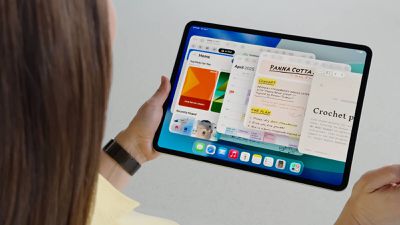
‌iPadOS 26‌ allows for multiple app windows, each of which can be resized freely on the display. The feature works on all ‌iPad‌ models able to run ‌iPadOS 26‌, though there are limitations on how many apps can be open at once. On older iPads, for example, you're limited to four apps. Newer iPads can have more open app windows.

You can change the size of ‌iPad‌ app windows, move them on top of each other, and rearrange them as desired, much like on the Mac. There are also tiling options so that you can see two to four apps side-by-side, a feature that's similar to Split View.

Windows retain their positions even when you shut off your ‌iPad‌ or close an app, and you can see all of your open apps with a swipe up gesture that activates an Exposé-style view.

‌iPad‌ app windows feature the Mac traffic-light controls, and these can be used for resizing and closing apps. ‌iPad‌ apps also have Mac-style menu bars for tweaking settings, and there's a feature for running system-intensive tasks in the background.

The new multitasking feature that replaces Slide Over and Split View is much more robust, so it is unlikely that most ‌iPad‌ users are going to miss these options.

Related Roundups: iOS 26, iPadOS 26
Related Forum: iOS 26

Popular Stories

iOS 26

Apple Releases iOS 26.5.1 to Fix Charging Issue on iPhone Air and iPhone 17 Models

Monday June 1, 2026 10:23 am PDT by
Apple today released iOS 26.5.1, a minor update to iOS 26. The software is available three weeks after iOS 26.5 came out, and appears to only be available for the iPhone Air and all models in the iPhone 17 lineup. The new software can be downloaded on eligible iPhones over-the-air by going to Settings > General > Software Update. According to Apple's release notes, the update fixes a previ...
iOS 26

Apple Seeds Second Public Betas of iOS 26.6, macOS Tahoe 26.6 and More

Tuesday June 16, 2026 10:18 am PDT by
Apple today provided public beta testers with the second betas of iOS 26.6, iPadOS 26.6, macOS Tahoe 26.6, watchOS 26.6, and tvOS 26.6, with the software coming a day after Apple seeded the betas to developers and three weeks after the first public betas. After signing up to beta test the software updates on Apple's beta site, public beta testers can download the new software using the...


iOS 26

Apple Seeds Second iOS 26.6 and iPadOS 26.6 Betas to Developers

Monday June 15, 2026 10:07 am PDT by
Apple today seeded the second betas of upcoming iOS 26.6 and iPadOS 26.6 updates to developers for testing purposes, with the software coming three weeks after Apple seeded the first betas. Registered developers can download the betas from the Settings app on the iPhone or iPad by going to the General section and selecting Software Update. With iOS 27 set to launch in September, Apple is...

Top Rated Comments

Apple Knowledge Navigator Avatar
14 months ago
I’m split on this one, but I’ll let it slide.
Score: 67 Votes (Like | Disagree)
klasma Avatar
14 months ago
I feel that removing Slide Over is a mistake. The new interface doesn’t seem to have a similar equivalent that would cover the same use cases.
Score: 29 Votes (Like | Disagree)
dugbug Avatar
14 months ago
I think things like slide over and their multiple difficult to discover and memorize gestures for all of that ran its course. This new system is so much more practical and discoverable.

I think the only downside is the ipad mini benefited from the slide over given space constraints.
Score: 20 Votes (Like | Disagree)
fatTribble Avatar
14 months ago
I actually use Split View a lot. I hope that functionality is just as simple to do in 26.
Score: 19 Votes (Like | Disagree)
14 months ago

Don’t think I’ve ever used Split View and slid over is useless imo glad they are getting replaced in ios26.
Split View is actually useful when using the iPad as a tablet. Hope Apple reverses courses on this one.
Score: 16 Votes (Like | Disagree)
jonnyb098 Avatar
14 months ago
Slideover has been invaluable for quick access to apps like messages or calculator. I don’t want it in its own window. I want it right there in slideover for quick access to an app and then get rid of it.

Slide over was the ONE multitasking feature they got right from the start and now they are ditching it.

Bad move Apple, bad move.
Score: 14 Votes (Like | Disagree)








































