

Apple Unveils macOS Tahoe With Liquid Glass Design, Phone App, Live Translation, and More - MacRumors
Skip to Content

Apple Unveils macOS Tahoe With Liquid Glass Design, Phone App, Live Translation, and More

Apple has announced macOS Tahoe 26 at WWDC 2025, introducing a striking visual redesign alongside expanded Apple Intelligence capabilities and new Continuity features that further integrate Mac and iPhone workflows.

macos tahoe
The update centers around what Apple calls a "gorgeous new design" built with Liquid Glass, a translucent material that reflects surrounding elements. The Dock, sidebars, and toolbars have been refined to emphasize content, while a completely transparent menu bar makes displays feel larger. Users gain extensive personalization options, including colorful app icon tints, customizable folder colors with emoji symbols, and enhanced Control Center layouts.

Continuity receives significant upgrades with the Phone app arriving on Mac, bringing familiar iPhone features like Recents, Contacts, and Voicemails. New capabilities include Call Screening, which automatically answers unknown calls and gathers caller information, and Hold Assist, allowing users to maintain their position in phone queues while continuing Mac work.
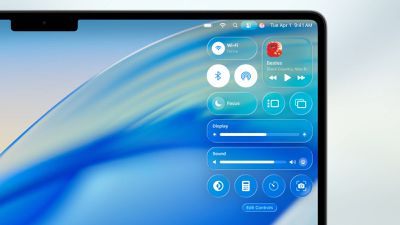
control center tahoe
Live Activities from iPhone now appear in the Mac menu bar, displaying real-time updates for flights, ride-sharing, and sports scores. Clicking these activities opens iPhone Mirroring for additional details and actions.
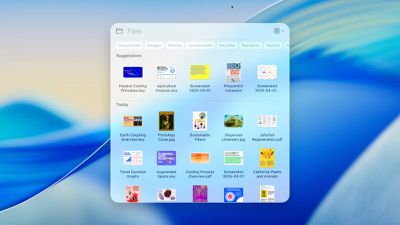
spotlight tahow
Spotlight undergoes its most substantial update ever, intelligently ranking all search results together while introducing filtering options for specific file types. Users can now execute hundreds of actions directly from Spotlight – sending emails, creating notes, or playing podcasts – without switching apps. The feature learns user routines and surfaces personalized actions, plus introduces "quick keys" for rapid access to frequent tasks.
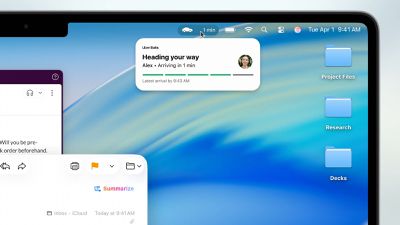
live activities macos
Apple Intelligence expands with Live Translation across Messages, FaceTime, and Phone calls, automatically translating conversations in real-time while maintaining privacy through on-device processing. Shortcuts become more powerful with intelligent actions that tap directly into Apple Intelligence models for complex automation.
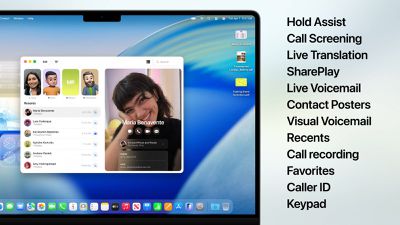
macoOS tahoe features
Genmoji and Image Playground receive enhancements, allowing users to modify existing emoji and access new creative styles including oil painting and vector art through ChatGPT integration. Apple Intelligence can also identify action items from emails and websites, automatically organizing Reminders into manageable categories.

A new Apple Games app centralizes gaming experiences with personalized recommendations and social features. The Game Overlay provides quick access to system settings and friend interactions without leaving games, while Low Power Mode extends battery gaming sessions.

Additional updates include Safari's 50% faster loading speeds and four additional hours of video streaming battery life compared to Chrome, the Journal app arrives on Mac with multi-device sync, Messages comes with backgrounds and polls, and accessibility improvements include Magnifier and Braille Access enhancements.

macOS Tahoe 26 enters developer beta today, with public beta availability next month and general release planned for fall 2025.


Popular Stories

Apple MacBook Pro with PROLED XDR Display family lineup feature

Apple Announces OLED MacBook Pro With Touch Display

Wednesday October 28, 2026 10:11 am PDT by
Apple today announced a new high-end MacBook Pro, which is available in 14-inch and 16-inch sizes. The new device has a PROLED XDR display that supports touch gestures, and a glowing rear Apple logo. Pricing on the MacBook Pro starts at $2,899 for the 14-inch model and $3,399 for the 16-inch model. Apple says the MacBook Pro has the "world's best display in a pro laptop." The PROLED...
iPad mini OLED feature 1

Apple Executive Comments on New iPad Mini Lacking 120Hz Display

Thursday October 29, 2026 1:47 pm PDT by
While the new iPad mini has an OLED display, the device does not support ProMotion, meaning the display's refresh rate is limited to 60Hz instead of 120Hz. ProMotion support would have allowed for the iPad mini's refresh rate to automatically adjust from 10Hz to 120Hz depending on the content being displayed, but evidently Apple has kept the feature exclusive to the iPad Pro among iPad...
apple pro tell logo

Apple Opened Pre-Orders for Five New Products This Week

Wednesday October 28, 2026 2:49 am PDT by
Apple opened pre-orders for five new products on Wednesday, October 28, including its first touchscreen MacBook Pro models. Pre-orders opened for the following new products: iPad mini with OLED display and A20 Pro chip iMac with M6 chip 14-inch MacBook Pro with M6 chip 14-inch MacBook Pro with OLED touchscreen 16-inch MacBook Pro with OLED touchscreen Pre-orders for the iPad mini,...

Top Rated Comments

18 months ago


It's literally hard to read.
And I'm not talking about the (limited) resolution of these preview images.

The new UI is just awful. Try reading the text underneath "Energy Mode"... you have to squint to read it because of the translucency behind it.

Score: 32 Votes (Like | Disagree)
AppliedMicro Avatar
18 months ago
It's literally hard to read.
And I'm not talking about the (limited) resolution of these preview images.

Attachment Image
Score: 27 Votes (Like | Disagree)
fel10 Avatar
18 months ago
I think I’m just getting old cause these announcements are just not as exciting as they used to be
Score: 26 Votes (Like | Disagree)
AppliedMicro Avatar
18 months ago
Transparent menu bar …here we go again. 👎
Score: 26 Votes (Like | Disagree)
antiprotest Avatar
18 months ago


It's literally hard to read.
And I'm not talking about the (limited) resolution of these preview images.
With the white on white against white design, it will be harder for anybody to see anything on your devices -- including someone looking over your shoulder.

Privacy. That's iPhone.


Attachment Image
Score: 21 Votes (Like | Disagree)
dumbscott Avatar
18 months ago
Thanks, now how do I turn it all off
Score: 20 Votes (Like | Disagree)
Latest Stories
HomeView Software 27.2: Wallpapers, Control Center, and More
3 hours ago
Apple Alerts Stores to iPhone Duo's Display Cracking Issue
4 hours ago
iOS 27.3 Will Enable These Apple Intelligence Features in China
4 hours ago
Apple Says iOS 27.3 Beta Coming Next Week
4 hours ago
Apple's Flash Storage Suppliers Are Finally 'Getting Their Revenge'
6 hours ago
14 New Things Your iPhone Can Do in iOS 27.2
7 hours ago
iPhone Duo Review: One Week Later
7 hours ago
Samsung Mocks iPhone Duo Display Cracks in New Ad Campaign
9 hours ago
The MacRumors Show: OLED MacBook Pro, iPad Mini 8, and More
9 hours ago
MacBook Pro With Touch Display: 15 More Details Revealed
9 hours ago
Russia Places Apple on State Surveillance Registry
11 hours ago
Halloween Weekend Brings Discounts on Apple Accessories and Pre-Orders
12 hours ago
Apple Has Released More Than 25 New Products in the Past Two Months
12 hours ago
Local Code Launches as Free, Private AI Assistant Tool for Mac
13 hours ago
Apple Acquires Ascend.io
13 hours ago
HomePod Mini 2 Launches Today: All the New Features
14 hours ago
AirTag 2 4-Pack Drops to New Low Price of $69.99
14 hours ago
Rian Johnson's iPhone Camera App Goes Viral
14 hours ago
Where Did All the iPhone Duos Go? Mostly to Apple's Stores
16 hours ago
Apple's Touchscreen MacBook Pro Could Ship 1.5M Units in 2027
17 hours ago
New Apple TV 4K and iPad Mini: RAM Amounts Revealed
1 day ago
Apple Executive Comments on New iPad Mini Lacking 120Hz Display
1 day ago
Here's a Hands-On Look at HomePod Mini 2's New Two-Tone Colors
1 day ago
Apple Lowers App Store Fees in Taiwan Starting October 31
1 day ago
HomeView Pre-Order Returns to $289.99 on Amazon
1 day ago
Apple Avoids Showing Pinched Fingers on iPad Mini Page in South Korea
1 day ago
Old 'Popcorn Time' App Left Hundreds of Thousands of Macs at Risk
1 day ago
You Can Turn Off the New MacBook Pro's Touchscreen Functionality
1 day ago
MacBook Pro Mini-LED vs. OLED Buyer's Guide: Every Difference
1 day ago
Where to Pre-Order Apple's New MacBooks, iPad Mini, and iMac
2 days ago











































