Skip to Content

iOS 18 Adds Camera Setting to Allow iPhone Audio Playback When Shooting Video

In iOS 18, Apple has added a control in the Camera app's Settings menu that lets you choose whether audio playing on your iPhone should pause or continue when you start recording in Video mode.
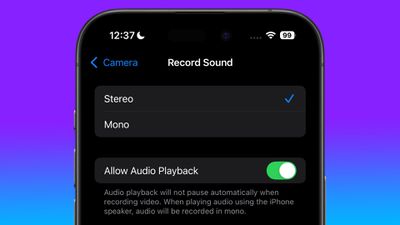
allow audio playback camera setting
In previous versions of iOS, shooting in Video mode in the Camera app automatically pauses any playing audio including music and podcasts. This behavior is based on the assumption that you don't want any sound coming out of your iPhone's speakers to be picked up on the video recording, but it's no good if you want to play a soundtrack to accompany whatever you're shooting.

One way to get around this is to use the QuickTake method of recording video in Photo mode, introduced in iOS 13, which allows any audio playback to continue during shooting. The only issue is that QuickTake records in lower quality than Video mode is capable of.

But that won't matter soon, because iOS 18 lets you control what happens to audio playback in dedicated Video mode, thanks to a new Allow Audio Playback toggle. "Audio playback will not pause automatically when recording video," notes Apple under the setting. "When playing audio using the iPhone speaker, audio will be recorded in mono."

iPhone users can look forward to several new features when iOS 18 arrives in the fall, around mid-September, with new customization options, generative AI features, Siri improvements, and more. For details on everything that's new, be sure to check out our dedicated iOS 18 roundup.

Related Forums: iOS 18, iPadOS 18

Popular Stories

MacBook Neo Feature Pastel 1

First MacBook Neo Benchmarks Are In: Here's How It Compares to the M1 MacBook Air

Thursday March 5, 2026 4:07 pm PST by
Benchmarks for the new MacBook Neo surfaced today, and unsurprisingly, CPU performance is almost identical to the iPhone 16 Pro. The MacBook Neo uses the same 6-core A18 Pro chip that was first introduced in the iPhone 16 Pro, but it has one fewer GPU core. The MacBook Neo earned a single-core score of 3461 and a multi-core score of 8668, along with a Metal score of 31286. Here's how the...

imac video apple feature

Apple Unveils Seven New Products

Friday March 6, 2026 11:48 am PST by
Apple this week unveiled seven products, including an iPhone 17e, an iPad Air with the M4 chip, updated MacBook Air and MacBook Pro models, a new Studio Display, a higher-end Studio Display XDR, and an all-new MacBook Neo that starts at just $599. iPhone 17e features the same overall design as the iPhone 16e, but it gains Apple's A19 chip, MagSafe for magnetic wireless charging and magnetic...
Apple MacBook Pro M4 hero

Apple Planning 'MacBook Ultra' With Touchscreen and Higher Price

Sunday March 8, 2026 8:05 am PDT by
Apple is planning to launch an all-new "MacBook Ultra" model this year, featuring an OLED display, touchscreen, and a higher price point, Bloomberg's Mark Gurman reports. Gurman revealed the information in his latest "Power On" newsletter. While Apple has been widely expected to launch new M6-series MacBook Pro models with OLED displays, touchscreen functionality, and a new, thinner design...

Top Rated Comments

0-0 Avatar
21 months ago
Now we need iOS 18 to allow for multiple audio simultaneous playback.
Score: 18 Votes (Like | Disagree)
ghostface147 Avatar
21 months ago

Can someone explain this is kindergarten language. LOL.

If i'm recording a video, it's going to pick up sound. Unless i'm missing something
Put a song on, then put your camera in video mode. Song is paused. This overrides that.
Score: 13 Votes (Like | Disagree)
21 months ago
Now can we block apps from pausing my music? Sick of Instagram, AliExpress, Tumblr, and the like turning my music off cos I scrolled past a video thumbnail when the video wasn't even playing.
Score: 7 Votes (Like | Disagree)
maruyama Avatar
21 months ago

Why would you need this out of curiosity. I'm glad it doesn't let you do this. Hurts my brain on my Mac
In my experience, the biggest use case is where you have music playing in the background and you’re scrolling in Safari. Just scrolling a muted video into view will take over the audio, stopping your music. If you’re scrolling on X Twitter, where there’s a lot of videos you’re scrolling past, it’s maddening! It basically makes it impossible to listen to music while using certain sites in Mobile Safari.
Score: 5 Votes (Like | Disagree)
21 months ago
I always thought this was some kind of copy protection/analog hole thing.
Score: 5 Votes (Like | Disagree)
TheGhostWalker Avatar
21 months ago

Now we need iOS 18 to allow for multiple audio simultaneous playback.
Why would you need this out of curiosity. I'm glad it doesn't let you do this. Hurts my brain on my Mac
Score: 2 Votes (Like | Disagree)