Apple Releases Fourth Beta of visionOS 1.3 to Developers - MacRumors
Skip to Content

Apple Releases Fourth Beta of visionOS 1.3 to Developers

Apple today released the fourth beta of an upcoming visionOS 1.3 update to developers, allowing them to test new features ahead of the software seeing a public launch. The fourth visionOS 1.3 beta comes a week after the release of the third beta.
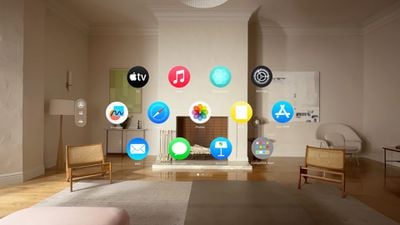
visionOS Home Screen
The visionOS beta can be downloaded by going to the Settings app on the device and toggling on developer betas. A registered developer account is required, and Apple recommends making a backup before installing new software.

Apple may make further improvements to Personas, EyeSight, and other features with visionOS 1.3, as well as implement additional bug fixes. No new features were found in the first three visionOS 1.3 betas.

Related Roundup: Apple Vision Pro
Buyer's Guide: Vision Pro (Neutral)
Related Forum: Apple Vision Pro

Popular Stories

apple vision pro orange

Apple's Vision Pro Layoffs Were Broader Than First Reported

Tuesday September 1, 2026 4:18 am PDT by
Recent layoffs of Apple employees working on the Vision Pro were broader than previously thought, Bloomberg's Mark Gurman reports. Last month, Gurman said that Apple cut around 100 jobs from the Vision Products Group, with those cuts centered on the headset's gaming and immersive video teams. Gurman now says the layoffs also reached Vision Pro staff across the rest of the company, including ...

watchos 27

Apple Seeds watchOS 27, visionOS 27, and tvOS 27 Release Candidates

Wednesday September 9, 2026 12:06 pm PDT by
Apple today seeded the release candidate versions of watchOS 27, visionOS 27, and tvOS 27 to developers and public beta testers. The release candidates are the final versions of the updates that will be seeded to the public as long as no final bugs are found during this last round of testing. The updates can be installed through the Software Update section in the Settings app on each...

Foldable iPhone 2023 Feature 1

'iPhone Ultra' Could Face Staggered Market Rollout, US Only at Launch

Thursday August 13, 2026 5:56 am PDT by
Apple's upcoming foldable "iPhone Ultra" may see a staggered country-by-country launch over several months, with initial availability limited to the U.S. market, according to an Australian publication. In a report labeled "exclusive," ChannelNews said today it has been told by local carriers and one major retailer that Apple's first foldable iPhone will be a "no show" when the iPhone 18 Pro...

Top Rated Comments

Amazing Iceman Avatar
28 months ago

Does eye tracking and pinch gestures work on apps that are being mirrored to the avp from a Mac or can you only use the Bluetooth keyboard to control the mirrored apps?
Not at this time.
If you are using TeamViewer or VNC then yes.
Score: 1 Votes (Like | Disagree)
Amazing Iceman Avatar
28 months ago

The Vision goggles can see my hands, it could most likely see my fingers typing on a keyboard placed on the table. The "angle" would be like a keyboard on the table in-front of me. I look down and it's there.

The point is Vision Pro will also be a great mobile device and I don't want to carry around a keyboard and mouse. Use surfaces around me...horizontal, vertical, curved...Simply put on the goggles and everything I need appears.
On 2.0 using a Magic Keyboard, you will be able to see the whole keyboard even when immersed.
Hopefully other keyboards will be supported. I have a foldable keyboard, and would love to be able to see it while immersed.
Score: 1 Votes (Like | Disagree)
28 months ago

Any advantages over current VisionOS 2.0 Beta?
This is the v1.3 beta. I made the mistake of thinking it was v2.0 and wondered why I couldn't update. I imagine v2.0 beta 3 is still way superior.
Score: 1 Votes (Like | Disagree)
anthogag Avatar
28 months ago
I recently tried Vision Pro at an Apple Store. I am guessing they don't use VisionOS 2 for store demos.

Vision Pro is spectacular. I definitely will be getting one.

Can VisionOS 2 place the virtual keyboard on the table if I am sitting at a table? A keyboard button press would coincide with touching the table surface.
Score: 1 Votes (Like | Disagree)