Satechi Launches Thunderbolt 4 Multi-Display Docking Station

Satechi today announced the launch of its latest Mac accessory, the Thunderbolt 4 Multi-Display Docking Station. The Docking Station uses DisplayLink software technology to allow a Mac to connect to up to four external monitors, plus it offers 96W power delivery and Thunderbolt 4 transfer speeds.
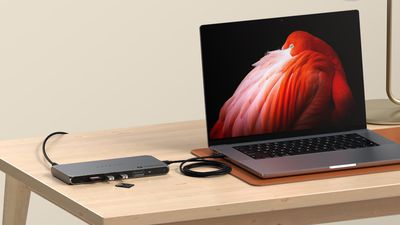
satechi thunderbolt dock
Made from a space gray aluminum that is meant to match Apple devices, the hub supports up to four extended monitors at 4K/60Hz resolution, or one display at 8K/60Hz. With four displays, two can be connected through Thunderbolt 4 and two through HDMI. Satechi says that this feature is designed to address the single display limit of M1, M2, and M3 chips. ‌M1‌, ‌M2‌, and M3 MacBook Pro models support up to three displays with Satechi's dock, while the M3 MacBook Air supports four when in clamshell mode. Machines with Pro and Max chips support up to four displays through the hub.

The hub provides 96W power delivery to the host machine, which is enough to charge even the 16-inch ‌MacBook Pro‌. Each of the three Thunderbolt 4 downstream ports also offer 15W for charging iPhones, Apple Watches, and other accessories, with two ports able to be used at one time for charging purposes. The Thunderbolt 4 ports facilitate data transfers at speeds up to 40Gb/s, and there are two USB-A ports that support transfer speeds up to 10Gb/s. a UHS-II SD card reader is available as well, and it is capable of transferring up to 312MB/s.

Satechi says the dock supports daisy-chaining up to six devices, providing 32Gb/s native PCIe support for external GPUs and Thunderbolt-based storage devices.

The Thunderbolt 4 Multi-Display Docking Station can be purchased from the Satechi website for $300.


Tag: Satechi

Popular Stories

iOS 26

iOS 26.2 Coming Soon With These 8 New Features on Your iPhone

Thursday December 11, 2025 8:49 am PST by
Apple seeded the second iOS 26.2 Release Candidate to developers earlier this week, meaning the update will be released to the general public very soon. Apple confirmed iOS 26.2 would be released in December, but it did not provide a specific date. We expect the update to be released by early next week. iOS 26.2 includes a handful of new features and changes on the iPhone, such as a new...
iOS 26

iOS 26.4 and iOS 27 Features Revealed in New Leak

Friday December 12, 2025 10:56 am PST by
Macworld's Filipe Espósito today revealed a handful of features that Apple is allegedly planning for iOS 26.4, iOS 27, and even iOS 28. The report said the features are referenced within the code for a leaked internal build of iOS 26 that is not meant to be seen by the public. However, it appears that Espósito and/or his sources managed to gain access to it, providing us with a sneak peek...
AirPods Pro Firmware Feature

Apple Releases New Firmware for AirPods Pro 2 and AirPods Pro 3

Thursday December 11, 2025 11:28 am PST by
Apple today released new firmware designed for the AirPods Pro 3 and the prior-generation AirPods Pro 2. The AirPods Pro 3 firmware is 8B30, up from 8B25, while the AirPods Pro 2 firmware is 8B28, up from 8B21. There's no word on what's include in the updated firmware, but the AirPods Pro 2 and AirPods Pro 3 are getting expanded support for Live Translation in the European Union in iOS...
iOS 26

Apple Releases iOS 26.2 With Alarms for Reminders, Lock Screen Changes, Enhanced Safety Alerts and More

Friday December 12, 2025 10:10 am PST by
Apple today released iOS 26.2, the second major update to the iOS 26 operating system that came out in September, iOS 26.2 comes a little over a month after iOS 26.1 launched. ‌iOS 26‌.2 is compatible with the ‌iPhone‌ 11 series and later, as well as the second-generation ‌iPhone‌ SE. The new software can be downloaded on eligible iPhones over-the-air by going to Settings >...
Google maps feaure

Google Maps Quietly Added This Long-Overdue Feature for Drivers

Wednesday December 10, 2025 2:52 am PST by
Google Maps on iOS quietly gained a new feature recently that automatically recognizes where you've parked your vehicle and saves the location for you. Announced on LinkedIn by Rio Akasaka, Google Maps' senior product manager, the new feature auto-detects your parked location even if you don't use the parking pin function, saves it for up to 48 hours, and then automatically removes it once...
AirTag 2 Mock Feature

Apple AirTag 2: Four New Features Found in iOS 26 Code

Thursday December 11, 2025 10:31 am PST by
The AirTag 2 will include a handful of new features that will improve tracking capabilities, according to a new report from Macworld. The site says that it was able to access an internal build of iOS 26, which includes references to multiple unreleased products. Here's what's supposedly coming: An improved pairing process, though no details were provided. AirTag pairing is already...
macOS Tahoe 26 Thumb

Apple Releases macOS Tahoe 26.2 With Edge Light

Friday December 12, 2025 10:08 am PST by
Apple today released macOS Tahoe 26.2, the second major update to the macOS Tahoe operating system that came out in September. macOS Tahoe 26.2 comes five weeks after Apple released macOS Tahoe 26.1. Mac users can download the macOS Tahoe update by using the Software Update section of System Settings. macOS Tahoe 26.2 includes Edge Light, a feature that illuminates your face with soft...
iOS 26

15 New Things Your iPhone Can Do in iOS 26.2

Friday December 5, 2025 9:40 am PST by
Apple is about to release iOS 26.2, the second major point update for iPhones since iOS 26 was rolled out in September, and there are at least 15 notable changes and improvements worth checking out. We've rounded them up below. Apple is expected to roll out iOS 26.2 to compatible devices sometime between December 8 and December 16. When the update drops, you can check Apple's servers for the ...

Top Rated Comments

bradman83 Avatar
20 months ago

Doubtful. Sounds like this dock is using DisplayLink (a software graphics solution) to get around the limitations of Apple's fairly weak GPUs.
It's less an issue of the GPUs being weak as it's an issue that the base M-series SoCs have a limited number of display controllers. The M1 MacBook Air/Pro and iMac all have two display controllers but one is hard-wired to the internal display, hence the one external display limitation (the Mac Mini has one controller hardwired to HDMI and the other to Thunderbolt). The display controllers themselves are apparently physically quite large and are built into the SoC; they take up the same silicon space as two performance cores, so Apple is limited in how many they can put into their chips. M3 SoCs allow the display controller to switch between the internal display or USB-C/Thunderbolt, hence the second display with the lid closed. Even the base M1 GPU would handle 3-4 external displays just fine if it had the controller support to do it.
Score: 12 Votes (Like | Disagree)
bakerzdosen Avatar
20 months ago
Sigh... yet another TB4 dock without 10GbE (or even 2.5GbE.)
Score: 7 Votes (Like | Disagree)
brofkand Avatar
20 months ago
I've been liking the Dell Thunderbolt 4 docks, they're universal and work with everything - for less money than the Apple specific ones like this.
Score: 7 Votes (Like | Disagree)
brofkand Avatar
20 months ago

It's less an issue of the GPUs being weak as it's an issue that the base M-series SoCs have a limited number of display controllers. The M1 MacBook Air/Pro and iMac all have two display controllers but one is hard-wired to the internal display, hence the one external display limitation (the Mac Mini has one controller hardwired to HDMI and the other to Thunderbolt). The display controllers themselves are apparently physically quite large and are built into the SoC; they take up the same silicon space as two performance cores, so Apple is limited in how many they can put into their chips. M3 SoCs allow the display controller to switch between the internal display or USB-C/Thunderbolt, hence the second display with the lid closed. Even the base M1 GPU would handle 3-4 external displays just fine if it had the controller support to do it.
Semantics - supports less external displays than the old Intel machines, and a $300 Chromebook without nasty software based solutions like DisplayLink - it's a problem.
Score: 3 Votes (Like | Disagree)
nt5672 Avatar
20 months ago
I have no experience with Satechi, but bad experience with OWC. In general is Satechi any better?
Score: 3 Votes (Like | Disagree)
neuropsychguy Avatar
20 months ago
The link isn’t working yet. I’m interested to know what the Ethernet speed is.

Edit: It's working now. "1 Gigabit Ethernet Port". That makes it a pass for me unless it hits $200 or less. I could use an external dongle and get faster speeds, but I'm interested in something with 2.5 or faster built-in.
Score: 3 Votes (Like | Disagree)