Apple's New Cellular iPad Air and iPad Pro Models Are eSIM Only
Apple at its "Let Loose" event today announced new iPad Pro and iPad Air models, and there are smaller changes compared to the previous generation devices that did not get mentioned during the event but are worth knowing about.
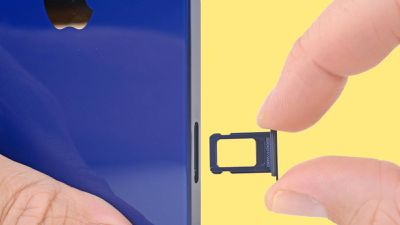
One of the differences worth noting is the lack of a physical SIM card slot. On the previous generation models, the cellular versions of both the iPad Air and the iPad Pro included a physical SIM card slot. In the new devices, that's no longer the case. All cellular models now support eSIM only.
It's a small but crucial detail for anyone looking to upgrade their iPad while sticking with their current cellular plan. Apple has not divulged the reason why it chose to remove the physical SIM slot, but it could have been a design decision related to making the devices slimmer, or a necessity to keep them slim, given all of the devices' hardware upgrades.
Either way, the change brings parity to Apple's latest iPad models and its iPhone, which dropped the physical SIM slot in 2022 with the launch of the iPhone 14.
Popular Stories
iOS 26.4 was released today, and it includes a couple of new features for CarPlay: an Ambient Music widget and support for voice-based chatbot apps.
To update your iPhone 11 or newer to iOS 26.4, open the Settings app and tap on General → Software Update. CarPlay will automatically offer the new features so long as the iPhone connected to your vehicle is running iOS 26.4 or later....
Apple today released new firmware for the AirPods Pro 2, AirPods Pro 3, and the AirPods 4. The firmware has a version number of 8B39, up from 8B34 on the AirPods Pro 3, 8B28 on the AirPods Pro 2, and 8B21 on the AirPods 4.
There is no word on what's included in the firmware, but Apple has a support document with limited notes. Most updates are limited to bug fixes and performance...
Apple this week released tvOS 26.4, and the software update includes a handful of new features and changes for the Apple TV.
tvOS 26.4 is compatible with all Apple TV 4K and Apple TV HD models released since 2015. To update your Apple TV, open the Settings app on the device, navigate to System → Software Updates, and select Update Software.
Below, we have recapped what is new in tvOS...