Apple Retail Store Guide 'Facades' Refreshed With Timelines, Visit Receipts and More
Comprehensive Apple Store guide Facades received a major update today, with developer Michael Steeber introducing version two of the app. If you're unfamiliar with Facades, it has everything you would ever want to know about Apple's retail locations.
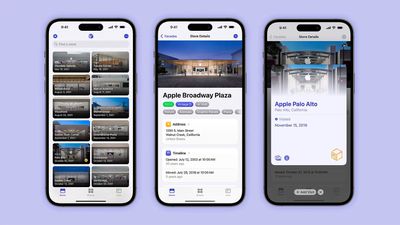
The app has always had a directory of every worldwide Apple Store with details like store features and trends, but Steeber has added a timeline that provides a wealth of additional information. The Timeline button on each store detail page has the earliest photo of the store, grand opening art, and gifts distributed at openings, along with info on renovations, anniversaries, and more.
The option to log visits to stores has an added "receipt" animation to mark the occasion, along with tools for sharing on social media. Custom store lists can also be created, with the stores selected visible on a map. For example, if you're going to a city with multiple stores, you can compile them in a list and view them on the map to plan stops.
Other new additions include search filters for finding stores and store information, Shortcuts for things like searching for nearby stores, and Chinese localization.
Facades can be downloaded on the iPhone, iPad, and Mac. [Direct Link]
Popular Stories
Apple is releasing five new products this Friday, November 6, following pre-orders that opened last week, including its first touchscreen MacBook Pro models.
The following new products will be available from tomorrow:
iPad mini with OLED display and A20 Pro chip
iMac with M6 chip
14-inch MacBook Pro with M6 chip
14-inch MacBook Pro with OLED touchscreen
16-inch MacBook Pro with OLED...
Apple today announced that its Festival Place store in Basingstoke, England will be permanently closing on Saturday, November 21.
Apple Festival Place
Apple had already announced that the store would be closing in November, but it had not provided the public with a specific date until now.
Apple's store inside the Festival Place shopping center opened in 2011, so it had a 15-year run....
YouTuber Marques Brownlee has switched back to the iPhone 18 Pro after spending more than two weeks with the iPhone Duo. On the latest episode of the "Waveform" podcast, Brownlee said he missed the Pro's cameras and Face ID. He added that he would miss opening the iPhone Duo, using it in portrait, and reading on the larger screen.
Despite strong initial demand for Apple's first foldable...