

Apple Releases watchOS 10.1 With Double Tap, NameDrop and More

Apple today released watchOS 10.1, the latest version of the watchOS 10 operating system that was released in September. watchOS 10.1 comes four weeks after watchOS 10.0.2, a minor update that brought bug fixes.
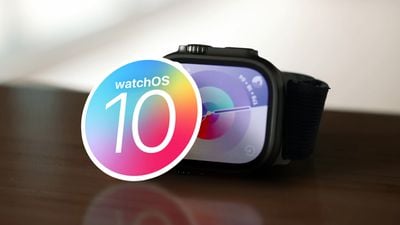
watchOS 10 Launch Feature
‌watchOS 10‌‌.1 can be downloaded for free through the Apple Watch app on an iPhone running iOS 17 or later by opening it up and going to General > Software Update. To install the new software, the Apple Watch needs to have at least 50 percent battery and it needs to be placed on a charger.

There are several new Apple Watch features enabled in watchOS 10.1, including NameDrop. NameDrop lets you tap an Apple Watch to another Apple Watch or ‌iPhone‌ to exchange contact information with someone.
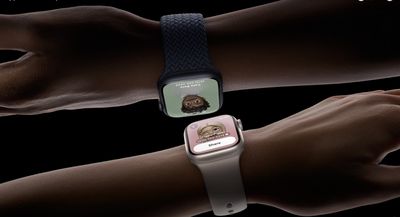
apple watch namedrop
The update also includes Double Tap, a gesture that is available on the Apple Watch Series 9 and the Apple Watch Ultra 2. Double Tap can be activated by tapping the index finger and thumb together twice, and it can be used to answer phone calls, end phone calls, stop alarms, and more.
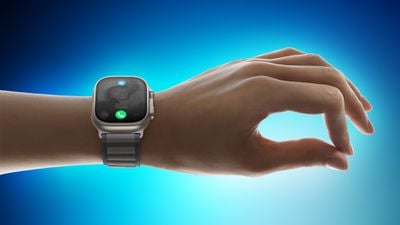
Apple Watch Ultra 2 double tap gesture 230912 Faeture Blue
Along with these two features, there are a handful of bug fixes, including an issue that could cause cities not to sync in the Weather app and a bug that could cause the elevation to be incorrect for some users. Apple's full release notes for the update are below.

watchOS 10.1 includes new features, improvements, and bug fixes, including:

  • Double tap gesture can be used to perform the primary action in notifications and most apps so you can answer a call, play and pause music, stop a timer, and more (Available on Apple Watch Series 9 and Apple Watch Ultra 2)
  • NameDrop allows you to exchange contact information with someone new by simply bringing your Apple Watch near their iPhone with iOS 17 or Apple Watch (Available on Apple Watch SE 2, Apple Watch Series 7 and later, and Apple Watch Ultra)
  • My Card is available as a complication for quick access to NameDrop
  • Fix for bug that causes the climate section in the Home app to be blank
  • Addresses an issue that causes a white selection border to be unexpectedly displayed after turning off AssistiveTouch
  • Fixes an issue where cities may not sync between iPhone and watch in Weather
  • Resolves an issue where the scroll bar may unexpectedly be visible on the display
  • Fix for bug that causes elevation to be incorrect for some users
    For information on the security content of Apple software updates, please visit this website: https://support.apple.com/kb/HT201222

More details on everything new in the watchOS 10 update can be found in our watchOS 10 roundup.
Related Roundup: watchOS 26
Related Forum: Apple Watch

Popular Stories

iOS 26

iOS 26.3 and iOS 26.4 Will Add These New Features to Your iPhone

Tuesday February 3, 2026 7:47 am PST by
While the iOS 26.3 Release Candidate is now available ahead of a public release, the first iOS 26.4 beta is likely still at least a week away. Following beta testing, iOS 26.4 will likely be released to the general public in March or April. Below, we have recapped known or rumored iOS 26.3 and iOS 26.4 features so far. iOS 26.3 iPhone to Android Transfer Tool iOS 26.3 makes it easier...
imac video apple feature

Apple Makes Its Second-Biggest Acquisition Ever

Tuesday February 3, 2026 12:45 pm PST by
Apple recently acquired Israeli startup Q.ai for close to $2 billion, according to Financial Times sources. That would make this Apple's second-biggest acquisition ever, after it paid $3 billion for the popular headphone maker Beats in 2014. This is also the largest known Apple acquisition since the company purchased Intel's smartphone modem business and patents for $1 billion in 2019....
Apple Logo Zoomed

Tim Cook Teases Plans for Apple's Upcoming 50th Anniversary

Thursday February 5, 2026 12:54 pm PST by
Apple turns 50 this year, and its CEO Tim Cook has promised to celebrate the milestone. The big day falls on April 1, 2026. "I've been unusually reflective lately about Apple because we have been working on what do we do to mark this moment," Cook told employees today, according to Bloomberg's Mark Gurman. "When you really stop and pause and think about the last 50 years, it makes your heart ...
iphone 16 pro colors 1

Apple Begins Selling Refurbished iPhone 16 and iPhone 16 Pro Models at Lower Prices

Wednesday February 4, 2026 7:44 am PST by
Apple today began selling certified refurbished iPhone 16, iPhone 16 Plus, iPhone 16 Pro, and iPhone 16 Pro Max models on its online store in the U.S., with prices discounted by 12% to 22% compared to Apple's current or former pricing for the devices. Here were Apple's starting prices when the devices launched in September 2024: iPhone 16: $799 iPhone 16 Plus: $899 iPhone 16 Pro:...
Apple TV Color

Apple TV Announces 12 New Shows and Films Coming This Year

Wednesday February 4, 2026 12:29 pm PST by
Apple on Tuesday previewed 12 new shows and films that will be premiering on the Apple TV streaming service throughout 2026. The new series: Imperfect Women — March 18, 2026 Margo's Got Money Troubles — April 15, 2026 Widow's Bay — April 29, 2026 Maximum Pleasure Guaranteed — May 20, 2026 Cape Fear — June 5, 2026 Lucky — July 15, 2026 The new films: Eternity — ...

Top Rated Comments

tennisproha Avatar
30 months ago
They finally fixed the issue where cities don't sync between iPhone and watch in Weather app after 2 years!!!! First time I"ve seen a bug I've constantly reported actually get fixed. Now if only they can fix the 100s of other bugs riddled through all OSs.
Score: 7 Votes (Like | Disagree)
sniffies Avatar
30 months ago
What should've been watchOS 10.0

But ok, better late than never.

I guess.
Score: 6 Votes (Like | Disagree)
iPhonNick Avatar
30 months ago

Build number?
21S67 (Same as RC)
Score: 4 Votes (Like | Disagree)
Phuz01 Avatar
30 months ago
Holy crap… just used Double Tap to close a notification, and this feels like THE FUTURE!
Score: 4 Votes (Like | Disagree)
Apple_Robert Avatar
30 months ago
I like the new Double Tap feature. Works great.
Score: 3 Votes (Like | Disagree)
Apple_Robert Avatar
30 months ago

How to enable or disable namedrop on apple watch?
There doesn't appear to be a toggle for the watch. You turn it off / on in the phone app (Settings > General > Airdrop > Bring device together toggle off. That controls both.
Score: 3 Votes (Like | Disagree)














