macOS Sonoma 14.1 Features New Warranty Coverage Section in System Settings

The second beta of macOS Sonoma 14.1 seeded to developers today includes a new "Coverage" section in the System Settings app that displays warranty and AppleCare+ coverage for the Mac and select Bluetooth-paired accessories.
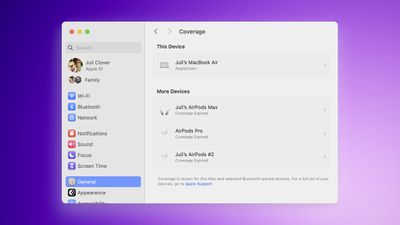
macOS Sonoma Coverage Feature
The section can be found in the System Settings app under General → Coverage, and it provides an overview of hardware service options and other information.

A similar "Coverage" section already existed in the Settings app on the iPhone and iPad under General → About → Coverage, and now it is on the Mac.

macOS Sonoma 14.1 is currently in beta testing and is expected to be released in late October alongside iOS 17.1 and other software updates.

Related Forum: macOS Sonoma

Popular Stories

iphone 17 models

No iPhone 18 Launch This Year, Reports Suggest

Thursday January 1, 2026 8:43 am PST by
Apple is not expected to release a standard iPhone 18 model this year, according to a growing number of reports that suggest the company is planning a significant change to its long-standing annual iPhone launch cycle. Despite the immense success of the iPhone 17 in 2025, the iPhone 18 is not expected to arrive until the spring of 2027, leaving the iPhone 17 in the lineup as the latest...
duolingo ad live activity

Duolingo Used iPhone's Dynamic Island to Display Ads, Violating Apple Design Guidelines

Friday January 2, 2026 1:36 pm PST by
Language learning app Duolingo has apparently been using the iPhone's Live Activity feature to display ads on the Lock Screen and the Dynamic Island, which violates Apple's design guidelines. According to multiple reports on Reddit, the Duolingo app has been displaying an ad for a "Super offer," which is Duolingo's paid subscription option. Apple's guidelines for Live Activity state that...
Low Cost A18 Pro MacBook Feature Pink

Apple's 2026 Low-Cost A18 Pro MacBook: What We Know So Far

Friday January 2, 2026 4:33 pm PST by
Apple is planning to release a low-cost MacBook in 2026, which will apparently compete with more affordable Chromebooks and Windows PCs. Apple's most affordable Mac right now is the $999 MacBook Air, and the upcoming low-cost MacBook is expected to be cheaper. Here's what we know about the low-cost MacBook so far. Size Rumors suggest the low-cost MacBook will have a display that's around 13 ...
govee floor lamp

CES 2026: Govee Announces New Matter-Connected Ceiling and Floor Lights

Sunday January 4, 2026 5:00 am PST by
Govee today introduced three new HomeKit-compatible lighting products, including the Govee Floor Lamp 3, the Govee Ceiling Light Ultra, and the Govee Sky Ceiling Light. The Govee Floor Lamp 3 is the successor to the Floor Lamp 2, and it offers Matter integration with the option to connect to HomeKit. The Floor Lamp 3 offers an upgraded LuminBlend+ lighting system that can reproduce 281...
airpods pro 3 glitter

AirPods New Year's Deals Include Up to $99 Off AirPods Max, AirPods Pro 3, and AirPods 4

Sunday January 4, 2026 8:04 am PST by
Now that the calendar has flipped over into January, steep discounts on popular Apple products have become more rare after the holidays. However, if you didn't get a new pair of AirPods recently and are looking for a model on sale, Amazon does have a few solid second-best prices this week. Note: MacRumors is an affiliate partner with some of these vendors. When you click a link and make a...
Belkin 25W Battery magnetic

CES 2026: Belkin Announces Magnetic Ring Power Bank, Modular Dock, and More

Sunday January 4, 2026 3:02 pm PST by
Belkin today announced a range of new charging and connectivity accessories at CES 2026, expanding its portfolio of products aimed at Apple device users. UltraCharge Pro Power Bank 10K with Magnetic Ring The lineup includes new Qi2 and Qi2.2 wireless chargers, magnetic power banks, a high-capacity laptop battery, and USB-C productivity accessories, with an emphasis on higher charging...
m4 macbook air blue 2

iPadOS and macOS 26.2 Double 5GHz Wi-Fi Bandwidth for Wi-Fi 6E Devices

Monday January 5, 2026 1:57 pm PST by
With the release of iPadOS 26.2 and macOS Tahoe 26.2, Apple has improved the Wi-Fi speeds for select Macs and iPads that support Wi-Fi 6E. Updated Wi-Fi connectivity specifications are listed in Apple's platform deployment guide. The M4 iPad Pro models, M3 iPad Air models, A17 Pro iPad mini, M2 to M5 MacBook Pro models, M2, M3, and M4 MacBook Air models, and other Wi-Fi 6E Macs and iPads now ...
AirPods Pro 3 Year of the Horse Feature

Apple Launches Year of the Horse AirPods Pro 3 for Lunar New Year

Monday January 5, 2026 11:28 am PST by
Apple has designed a limited edition version of the AirPods Pro 3 to celebrate Lunar New Year, and customers in select countries can purchase them starting today. The Year of the Horse Special Edition AirPods Pro 3 feature a unique horse emoji character that's otherwise unavailable. Customers in China, Hong Kong, Taiwan, Malaysia, and Singapore are able to buy the AirPods, and they'll be...

Top Rated Comments

nottooshabby Avatar
30 months ago
I still prefer the system preference layout used in Monterey and earlier operating systems. The list of preferences that mimics the iPhone is ugly and hard to navigate.
Score: 14 Votes (Like | Disagree)
GSWForever8 Avatar
30 months ago
It’s there to remind you to buy AppleCare.
Score: 8 Votes (Like | Disagree)
alexandr Avatar
30 months ago
This is great. I wonder if there will be a button to add a calendar reminder for these. :)
Score: 5 Votes (Like | Disagree)
ThomasJL Avatar
30 months ago
I wish Apple mostly focused their point updates on bug fixes instead of endless new features.
Score: 5 Votes (Like | Disagree)
antiprotest Avatar
30 months ago

given the poor quality of apple products under timmy the criminal, i can see why they want an opportunity to sell.
I agree with the declined quality part, but why do you say Tim's a criminal?
Score: 3 Votes (Like | Disagree)
AppleTO Avatar
30 months ago

I still prefer the system preference layout used in Monterey and earlier operating systems. The list of preferences that mimics the iPhone is ugly and hard to navigate.
I couldn’t agree more. It’s a terrible UX experience on a desktop operating system.
Score: 3 Votes (Like | Disagree)