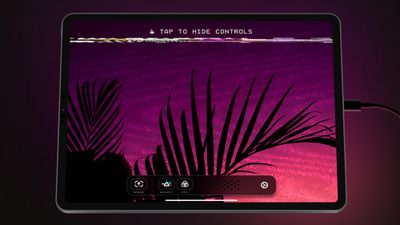
Lux, the developers behind popular camera app Halide, today announced the launch of Orion Video System, an app that is designed to turn the iPad into an external HDMI monitor that can be used with computers, gaming consoles, cameras, and other devices.
Using the Orion app requires iOS 17, an iPad that has a USB-C port, and a USB-C Video Capture Card. USB-C Capture Cards can be purchased from websites like Amazon for around $15 to $20.
The app is able to work with any device that supports HDMI, including Macs, PCs, game consoles like the Nintendo Switch, retro consoles, and cameras. According to the developers, Orion Video System will upscale Nintendo Switch gameplay to 4K in realtime. When used with a camera, Orion allows an iPad to be used for checking framing, focus, and color for video capture and stills.
Orion is free to download, and there is a demo mode that allows users to test the app without a Capture Card. There is an optional one-time $5 upgrade purchase to unlock AI-powered 4K upscaling, CRT Emulation, and Picture Adjustment.
Wednesday March 18, 2026 7:39 am PDT by Joe Rossignol
While the iPhone 18 Pro and iPhone 18 Pro Max are not expected to launch for another six months or so, there are already plenty of rumors about the devices.
It was initially reported that the iPhone 18 Pro models would have fully under-screen Face ID, with only a front camera visible in the top-left corner of the screen. However, the latest rumors indicate that only one Face ID component...
Apple has unveiled a whopping eight new products so far this March, including an iPhone 17e, iPad Air models with the M4 chip, MacBook Air models with the M5 chip, MacBook Pro models with M5 Pro and M5 Max chips, the all-new MacBook Neo, an updated Studio Display, a higher-end Studio Display XDR, and now the AirPods Max 2 this week.
iPhone 17e features the same overall design as the iPhone...
Wednesday March 18, 2026 11:56 am PDT by Juli Clover
Apple provided developers and public beta testers with the release candidate versions of iOS 26.4 and iPadOS 26.4, which means we're going to see a public launch as soon as next week. The RC versions of the software include Apple's official release notes, giving us final details on what's included in the update.
Apple Music
- Playlist Playground (beta) generates a playlist from your...
I guess it's cool but, you can get better portable monitors than an ipad for a display.
True (and I have one -- only 1080p and not the most accurate colors, but it works) but that's one more thing to bring with you. If you already own an iPad and a small adapter (or buy one -- they are inexpensive), that's easier and less expensive than bringing yet one more "device" with you.
Am I the only one on the planet that thinks that 4:3 still has plenty of merit, particularly for photos and monitors. Given that most websites, and I've noticed American ones particularly, run down the middle of a 16:9 monitor leaving most of it as blank real estate. 4:3 is beneficial in those situations, and the miles of extra width 16:9 gives is often chasing an elusive use.
This is what I've been waiting for. This is the first step towards plugging your Xbox, Playstation, or anything else into your VisionPro USB-C port so that you have a personal large screen for any video input you might have.