

iOS 17 Lets You Share iCloud Keychain Passwords With Friends and Family

Apple has been improving password management over the last several years to encourage people to use separate, hard-to-guess passwords for each site, and the latest improvement adds password sharing.
ios 17 shared passwords
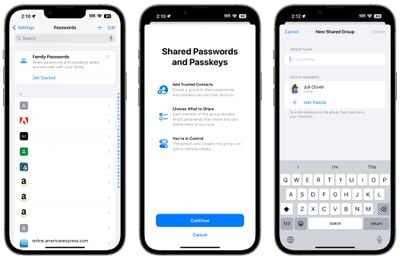
In iOS 17, Family Passwords is designed to let you share your passwords and passkeys with friends and family members. Using the Passwords section of the Settings app, you can create a group of people to share passwords with.

Using a setup process, you can select trusted contacts to share information with. Each person who is in the group can select passwords and passkeys to share with others. You can, for example, share passwords to streaming services and online bill paying sites without having to share the password for your bank.

You can select specific passwords to share after the group is created, and then people in the group can upload their own. Each participant can edit and add passwords, with changes synced across the entire group. There are options to create multiple groups, so you can have a group with a spouse and children and then a separate group with just a spouse, or a group of roommates and friends.

The person who created the group can add and delete people at will, and the entire group can be deleted as well. Adding people to a group requires the person to be in your Contact list, and everyone also must be running the iOS 17 update.

Like regular passwords, shared passwords are stored in iCloud Keychain and are end-to-end encrypted. Passkeys, Apple's device-verified alternative to passwords, can also be shared.

The addition of multi-user password sharing brings Apple's free built-in Password functionality closer to third-party apps like 1Password and LastPass, as there was previously no simple, free, and secure way to share passwords between Apple device users.


Related Forums: iOS 17, iPadOS 17

Popular Stories

Apple Logo Zoomed

Tim Cook Teases Plans for Apple's Upcoming 50th Anniversary

Thursday February 5, 2026 12:54 pm PST by
Apple turns 50 this year, and its CEO Tim Cook has promised to celebrate the milestone. The big day falls on April 1, 2026. "I've been unusually reflective lately about Apple because we have been working on what do we do to mark this moment," Cook told employees today, according to Bloomberg's Mark Gurman. "When you really stop and pause and think about the last 50 years, it makes your heart ...
iOS 26

iOS 26.3 and iOS 26.4 Will Add These New Features to Your iPhone

Tuesday February 3, 2026 7:47 am PST by
While the iOS 26.3 Release Candidate is now available ahead of a public release, the first iOS 26.4 beta is likely still at least a week away. Following beta testing, iOS 26.4 will likely be released to the general public in March or April. Below, we have recapped known or rumored iOS 26.3 and iOS 26.4 features so far. iOS 26.3 iPhone to Android Transfer Tool iOS 26.3 makes it easier...
imac video apple feature

Apple Makes Its Second-Biggest Acquisition Ever

Tuesday February 3, 2026 12:45 pm PST by
Apple recently acquired Israeli startup Q.ai for close to $2 billion, according to Financial Times sources. That would make this Apple's second-biggest acquisition ever, after it paid $3 billion for the popular headphone maker Beats in 2014. This is also the largest known Apple acquisition since the company purchased Intel's smartphone modem business and patents for $1 billion in 2019....
wwdc sans text feature

Apple Rumored to Announce New Product on February 19

Thursday February 5, 2026 12:22 pm PST by
Apple plans to announce the iPhone 17e on Thursday, February 19, according to Macwelt, the German equivalent of Macworld. The report, citing industry sources, is available in English on Macworld. Apple announced the iPhone 16e on Wednesday, February 19 last year, so the iPhone 17e would be unveiled exactly one year later if this rumor is accurate. It is quite uncommon for Apple to unveil...
Finder Siri Feature

Why Apple's iOS 26.4 Siri Upgrade Will Be Bigger Than Originally Promised

Friday February 6, 2026 3:06 pm PST by
In the iOS 26.4 update that's coming this spring, Apple will introduce a new version of Siri that's going to overhaul how we interact with the personal assistant and what it's able to do. The iOS 26.4 version of Siri won't work like ChatGPT or Claude, but it will rely on large language models (LLMs) and has been updated from the ground up. Upgraded Architecture The next-generation...

Top Rated Comments

aperture01 Avatar
35 months ago
But are they going to make it easier to access the password manager? Right now I have to go to settings > safari > passwords. It’s hella annoying. Can I just have an icon on the Home Screen or in the control center?
Score: 18 Votes (Like | Disagree)
tubedogg Avatar
35 months ago
As much as I despised 1Password's move to Electron, after trying a bunch of alternatives, I ended up sticking with it due to the feature set offered. And those claiming the death of the service (or any third-party password manager) are far too premature, for a number of reasons.

This sharing requires iOS 17 (and presumably macOS 14). I currently have 1Password running on my Apple devices ranging from iOS 16 and macOS 13 down to iOS 12 and macOS 10.12.

Apparently there is a Windows app (or at least browser extension?) for iCloud Passwords, but on macOS, if you don't use Safari, you're completely out of luck.

And none of this takes into account 1Password's pivot into enterprise. I don't know what kind of inroads they've made there, but this sharing is likely not enterprise-grade (i.e. can it be remotely configured?).

1Password, Enpass, Bitwarden...none of them will be going away as a result of this announcement. The people who use a password manager other than iCloud Passwords right now are likely doing so because of a wealth of other features, not just sharing, none of which this new feature addresses.
Score: 11 Votes (Like | Disagree)
macsplusmacs Avatar
35 months ago
LOL! to 1Password.

Going to use the heck out of this. (and be Electron free)
Score: 10 Votes (Like | Disagree)
AppliedMicro Avatar
35 months ago

Can I just have an icon on the Home Screen or in the control center?
With a shortcut, you can.

Edit: Using Shortcuts app, create a new shortcut to Open URL „prefs:root=PASSWORDS“ (without quotation marks) as documented by Viticci ('https://www.macstories.net/ios/a-comprehensive-guide-to-all-120-settings-urls-supported-by-ios-and-ipados-13-1/') and add it to your home screen.
Score: 7 Votes (Like | Disagree)
locovaca Avatar
35 months ago
Unfortunately still doesn’t have the cross-platform support of Bitwarden. Getting better, though.
Score: 5 Votes (Like | Disagree)
Heelpir8 Avatar
35 months ago

I honestly can’t think of anyone I would share my passwords with. Not my wife and certainly not my children. The only one I have complete trust in is my dog.
Will be a nice feature for those of us who do trust our human family members.
Score: 4 Votes (Like | Disagree)















