WhatsApp's New Accidental Delete Feature Lets You Undo 'Delete For Me' So You Can 'Delete For All' Instead
WhatsApp has rolled out a new group chat feature that lets you undo the "Delete for Me" action, to avoid potentially embarrassing scenarios where you accidentally delete a message only for yourself instead of removing it from the conversation for everyone.
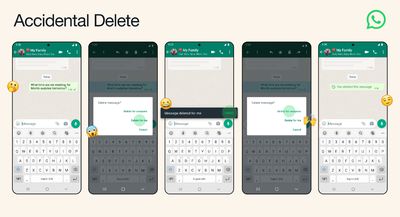
Called "Accidental Delete," the new feature adds a five-second window to let users reverse an unintentional Delete for Me action and completely delete it from the group chat.
Previously, if you accidentally tapped Delete for Me, there was no way to undo it, leaving the message inaccessible to you but freely viewable to everyone else. By introducing a small time window to roll back the action, Accidental Delete aims to help users avoid such situations.
WhatsApp says the new feature is available to all users on Android and iOS.
WhatsApp introduced the ability to delete and revoke messages up to seven minutes after they've been sent in October 2017. WhatsApp later extended the time window in which users can delete a message they already sent to a person or group to over an hour.
Popular Stories
Popular Meta chat app WhatsApp today gained guest calling, a feature that lets users invite anyone to join a voice or video call, even if the invitee doesn't have a WhatsApp account.
WhatsApp says everyone has access to free, end-to-end encrypted calls with no time limits and support for up to 32 people at once.
A guest joining a call needs permission from the call host, and guests will...
WhatsApp is developing an optional in-app browser for its iPhone app that would let users open any link shared in chats without leaving the app, according to WABetaInfo.
A new "In-app browser" option under Settings and Chats would let users enable the feature or continue opening links in their default browser. Users would also be able to clear cookies, cache, and other browsing data. The...
Shortly after the iPhone Duo launched, a few users reported hinge issues that were causing cracks in the inner display. Apple has now responded to the reports in a statement to MacRumors, saying a small number of units are affected.
The response to iPhone Duo from early users has been incredibly positive, and we are seeing exciting things from developers who are rapidly updating their apps...