Latest iOS 16.2 Beta Lets You Disable Wallpaper and Notifications for Always On Display
With the third beta of iOS 16.2 that was provided to developers this morning, Apple has added new functionality to the always on display feature available for the iPhone 14 Pro models.
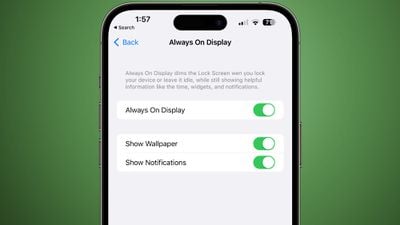
There are now two toggles for disabling wallpaper or notifications when always on display is active. The options can be reached by opening up the Settings app, selecting Display & Brightness, and then going to the Always On Display section.
Toggling off wallpaper will remove your wallpaper when you have always on display enabled, and toggling off notifications will prevent notifications from showing, leaving just the time and widgets if you have widgets installed on your Lock Screen.
The updated option makes for a much simpler always on display interface for those who want a more minimal look that may also save some battery life.
Popular Stories
Last year, Apple launched CarPlay Ultra, the long-awaited next-generation version of its CarPlay software system for vehicles. Nearly a year later, CarPlay Ultra is still limited to Aston Martin's latest luxury vehicles, but that should change fairly soon.
In May 2025, Apple said many other vehicle brands planned to offer CarPlay Ultra, including Hyundai, Kia, and Genesis.
CarPlay Ultra...
As we wait for WWDC to kick off next Monday, Apple today announced the winners of its annual Apple Design Awards, recognizing apps and games for their innovation, ingenuity, and technical achievement.
The 2025 Apple Design Award winners are listed below, with one app and one game selected per category:
Delight and Fun - CapWords (App) and Balatro (Game)
Innovation - Play (App) and PBJ -...
While the AirPods Max 2 received more attention, Apple also released a second pair of headphones last month: Nike Powerbeats Pro 2.
Nike Powerbeats Pro 2 are the same as the regular Powerbeats Pro 2, except they have a two-tone design consisting of black and Nike's signature Volt neon green-yellow color. The headphones were released on March 20 in the U.S., Canada, Australia, the U.K., and a ...
Popular Stories
Last year, Apple launched CarPlay Ultra, the long-awaited next-generation version of its CarPlay software system for vehicles. Nearly a year later, CarPlay Ultra is still limited to Aston Martin's latest luxury vehicles, but that should change fairly soon.
In May 2025, Apple said many other vehicle brands planned to offer CarPlay Ultra, including Hyundai, Kia, and Genesis.
CarPlay Ultra...
As we wait for WWDC to kick off next Monday, Apple today announced the winners of its annual Apple Design Awards, recognizing apps and games for their innovation, ingenuity, and technical achievement.
The 2025 Apple Design Award winners are listed below, with one app and one game selected per category:
Delight and Fun - CapWords (App) and Balatro (Game)
Innovation - Play (App) and PBJ -...
While the AirPods Max 2 received more attention, Apple also released a second pair of headphones last month: Nike Powerbeats Pro 2.
Nike Powerbeats Pro 2 are the same as the regular Powerbeats Pro 2, except they have a two-tone design consisting of black and Nike's signature Volt neon green-yellow color. The headphones were released on March 20 in the U.S., Canada, Australia, the U.K., and a ...