You Can Get Translations Directly From the Camera App in iOS 16 - MacRumors
Skip to Content

You Can Get Translations Directly From the Camera App in iOS 16

Apple in iOS 16 has brought its system wide translate feature to the Camera app, allowing the iPhone to be used to translate signs, packaging, and more in real time.

ios 16 translate camera
Using the translate feature is as simple as opening up the Camera app and pointing it at the text you want to translate. Tap on the text selection button in the app to select the detected text, and then choose the translate option to get an instant translation.

You can pause the view to get translations overlaid on text, and zoom in for a closer look. It's a useful feature that's perfect for signs and other wording that you might not understand when you're traveling.

The Google Translate app has long had a similar feature where you can activate a camera in the app and translate whatever text is around you, so this new iOS 16 feature basically puts the iOS Camera app on par with Google's Translate option.

Apple has also added new Quick Actions that can be used with this Camera feature and with other Live Text options across iOS. Quick Actions make data that's detected in photos, videos, and through the Camera app actionable. Flight information, shipments, foreign languages, currencies, URLs, and more can be tapped on so you can track packages, make conversions, visit URLs, and more, all from content within photos and videos.
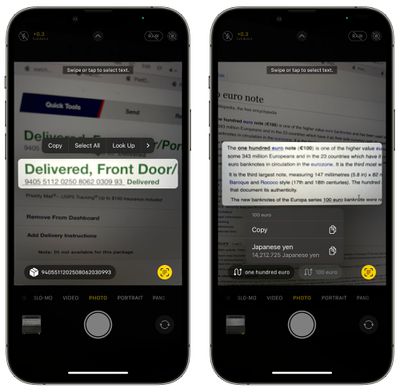
actionable live text ios 16
iOS 16 is available to developers at the current time, with Apple planning to make a public beta available in July.


Related Forum: iOS 16

Popular Stories

8 CarPlay Features in iOS 27 Feature

Which iOS 27 CarPlay Features Actually Work in Your Car?

Thursday September 17, 2026 4:17 am PDT by
In iOS 27, available now, CarPlay gets its biggest update in years, but some features depend on what type of car you have rather than your iPhone model. Some of the biggest additions won't do anything in the vast majority of vehicles on the road today. Here's how the new features pan out. Works in Any CarPlay Vehicle Custom widgets: In iOS 27, CarPlay is no longer limited to Apple's handful ...
Apple Watch New Charging Puck

Here's Why a New Apple Watch Charging Puck Was Just Released

Wednesday September 16, 2026 8:53 am PDT by
The new Apple Watch Series 12 and Apple Watch Ultra 4 have hardware changes that allow for faster charging, but you will need to use the new version of the Apple Watch Magnetic Fast Charger included in the box in order to achieve this boost. If you need extra ones for your own charging stands or travel or so forth, Apple released the new version of the charger on its online store last week, with...
ios272anniversary

iOS 27.2 Could Save Your Marriage

Wednesday September 16, 2026 1:32 pm PDT by
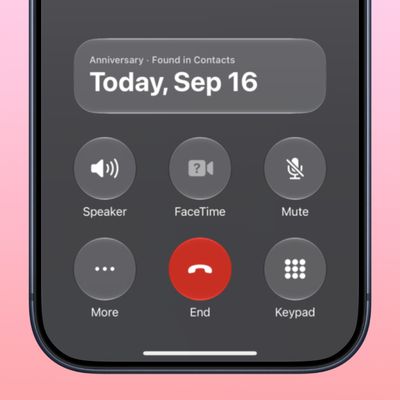
The iOS 27.2 beta that Apple released today adds a feature that reminds you it's your anniversary when you call someone, as long as you've added the date in the Contacts app. On the date of your anniversary, when you go to call the person, you'll see a reminder that it's an important day so you don't forget to say something. The anniversary alert uses Call Context, a feature Apple added in...

Top Rated Comments

chumps52 Avatar
56 months ago
I've not used Apple's translate much, but if it's as accurate as Google Translate (probably not, but if it's close enough at least), I might replace the latter with this...
Score: 7 Votes (Like | Disagree)
56 months ago
As someone teaching themselves a new language I’m looking forward to this new feature
Score: 4 Votes (Like | Disagree)
56 months ago
Very cool feature! I can see this being very useful.
Score: 3 Votes (Like | Disagree)
red elma Avatar
56 months ago
Awesome feature!
Score: 3 Votes (Like | Disagree)
56 months ago
Fantastic addition. Will definitely be using this.
Score: 2 Votes (Like | Disagree)
Sakurambo-kun Avatar
56 months ago
Siri understands a small number of languages compared to Google Translate, so unless that's changed then this won't be on the same level.
Score: 2 Votes (Like | Disagree)