

Skip to Content

Books App Gets Redesign in iOS 16 and iPadOS 16

Apple in iOS 16 and iPadOS 16 has overhauled the design of the Books app, simplifying the interface and adding some new customization tools.
ios 16 books app 1
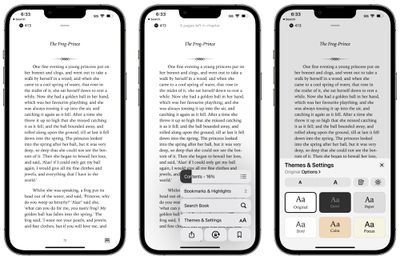
In iOS 15, there's a toolbar at the top of the app that provides access to the chapter index, font adjustments, search tools, and bookmarks, but in iOS 16, everything has been moved to the bottom of the app.

There's a single tappable icon at the bottom of the book interface to access the settings. It provides a distraction-free reading experience, but it's worth noting that it can't be tapped away.

Tapping on the button brings up all of the available settings in the Books app. The top menu bar features the table of contents, while there's also an option to tap in to see all of your bookmarks and highlights.

The search interface is also available, and search does not appear to have been updated. There's a one-tap option for locking orientation, bookmarking a page, and accessing the share sheet.

Tapping on Themes and Settings brings up options to change the font size and the color of the background. There are a few new color options in iOS 16, including a lighter gray, a different shade of white, and a light yellow.
ios 16 books app 2
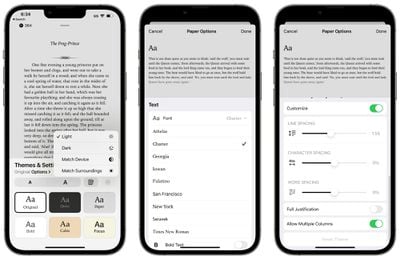
You can turn on vertical scrolling in this interface, and elect to activate Light Mode, Dark Mode, match the device settings, or match the ambient lighting with True Tone.

Tapping on Options brings up different fonts and the option to bold the text. There are easy to access Accessibility settings for adjusting line spacing, word spacing, and character spacing, along with toggling on full justification. Apple has also changed the way that pages turn.


All in all, the changes bring more customization options to the Books app on iPhone and iPad, and access to features like search and bookmarking still takes about the same amount of time despite the fact that they're now in a menu.


Popular Stories

MacBook Neo Feature Pastel 1

First MacBook Neo Benchmarks Are In: Here's How It Compares to the M1 MacBook Air

Thursday March 5, 2026 4:07 pm PST by
Benchmarks for the new MacBook Neo surfaced today, and unsurprisingly, CPU performance is almost identical to the iPhone 16 Pro. The MacBook Neo uses the same 6-core A18 Pro chip that was first introduced in the iPhone 16 Pro, but it has one fewer GPU core. The MacBook Neo earned a single-core score of 3461 and a multi-core score of 8668, along with a Metal score of 31286. Here's how the...

MacBook Neo Feature Pastel 1

Apple Announces $599 'MacBook Neo' With A18 Pro Chip

Wednesday March 4, 2026 6:15 am PST by
Apple today announced the "MacBook Neo," an all-new kind of low-cost Mac featuring the A18 Pro chip for $599. The MacBook Neo is the first Mac to be powered by an iPhone chip; the A18 Pro debuted in 2024's iPhone 16 Pro models. Apple says it is up to 50% faster for everyday tasks than the bestselling PC with the latest shipping Intel Core Ultra 5, up to 3x faster for on-device AI workloads,...
Multicolored Low Cost A18 Pro MacBook Feature

Apple Accidentally Leaks 'MacBook Neo'

Tuesday March 3, 2026 7:00 am PST by
Apple appears to have prematurely revealed the name of its rumored lower-cost MacBook model, which is expected to be announced this Wednesday. A regulatory document for a "MacBook Neo" (Model A3404) has appeared on Apple's website. Unfortunately, there are no further details or images available yet. While the PDF file does not contain the "MacBook Neo" name, it briefly appeared in a link...

Top Rated Comments

49 months ago
Wish they hadn't gotten rid of the bar at the bottom that indicated progress through the book and especially the number of pages left in the chapter. That gives me a good idea about whether I had enough time to read an entire new chapter (or how long I had left in a chapter).
Score: 31 Votes (Like | Disagree)
49 months ago
Disappointed to see the skeuomorphic page turning get removed. The new animation is so average and clinical. I hope the rest of the changes are nice in practice because Books is my favorite app to read in.
Score: 30 Votes (Like | Disagree)
49 months ago

Disappointed to see the skeuomorphic page turning get removed. The new animation is so average and clinical. I hope the rest of the changes are nice in practice because Books is my favorite app to read in.
It was a beautiful and natural animation. Sad to lose it and just turn books into boring web pages.
Score: 26 Votes (Like | Disagree)
fwmireault Avatar
49 months ago

..and Wow! They really make it worse, don't they?
I am a long time user of apple book. Can’t understand why they removed this animation. It’s a small detail that makes reading ebooks more natural. I don’t want to feel like I’m reading a PDF
Score: 18 Votes (Like | Disagree)
klasma Avatar
49 months ago

It provides a distraction-free reading experience, but it's worth noting that it can't be tapped away.
…so not distraction-free after all. Oh Apple.
Score: 18 Votes (Like | Disagree)
49 months ago
As a librarian, it’s baffling to me that it’s still not possible to sort your ebooks by the authors surname. Sorting them by name sorts them by the first name.
Score: 13 Votes (Like | Disagree)








































