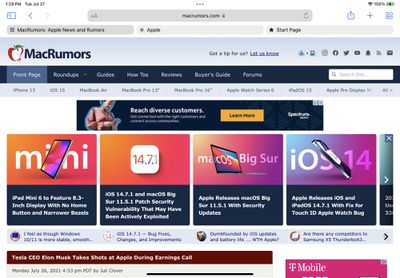
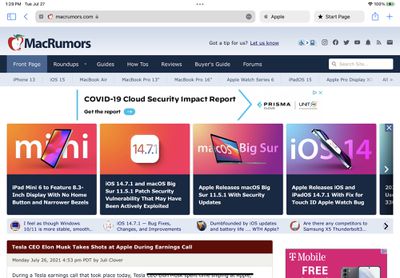
The fourth beta of iPadOS 15 that was released today introduces tweaks to Safari, with the Safari layout now mirroring the updated layout that was introduced in macOS Monterey Beta 3.
The new Safari design in iPadOS 15 beta 4
Prior to this beta, Safari on iPad was similar to Safari on iOS with no dedicated tab bar, but after the update, Apple has added a dedicated tab bar that's activated by default, which is the same layout that's now used in macOS Monterey.
The original Safari design in iPadOS 15 beta 3
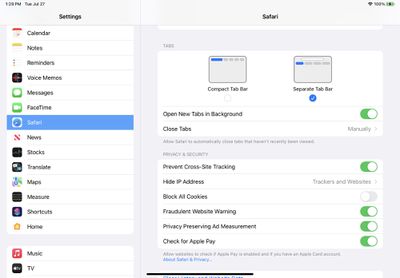
While the separate tab bar is enabled automatically when updating, in the Safari section of Settings, there is an option to toggle on the original compact tab bar that merged everything together.
Apple in iOS and iPadOS 15 introduced a compact and unified Safari design that did away with the dedicated URL and search interface, instead letting any individual tab be used for navigation input.
This design has not been popular with users, which has led to Apple making some changes during the beta testing period. As of now, Safari on iPadOS mirrors Safari on macOS Monterey, though additional design tweaks could come in the future.
Apple today announced it will be permanently closing three retail stores in the U.S. in June, including Apple Trumbull in Trumbull, Connecticut, Apple North County in Escondido, California, and Apple Towson Town Center in Towson, Maryland.
Apple Towson Town Center in Maryland
Apple issued the following statement to MacRumors:At Apple, we are constantly striving to deliver exceptional service...
The all-new MacBook Neo has been such a hit that Apple is facing a "massive dilemma," according to Taiwan-based tech columnist and former Bloomberg reporter Tim Culpan.
In the iPhone 16 Pro models, the A18 Pro chip has a 6-core GPU. During the chip manufacturing process, however, sometimes a CPU or GPU core can turn out to be faulty. Rather than discarding the leftover A18 Pro chips with...
Wednesday April 8, 2026 7:17 pm PDT by Joe Rossignol
Apple today released a minor iOS 26.4.1 update for the iPhone 11 and newer. While the release notes for the update only mention unspecified "bug fixes," we have since learned about two specific changes that are included in it.
First, 9to5Mac spotted an Apple Developer Forums thread suggesting that iOS 26.4.1 fixes an iOS 26.4 bug that affected iCloud syncing in some apps.
Second, an...
Apple today announced it will be permanently closing three retail stores in the U.S. in June, including Apple Trumbull in Trumbull, Connecticut, Apple North County in Escondido, California, and Apple Towson Town Center in Towson, Maryland.
Apple Towson Town Center in Maryland
Apple issued the following statement to MacRumors:At Apple, we are constantly striving to deliver exceptional service...
The all-new MacBook Neo has been such a hit that Apple is facing a "massive dilemma," according to Taiwan-based tech columnist and former Bloomberg reporter Tim Culpan.
In the iPhone 16 Pro models, the A18 Pro chip has a 6-core GPU. During the chip manufacturing process, however, sometimes a CPU or GPU core can turn out to be faulty. Rather than discarding the leftover A18 Pro chips with...
Wednesday April 8, 2026 7:17 pm PDT by Joe Rossignol
Apple today released a minor iOS 26.4.1 update for the iPhone 11 and newer. While the release notes for the update only mention unspecified "bug fixes," we have since learned about two specific changes that are included in it.
First, 9to5Mac spotted an Apple Developer Forums thread suggesting that iOS 26.4.1 fixes an iOS 26.4 bug that affected iCloud syncing in some apps.
Second, an...
It is interesting that - at least to me - the UX of the icons in the options page is better than the actual implementation. The blue bars clearly indicate what is selected. The actual implementation leaves me confused.
Why do the bubbles have white padding below them? If they're not connected to the web content rectangle then it breaks the metaphor of what a tab is.
I totally agree. Not having the tab connected to the content it is associated with makes it much harder to know which tab is the active one. This update is better than the previous beta but I think it’s still worse than Safari 14.