iOS 15 Photos App Tells You Which Apps Saved Images Originated From

In iOS 15, Apple has made some welcome improvements to the Photos app, such as the ability to see the EXIF data for a photo. The latter feature is accessed via a new "Info" button, which also brings up a caption field for the selected photo, the location where the photo was taken, and any Look Up information available.
ios 15 photos saved from
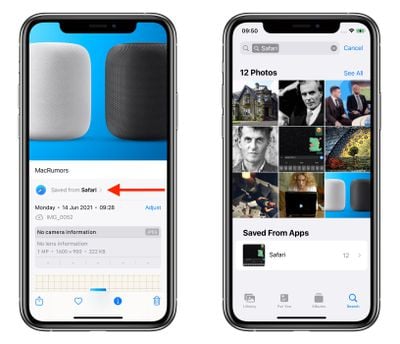
In addition to the above, the Info button will also tell you which app on your device that an image was saved from if you didn't take it using your camera. For instance, in the example above, you can see that the HomePod image was saved from the web via Safari.

This metadata information also acts like an organizing tag, so if you tap the "Saved from" location in bold, the ‌Photos‌ app will filter your photo library to show you any other images that were saved from the same app, meaning you don't have to scroll endlessly for any others that might be in your camera roll.

The new feature adds another organizational layer to your photos, allowing you to, say, find all the images you've saved from Messages or WhatsApp conversation threads without having to go into the apps themselves.

iOS 15 is available as an early developer beta, with a public beta due to be released next month and an official release set to drop this fall.

Related Forum: iOS 15

Popular Stories

maxresdefault

Apple Shows Off a Key Reason to Upgrade to the iPhone 17

Saturday February 7, 2026 9:26 am PST by
Apple today shared an ad that shows how the upgraded Center Stage front camera on the latest iPhones improves the process of taking a group selfie. "Watch how the new front facing camera on iPhone 17 Pro takes group selfies that automatically expand and rotate as more people come into frame," says Apple. While the ad is focused on the iPhone 17 Pro and iPhone 17 Pro Max, the regular iPhone...
m5 macbook pro deal

Why You Shouldn't Buy the Next MacBook Pro

Tuesday February 10, 2026 4:27 pm PST by
Apple is planning to launch new MacBook Pro models as soon as early March, but if you can, this is one generation you should skip because there's something much better in the works. We're waiting on 14-inch and 16-inch MacBook Pro models with M5 Pro and M5 Max chips, with few changes other than the processor upgrade. There won't be any tweaks to the design or the display, but later this...
apple wallet drivers license feature iPhone 15 pro

Apple Says These 7 U.S. States Plan to Offer iPhone Driver's Licenses

Monday February 9, 2026 6:24 am PST by
In select U.S. states, residents can add their driver's license or state ID to the Apple Wallet app on the iPhone and Apple Watch, and then use it to display proof of identity or age at select airports and businesses, and in select apps. The feature is currently available in 13 U.S. states and Puerto Rico, and it is expected to launch in at least seven more in the future. To set up the...
iOS 26

Apple Releases iOS 26.3 and iPadOS 26.3

Wednesday February 11, 2026 10:07 am PST by
Apple today released iOS 26.3 and iPadOS 26.3, the latest updates to the iOS 26 and iPadOS 26 operating systems that came out in September. The new software comes almost two months after Apple released iOS 26.2 and iPadOS 26.2. The new software can be downloaded on eligible iPhones and iPads over-the-air by going to Settings > General > Software Update. According to Apple's release notes, ...

Apple Logo Zoomed

Apple Expected to Launch These 10+ Products Over the Coming Months

Tuesday February 10, 2026 6:33 am PST by
It has been a slow start to 2026 for Apple product launches, with only a new AirTag and a special Apple Watch band released so far. We are still waiting for MacBook Pro models with M5 Pro and M5 Max chips, the iPhone 17e, a lower-cost MacBook with an iPhone chip, long-rumored updates to the Apple TV and HomePod mini, and much more. Apple is expected to release/update the following products...

Top Rated Comments

JKAussieSkater Avatar
61 months ago
Oooh! Nice!
I wonder if the metadata for the app-of-origin has always been present, or if it will only be available for pictures saved or taken under iOS 15 ?
Score: 8 Votes (Like | Disagree)
contacos Avatar
61 months ago
it still misses the most basic function though. Telling me which photos have already been saved to an album right from the endless camera roll or better yet, even which folder with a little indicator in the corner. As soon as you don’t sort your photos Right away, it becomes a mess. For instance I didn’t sort my photos in a month and now I am looking at this mess of a feed like hmmmm did I already sort these photos? Where did I stop sorting? Whatever, I’ll just select all the photos of my nephew since February again to be sure

Score: 7 Votes (Like | Disagree)
adammusic Avatar
61 months ago
All of this photo metadata stuff is the best part of ios 15

now bring back option for 4 pics in a row
Score: 5 Votes (Like | Disagree)
61 months ago
Nice! Would be really cool, if you could set up rules, to auto delete certain app images, such as Pokemon GO screenshots.

Edit:
Just noticed that it is possible to set up through shortcuts based on different filters, hopefully this will be exposed too :D
Score: 5 Votes (Like | Disagree)
61 months ago

All of this photo metadata stuff is the best part of ios 15

now bring back option for 4 pics in a row
So if you give a certain app, let’s say Facebook, access to your photo library they can see the sources of your photos.
Score: 3 Votes (Like | Disagree)
travoose Avatar
61 months ago

You can adjust the date and time of all images.
Can you adjust the location?
Score: 2 Votes (Like | Disagree)