WWDC 2021 Swag Begins Arriving to Swift Student Challenge Winners
Apple yesterday announced the winners of its Swift Student Challenge, and as promised, winners have started to receive WWDC 2021 swag as a prize.
Here's a photo of the exclusive outerwear shared by the developer behind Chain Reaction Games:
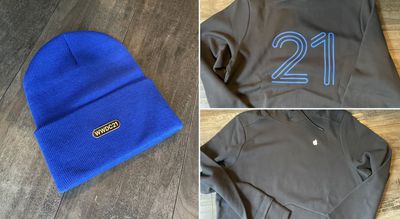
The annual Swift Student Challenge is a coding challenge that tasks students with creating an interactive scene in the Swift Playgrounds app. Apple said winners would receive exclusive WWDC 2021 outerwear, which appears to consist of a beanie and a pullover sweater.
Winners also received a set of WWDC 2021 pins, including the Finder icon on Mac, a "Make it beta" message bubble, and others, plus a one-year Apple Developer Program membership if they have reached the age of majority in their country.
WWDC 2021 begins next Monday, June 7 with a Keynote at 10 a.m. Pacific Time. Apple is expected to unveil major new software updates, including iOS 15, iPadOS 15, macOS 12, watchOS 8, and tvOS 15. Read our WWDC 2021 roundup for more details.
Popular Stories
Some Apple retail employees have been told to warn customers against visiting to purchase an iPhone Duo without a pre-order on Friday, October 23.
Apple Store employees told MacRumors that they have been advised that there will likely be no iPhone Duo stock available for walk-in purchases on launch day. Staff have been instructed to discourage customers without pre-orders from coming in...
Verizon plans to charge customers $10 per month for the iPhone Handoff feature that Apple added in iOS 27. iPhone Handoff allows one phone number to be shared across two separate iPhones.
Pricing was included in Verizon's iPhone Duo announcement today, with the carrier confirming iPhone Handoff will work with the iPhone Duo and the iPhone 18 Pro models.
Verizon will support iPhone Handoff,...
Apple has begun inviting selected members of the media to a product launch experience in Los Angeles on Wednesday, October 28, according to Bloomberg's Mark Gurman.
In a post on X, Gurman described the gathering as an "all-day product launch experience" for touchscreen MacBooks, a new iPad mini, and Macs equipped with M6 chips.
Gurman previously reported that Apple would introduce the...

















































