Gmail for iOS Updated for the First Time in Three Months

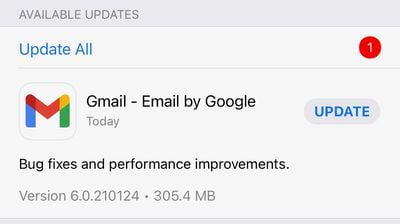
After neglecting the app for several months, Google today finally updated Gmail on the App Store for the first time in exactly three months.
gmail updated

Today's update, version 6.0.210124, says it includes "Bug fixes and performance improvements," but it is a notable update given it's the first one the app has seen in months. Alongside Gmail, Google Meet, Google Sheets, Google Docs, Google Calander, and Google Tasks have also received app updates today, with Google Tasks adding new iOS 14 widgets.

As with nearly all Google apps on the ‌App Store‌, Gmail had remained without a proper app update for months. Initial speculation was that Google was holding back app updates as a way to delay having to disclose to users its privacy practices. Updates for Google's more popular apps have started rolling out over the past few weeks, and Gmail is certainly one of the most high-profile ones to finally see an update.

Announced at WWDC 2020 and rolled out officially in December, Apple's privacy "nutrition labels" require developers to provide users detailed information about what data they collect and whether they share that data with third parties. As of early December, developers must provide this privacy information before a new or updated app can be made available on the ‌App Store‌.

Google updated Gmail with privacy labels just over a week ago, but the app itself was not updated until today.

Popular Stories

iOS 26

iOS 26.2 Coming Soon With These 8 New Features on Your iPhone

Thursday December 11, 2025 8:49 am PST by
Apple seeded the second iOS 26.2 Release Candidate to developers earlier this week, meaning the update will be released to the general public very soon. Apple confirmed iOS 26.2 would be released in December, but it did not provide a specific date. We expect the update to be released by early next week. iOS 26.2 includes a handful of new features and changes on the iPhone, such as a new...
iOS 26

iOS 26.4 and iOS 27 Features Revealed in New Leak

Friday December 12, 2025 10:56 am PST by
Macworld's Filipe Espósito today revealed a handful of features that Apple is allegedly planning for iOS 26.4, iOS 27, and even iOS 28. The report said the features are referenced within the code for a leaked internal build of iOS 26 that is not meant to be seen by the public. However, it appears that Espósito and/or his sources managed to gain access to it, providing us with a sneak peek...
AirPods Pro Firmware Feature

Apple Releases New Firmware for AirPods Pro 2 and AirPods Pro 3

Thursday December 11, 2025 11:28 am PST by
Apple today released new firmware designed for the AirPods Pro 3 and the prior-generation AirPods Pro 2. The AirPods Pro 3 firmware is 8B30, up from 8B25, while the AirPods Pro 2 firmware is 8B28, up from 8B21. There's no word on what's include in the updated firmware, but the AirPods Pro 2 and AirPods Pro 3 are getting expanded support for Live Translation in the European Union in iOS...
iOS 26

Apple Releases iOS 26.2 With Alarms for Reminders, Lock Screen Changes, Enhanced Safety Alerts and More

Friday December 12, 2025 10:10 am PST by
Apple today released iOS 26.2, the second major update to the iOS 26 operating system that came out in September, iOS 26.2 comes a little over a month after iOS 26.1 launched. ‌iOS 26‌.2 is compatible with the ‌iPhone‌ 11 series and later, as well as the second-generation ‌iPhone‌ SE. The new software can be downloaded on eligible iPhones over-the-air by going to Settings >...
Google maps feaure

Google Maps Quietly Added This Long-Overdue Feature for Drivers

Wednesday December 10, 2025 2:52 am PST by
Google Maps on iOS quietly gained a new feature recently that automatically recognizes where you've parked your vehicle and saves the location for you. Announced on LinkedIn by Rio Akasaka, Google Maps' senior product manager, the new feature auto-detects your parked location even if you don't use the parking pin function, saves it for up to 48 hours, and then automatically removes it once...
AirTag 2 Mock Feature

Apple AirTag 2: Four New Features Found in iOS 26 Code

Thursday December 11, 2025 10:31 am PST by
The AirTag 2 will include a handful of new features that will improve tracking capabilities, according to a new report from Macworld. The site says that it was able to access an internal build of iOS 26, which includes references to multiple unreleased products. Here's what's supposedly coming: An improved pairing process, though no details were provided. AirTag pairing is already...
macOS Tahoe 26 Thumb

Apple Releases macOS Tahoe 26.2 With Edge Light

Friday December 12, 2025 10:08 am PST by
Apple today released macOS Tahoe 26.2, the second major update to the macOS Tahoe operating system that came out in September. macOS Tahoe 26.2 comes five weeks after Apple released macOS Tahoe 26.1. Mac users can download the macOS Tahoe update by using the Software Update section of System Settings. macOS Tahoe 26.2 includes Edge Light, a feature that illuminates your face with soft...
iOS 26

15 New Things Your iPhone Can Do in iOS 26.2

Friday December 5, 2025 9:40 am PST by
Apple is about to release iOS 26.2, the second major point update for iPhones since iOS 26 was rolled out in September, and there are at least 15 notable changes and improvements worth checking out. We've rounded them up below. Apple is expected to roll out iOS 26.2 to compatible devices sometime between December 8 and December 16. When the update drops, you can check Apple's servers for the ...

Top Rated Comments

sir1963nz Avatar
63 months ago
I use Apple Mail for all my email needs.
I will not have google, Amazon, Facebook Apps on my devices.
Score: 29 Votes (Like | Disagree)
nutmac Avatar
63 months ago

Alright .. teach me.. Why would you use the google app (knowing google uses your data to make money) compared to the Apple iOS app. What are the benefits. Is it faster? Does it save battery? I just really want to know why this app is being downloaded?.
Push notification. Google got rid of Exchange Server several years ago. Apple Mail can access Gmail via IMAP, which is very inefficient (uses a lot of CPU). So Apple Mail defaults to "Automatically" fetch setting where IMAP email accounts are synched only your phone is plugged in or when you open Mail app. You can change the setting to every 15, 30, or 60 minutes, but at the expense of battery life.
Score: 12 Votes (Like | Disagree)
johnalan Avatar
63 months ago
WGAF.

Add PIP to YouTube ffs.
Score: 11 Votes (Like | Disagree)
nutmac Avatar
63 months ago
I mean, we know Google apps would have egregious privacy policy. So why delay the inevitable?

While App Privacy and allowing users to preventing apps from using advertising identifier are great steps, I would like Apple to extend their efforts by:

* Contacts. Like Photos, I should be able to specify which set of contacts app can access.

* Calendar and Reminders. New add only permission. Most apps should not be able to read my existing calendar events.
* Local Network: A separate setting to allow AirPlay while blocking other local network activities.
Score: 11 Votes (Like | Disagree)
jk1221 Avatar
63 months ago

Search history and location? Seriously???

I'm just puzzled at this point.
Yes. ROUGH location (the privacy card even says rough) using your IP to verify that you are in fact you logging into your account. A security feature that my app like banking apps use. The app has no GPS permissions. That is why it pops are is this you in this city logging in- it uses your IP address.

And search history of your email searches. That is how it has your prior search terms if you want to go back and do the same search again.

This is the problem with Apple's cards. There is not enough detail to explain to people what is actually going on. Most people have no idea what rough location is for instance.

And since we live in the conspiracy theory era now, more needs to be explained.
Score: 7 Votes (Like | Disagree)
jk1221 Avatar
63 months ago

Push notification. Google got rid of Exchange Server several years ago. Apple Mail can access Gmail via IMAP, which is very inefficient (uses a lot of CPU). So Apple Mail defaults to "Automatically" fetch setting where IMAP email accounts are synched only your phone is plugged in or when you open Mail app. You can change the setting to every 15, 30, or 60 minutes, but at the expense of battery life.
Also all of the Gmail features- snooze, schedule send, multiple categories/labels, auto-predict, etc etc.
Score: 7 Votes (Like | Disagree)