

Hands-On With the Apple Watch iPhone Unlocking Feature in iOS 14.5 - MacRumors
Skip to Content

Hands-On With the Apple Watch iPhone Unlocking Feature in iOS 14.5

Apple today released the iOS 14.5 and iPadOS 14.5 beta updates for developers, and included in the new software is a feature that's designed to make it easier to unlock an iPhone while wearing a mask by leveraging the Apple Watch.
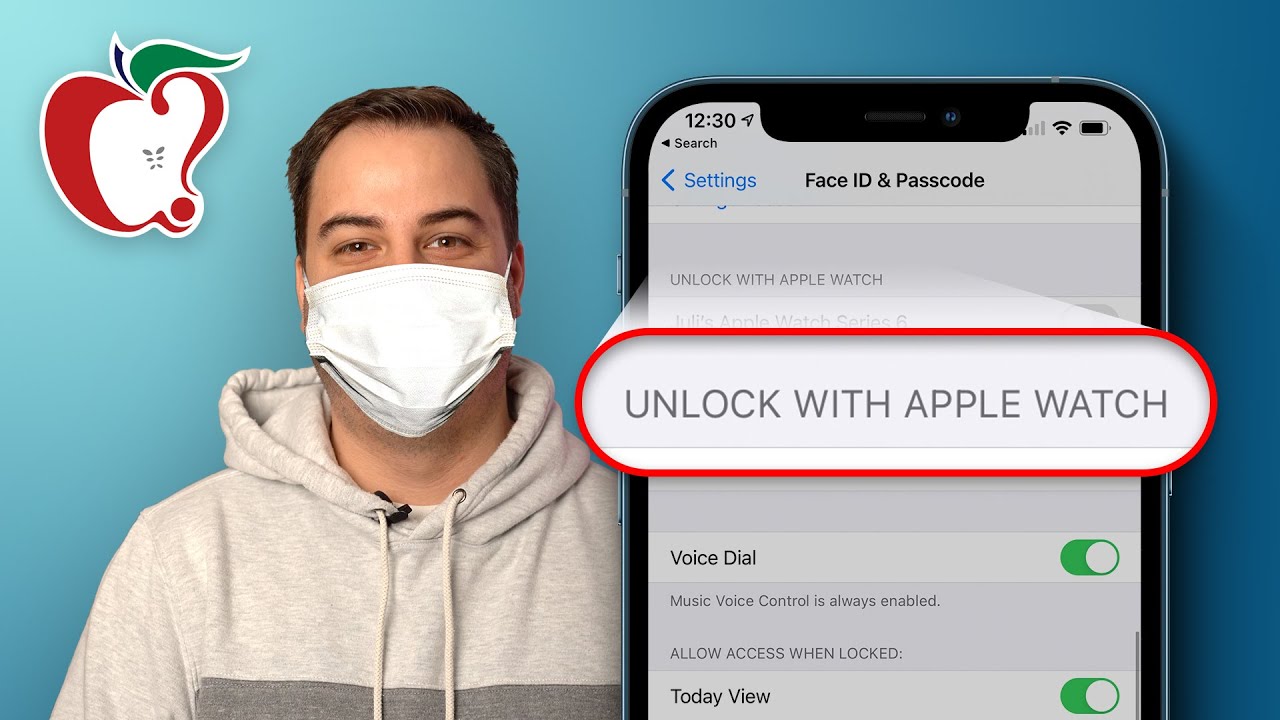

An opt-in setting lets you turn on a feature that allows an iPhone to be unlocked with both Face ID and an authenticated Apple Watch combined. You can find this setting by opening up the Settings app, going to the ‌Face ID‌ & Passcode section, entering your passcode, and then toggling on "Unlock with Apple Watch."

Both iOS 14.5 and watchOS 7.4 are required to enable this feature, and once turned on, you can begin unlocking your iPhone with an unlocked and authenticated Apple Watch while wearing a mask. The first time you go to unlock your iPhone with Apple Watch after enabling the feature you'll need to enter a passcode, but after that, Apple Watch unlocking is smooth, seamless, and quick.

When you're wearing a mask and go to use ‌Face ID‌, you'll feel a haptic vibration on your wrist and it will let you know that your iPhone was unlocked with your watch via a notification that pops up on your wrist.

‌Face ID‌ will work like normal on the iPhone, so you'll only feel a difference through the Apple Watch, though sometimes there's a slight delay that says "unlocking iPhone with Apple Watch." This seems to depend on the distance between your iPhone and your watch, and if your authenticated watch is too far away, you'll be told to move it closer.

Every time you unlock, you'll feel the vibration and see the pop up, and it's generally an interface that looks like the interface that comes up when you unlock your Mac with your Apple Watch. Unlocking a Mac through an authenticated Apple Watch has long been a feature.

You cannot make an Apple Pay or App Store purchases with the Apple Watch, nor can you use it for authenticating in apps that use ‌Face ID‌. In these situations, you still need to remove your mask and use the standard ‌Face ID‌ authentication or enter a passcode.

For those concerned about security or possible authentication bypasses with this method, the feature is entirely opt-in and is not enabled by default. You do need an unlocked Apple Watch for this to work, so there's no way to use it with an Apple Watch that has not been unlocked via the iPhone or by your Apple Watch passcode.

All in all, unlocking an iPhone with a paired Apple Watch is as seamless as unlocking with standard ‌Face ID‌, and it's just about as quick, so this will be a welcome change for people frustrated with using an iPhone while wearing a mask. Future iPhones may include in-display Touch ID alongside ‌Face ID‌, but for now, this is a useful solution for iPhone owners who also have an Apple Watch.

Related Forum: iOS 14

Popular Stories

iphone 16 teal

'Siri AI' Lawsuit Update: Apple to Pay Owners of These iPhone Models

Thursday July 9, 2026 7:08 am PDT by
In May, Apple agreed to pay $250 million to settle a U.S. class action lawsuit over Siri AI's delayed launch, and eligible iPhone users could receive up to a $95 payout. This week, the California court overseeing the case held a hearing regarding preliminary approval of the settlement, but the judge has not yet issued a ruling. It will likely be at least a few more months before eligible...
Apple TV Thumb 3

Everything Coming in the 2026 Apple TV 4K

Wednesday July 8, 2026 4:51 pm PDT by
The Apple TV 4K hasn't been updated since 2022, and it's due for a refresh. An update is planned for 2026, but Apple is likely going to wait to launch it after Siri AI launches in iOS 27. Design Apple TV design updates don't happen often, and that's not changing. The next Apple TV is going to have the same squircle shape as the current model, and it'll continue to be made from a black...
apple wallet drivers license feature iPhone 15 pro

Apple Says iPhone Driver's Licenses Will Expand to These 6 U.S. States

Thursday July 9, 2026 7:29 am PDT by
In select U.S. states, residents can add their driver's license or state ID to the Apple Wallet app on the iPhone and Apple Watch, and then use it to display proof of identity or age at select airports and businesses, and in select apps. To set up the feature, open the Wallet app on the iPhone and tap on the plus sign in the top-right corner. Next, tap on Driver's License and ID Cards,...

Top Rated Comments

71 months ago
I mean its good and all but why did it take so long?
Score: 33 Votes (Like | Disagree)
CarlJ Avatar
71 months ago
This is cool, but I still want an iPad Air4-style TouchID scanner on the “power” button.
Score: 19 Votes (Like | Disagree)
71 months ago
To get the Apple Pay part working you’ll also have to buy and wear the new AirPod Pro 2 ($299) that will analyze your ear wax to authenticate that it’s really you.
Score: 16 Votes (Like | Disagree)
rk-apple Avatar
71 months ago
Now here's to hoping it's more reliable and consistent than unlocking my Mac with my watch -- I get about a 60% success rate. Good, but not great.
Score: 12 Votes (Like | Disagree)
71 months ago


You cannot make an Apple Pay or App Store purchases with the Apple Watch, nor can you use it for authenticating in apps that use Face ID. In these situations, you still need to remove your mask and use the standard Face ID authentication or enter a passcode.


I'm a little confused by this statement. I use my unlocked Apple Watch all the time to use Apple Pay in a store while I leave my iPhone in the car. Does this no longer work? Or are you saying if you're using your iPhone to pay for something, you still need to take your mask off? That would be a purchase with your iPhone, not your Apple Watch.

Score: 11 Votes (Like | Disagree)
71 months ago

I'd say like 20% of the time my phone unlocks when my mask is on. Not great

Mine does too, when I’m not wearing my mask up over my nose like I’m supposed to
Score: 11 Votes (Like | Disagree)









































