Apple Fitness+ Works on iPhone and iPad Without an Apple Watch
Apple designed the new Fitness+ service to work with a paired Apple Watch as the Apple Watch is meant to allow you to track your metrics while you follow along on a workout, but as it turns out, an Apple Watch isn't strictly necessary to use the Fitness+ app on an iPhone or iPad.
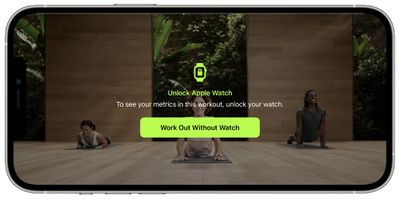
When starting a Fitness+ workout on iPhone or iPad when you're not wearing an Apple Watch, the app asks if you want to begin a workout without the watch. You can do the entire workout sans watch, but of course no metrics show up on the iPhone or iPad's display.
This is not, however, possible on Apple TV. When using Fitness+ with the Apple TV, Apple requires a synced and connected Apple Watch. Attempting to do a workout on Apple TV without the watch will only let you preview a workout, rather than begin one.
It's not clear why Apple is allowing workouts to be done on an iPhone or iPad without an Apple Watch while that same functionality does not work with the Apple TV, but the service was meant for an Apple Watch and isn't ideal for non-Apple Watch owners.
Popular Stories
iOS 26.4 was released today, and it includes a couple of new features for CarPlay: an Ambient Music widget and support for voice-based chatbot apps.
To update your iPhone 11 or newer to iOS 26.4, open the Settings app and tap on General → Software Update. CarPlay will automatically offer the new features so long as the iPhone connected to your vehicle is running iOS 26.4 or later....
Apple today released new firmware for the AirPods Pro 2, AirPods Pro 3, and the AirPods 4. The firmware has a version number of 8B39, up from 8B34 on the AirPods Pro 3, 8B28 on the AirPods Pro 2, and 8B21 on the AirPods 4.
There is no word on what's included in the firmware, but Apple has a support document with limited notes. Most updates are limited to bug fixes and performance...
Apple this week released tvOS 26.4, and the software update includes a handful of new features and changes for the Apple TV.
tvOS 26.4 is compatible with all Apple TV 4K and Apple TV HD models released since 2015. To update your Apple TV, open the Settings app on the device, navigate to System → Software Updates, and select Update Software.
Below, we have recapped what is new in tvOS...























