Adobe Lightroom CC v4.1 Brings Native Apple M1 Support
Adobe today updated Lightroom CC to version 4.1 in the Mac App Store to bring native support for Apple's new M1 Macs.
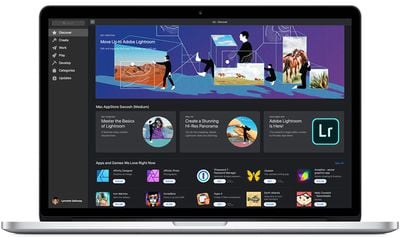
Adobe has been working to bring its Creative Cloud apps to Apple's new Macs. Adobe announced the release of Photoshop Beta for Apple silicon last month and says it is working on a native version of Lightroom Classic for Apple silicon that will be released next year.
Earlier versions of the photo-editing app worked on M1 Macs, but had to be run via Apple's Rosetta software, which translates made-for-Intel x86 code to allow it to work on machines powered by Apple silicon.
The professional photo editing software is free to download, but requires a $9.99 monthly subscription via Apple's in-app purchase system after a one-week trial. 1TB of cloud storage is included with a subscription.
In addition, Adobe Photoshop for iPadOS got a quick update today that fixes a critical bug that caused file import and brush problems.
Adobe on Monday also updated Lightroom for iPad. Version 6.1.0 of the app allows users to access to new Discover edits and Learn tutorials through widgets.
(Thanks, Roland!)
Popular Stories
MacRumors contributor Aaron Perris has uncovered an image file from Apple for an unreleased Apple TV 4K, suggesting that a new model will finally be released soon. The image is specifically for an "Apple TV 4K (4th generation)" model.
Apple TV 4K (4th generation) image (on a gradient)
The image reveals that the Apple TV will have the same external design as the current model, with all of its...
Amazon has introduced a major discount on the 16-inch MacBook Pro with the M5 Max chip, 32-Core GPU, 36GB RAM, and 2TB SSD, now available for $3,499.00, down from $4,399.00. This is a massive $900 markdown on the high-end MacBook Pro, and it's joining a few other MacBook Pro discounts on Amazon this week.
Note: MacRumors is an affiliate partner with Amazon. When you click a link and make a...
The iPhone Duo is reportedly facing production difficulties ahead of its October launch, with early output expected to be limited.
A person said to be close to Foxconn's supply chain told China's Jiemian News that final assembly yields for Apple's first foldable iPhone were only slightly above 60% as of September 17. The source said that, under Apple's current quality standards, it could...