Gmail App for iOS Gains iOS 14 Widget Support

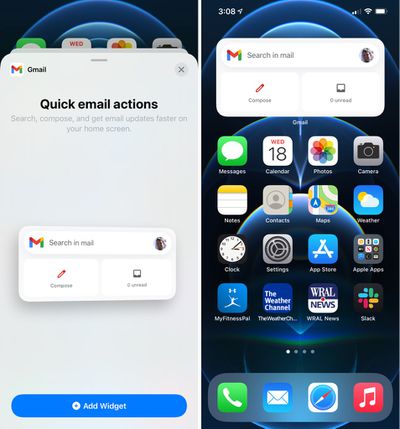
Google today updated its Gmail app designed for the iPhone and the iPad, introducing a new widget that can be added to the Today center alongside other widgets or to the Home Screen on an ‌iPhone‌.

gmail widget ios 14
After updating, the Gmail widget can be added to the ‌Home Screen‌ by pressing and holding to enter jiggle mode and then tapping the "+" button. From there, scroll down and tap on Gmail to add the widget, using a finger to drag it to the appropriate spot.

The Gmail widget can be used to search within the Gmail app, compose a new email message, or view unread email messages. It provides shortcuts for these tasks only and does not list sensitive email information nor can it be customized with other functionality.

Tags: Gmail, Google

Popular Stories

iOS 26

iOS 26.2 Coming Soon With These 8 New Features on Your iPhone

Thursday December 11, 2025 8:49 am PST by
Apple seeded the second iOS 26.2 Release Candidate to developers earlier this week, meaning the update will be released to the general public very soon. Apple confirmed iOS 26.2 would be released in December, but it did not provide a specific date. We expect the update to be released by early next week. iOS 26.2 includes a handful of new features and changes on the iPhone, such as a new...
iOS 26

iOS 26.4 and iOS 27 Features Revealed in New Leak

Friday December 12, 2025 10:56 am PST by
Macworld's Filipe Espósito today revealed a handful of features that Apple is allegedly planning for iOS 26.4, iOS 27, and even iOS 28. The report said the features are referenced within the code for a leaked internal build of iOS 26 that is not meant to be seen by the public. However, it appears that Espósito and/or his sources managed to gain access to it, providing us with a sneak peek...
iOS 26

Apple Releases iOS 26.2 With Alarms for Reminders, Lock Screen Changes, Enhanced Safety Alerts and More

Friday December 12, 2025 10:10 am PST by
Apple today released iOS 26.2, the second major update to the iOS 26 operating system that came out in September, iOS 26.2 comes a little over a month after iOS 26.1 launched. ‌iOS 26‌.2 is compatible with the ‌iPhone‌ 11 series and later, as well as the second-generation ‌iPhone‌ SE. The new software can be downloaded on eligible iPhones over-the-air by going to Settings >...
AirPods Pro Firmware Feature

Apple Releases New Firmware for AirPods Pro 2 and AirPods Pro 3

Thursday December 11, 2025 11:28 am PST by
Apple today released new firmware designed for the AirPods Pro 3 and the prior-generation AirPods Pro 2. The AirPods Pro 3 firmware is 8B30, up from 8B25, while the AirPods Pro 2 firmware is 8B28, up from 8B21. There's no word on what's include in the updated firmware, but the AirPods Pro 2 and AirPods Pro 3 are getting expanded support for Live Translation in the European Union in iOS...
macOS Tahoe 26 Thumb

Apple Releases macOS Tahoe 26.2 With Edge Light

Friday December 12, 2025 10:08 am PST by
Apple today released macOS Tahoe 26.2, the second major update to the macOS Tahoe operating system that came out in September. macOS Tahoe 26.2 comes five weeks after Apple released macOS Tahoe 26.1. Mac users can download the macOS Tahoe update by using the Software Update section of System Settings. macOS Tahoe 26.2 includes Edge Light, a feature that illuminates your face with soft...
AirTag 2 Mock Feature

Apple AirTag 2: Four New Features Found in iOS 26 Code

Thursday December 11, 2025 10:31 am PST by
The AirTag 2 will include a handful of new features that will improve tracking capabilities, according to a new report from Macworld. The site says that it was able to access an internal build of iOS 26, which includes references to multiple unreleased products. Here's what's supposedly coming: An improved pairing process, though no details were provided. AirTag pairing is already...
ipados 26 1 slide over

Apple Releases iPadOS 26.2 With Multitasking Improvements

Friday December 12, 2025 10:09 am PST by
Apple today released iPadOS 26.2, the second major update to the iPadOS 26 operating system released in September. iPadOS 26.2 comes a month after iPadOS 26.1. The new software can be downloaded on eligible iPads over-the-air by going to Settings > General > Software Update. iPadOS 26.2 continues with the multitasking improvements that were added with iPadOS 26.1. You can now drag and...
iphone fold text

'iPhone Fold' Arrival Expected to Cement Book-Style Era for Foldables

Friday December 12, 2025 3:55 am PST by
Foldable smartphone panel shipments are projected to jump 46% year-over-year in 2026, with Apple's entry into the market serving as the main catalyst, according to Counterpoint Research's latest Foldable-Rollable Display Shipment Tracker. "Apple is the key driver as it starts to procure panels for its first foldable iPhone," said Counterpoint's Guillaume Chansin. The research firm expects...

Top Rated Comments

seanbperiod Avatar
66 months ago
Wow - great job on a useless widget - so instead of just viewing the app icon with unread counts, or just tapping the icon to open the app and getting the same functionality, we now have the option of taking up 8 icon spaces. Awesome work Google!
Score: 15 Votes (Like | Disagree)
GeoStructural Avatar
66 months ago
Widgets have potential and I hope Apple delivers it with the next iteration. Right now they are basically huge icons.

I want widgets to be contextual, interactive, clickable and able to perform the functions of the app from the main screen without taking me to it and adding one more step to the process.
Score: 12 Votes (Like | Disagree)
contacos Avatar
66 months ago

Wow - great job on a useless widget - so instead of just viewing the app icon with unread counts, or just tapping the icon to open the app and getting the same functionality, we now have the option of taking up 8 icon spaces. Awesome work Google!
well to be fair, they are pretty limited by apples widget guidelines
Score: 7 Votes (Like | Disagree)
tgwaste Avatar
66 months ago
I wish apple would allow 1x1 widgets so that I can fit 4 pieces of different information in the same space.
Score: 3 Votes (Like | Disagree)
gaximus Avatar
66 months ago

Is that iPhone 12 pro yellow screengate I see in them screenshots. ?‍♂️

There is no escaping it ?‍♂️? IT'S EVERYWHERE. ???
Any chance you're viewing it on an iPhone 12 Pro?
Score: 2 Votes (Like | Disagree)
GeoStructural Avatar
66 months ago

I remember an article from a few years ago that said "You want the best Google experience? Buy an iPhone". Exactly pointing out that for some reason Google pays much more attention to its iPhone apps than to its Android apps.
The American market is dominated by iOS, and Apple users are also the most willing to pay for apps and services, I am not coming up with this, I actually heard about it in an App Development research/teaching group.

The rest of the world uses Android, but a large proportion of those users are not paying subscribers to any type of service Google offers, so... it makes sense.

Score: 2 Votes (Like | Disagree)