iOS 14 Adds Accessibility Feature for Tapping on the iPhone to Perform Actions - MacRumors
Skip to Content

iOS 14 Adds Accessibility Feature for Tapping on the iPhone to Perform Actions

iOS 14, released for developers today, includes an interesting new Accessibility option that's designed to allow users to double tap or triple tap on the back of the iPhone to perform various actions.
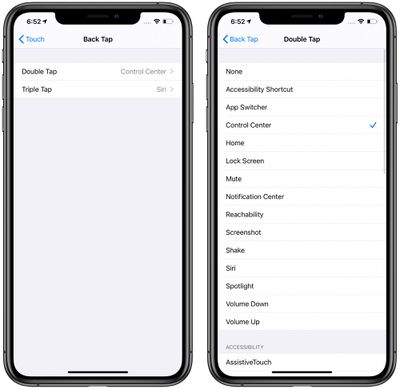
backtapios14
The feature can be used to do things like access Control Center, Notification Center, the Lock screen, the Home screen, or the App Switcher, or it can change the volume, bring up Siri, mute the iPhone, take a screenshot, or access a Shortcut.

It can also be set up to work with a number of Accessibility features like Assistive Touch, Magnifier, or VoiceOver.

The Back Tap options can be accessed in the Settings app by tapping Accessibility > Touch > Back Tap. Tapping to trigger an action appears to work fairly well when the iPhone's back is tapped in any spot on the device with either the double tap or triple tap gesture.

Back Tap is just one of many new Accessibility features that Apple has built into iOS 14. VoiceOver has also received major improvements with support for image descriptions, text recognition, and screen recognition, as well as Headphone Accommodations that can amplify soft sounds and adjust certain frequencies for music, movies, phone calls, podcasts, and more.


Related Forum: iOS 14

Popular Stories

Apple iCloud Plus expansion hero

iCloud+ Now Includes Apple TV, Apple Arcade, and Curated Apple Music Stations in Over 100 Countries

Tuesday September 15, 2026 1:43 am PDT by
Apple today announced a new subscription initiative that turns paid iCloud+ subscriptions into a broader services bundle in more than 100 countries. In select countries, Apple says every paid iCloud+ plan, including the cheapest 50GB tier, now includes Apple TV and Apple Arcade "at no additional cost," while family sharing extends the storage, TV and Arcade access to up to five people....
Everything New Your iPhone Can Do on iOS 27 Feature 1

50 New Things Your iPhone Can Do in iOS 27 - Out Now!

Monday September 14, 2026 10:48 pm PDT by
Apple released iOS 27 this week, and despite the company's focus this year on refining its flagship operating system and nixing bugs, there are still many additional features to explore, not least of which is Apple's new context-aware Siri, re-tooled for the generative AI era. Which iPhones Support Every iOS 27 Feature? This year's major iPhone software update isn't all about AI, though,...
iOS 27 Icon iPhone

iOS 27 Available Now With These 8 New Features

Monday September 14, 2026 9:00 am PDT by
Update — 10 a.m. Pacific Time: Apple has released iOS 27. During its iPhone 18 Pro and iPhone Duo event last week, Apple announced that iOS 27 will be released widely on Monday, September 14. iOS 27 should be available around 10 a.m. Pacific Time / 1 p.m. Eastern Time today via the Settings app, under General → Software Update. Below, we have highlighted eight new features and...

Top Rated Comments

QuarterSwede Avatar
81 months ago
Super cool!
Score: 11 Votes (Like | Disagree)
81 months ago
FYI: This only works on models that support tap to wake. It is not available on my iPhone SE 2nd gen.
Score: 6 Votes (Like | Disagree)
Hal~9000 Avatar
81 months ago
This seem’s like a fantastic trick for the large Pro Max iPhone in order to easily bring down Control Center when using the phone one handed. Just another feather in the cap of the great update that is iOS 14 🙂
Score: 6 Votes (Like | Disagree)
81 months ago
Interesting... wonder if it works with a case on...
Score: 6 Votes (Like | Disagree)
Mr. Awesome Avatar
81 months ago
Awesome! And arguably more useful then the squeeze gesture on Android phones.
Score: 4 Votes (Like | Disagree)
RA1N1 Avatar
81 months ago
Ok, I am mind-blown by this feature. thumbs up Apple 👍
Score: 3 Votes (Like | Disagree)