Microsoft Office App Released for iPhone, Combines Word, Excel, and PowerPoint - MacRumors
Skip to Content

Microsoft Office App Released for iPhone, Combines Word, Excel, and PowerPoint

Following beta testing, Microsoft today released its new Office app for iPhone, bringing together Word, Excel, and PowerPoint in a single app.
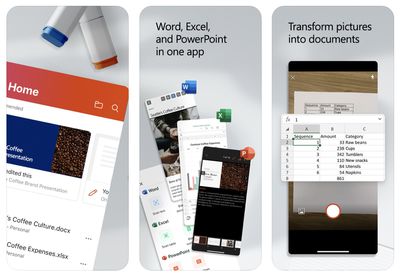
microsoft office app 2020
The main benefit of the unified Office app is that it requires only a single download with a much smaller file size, but it does have a few unique features, including camera integration for easily converting photos of documents and tables into Word and Excel files. The app also has a new Actions pane that supports a number of common tasks like signing PDFs and scanning QR codes.

Microsoft explains some of the benefits of the new Office app in a blog post:

The Office app delivers several key benefits including:

- Combining Word, Excel, and PowerPoint in a way that simplifies the experience with fewer apps to download or switch between. It requires far less phone storage than installing individual apps while maintaining virtually all the capabilities of the existing mobile apps people already know and use.

- Integrating our Lens technology to unlock the power of the camera with capabilities like converting images into editable Word and Excel documents, scanning PDFs, and capturing whiteboards with automatic digital enhancements to make the content easier to read.

- Adding new functionality for common tasks people often encounter when working on a phone—things like making quick notes, signing PDFs, scanning QR codes, and transferring files between devices.

The new Microsoft Office app is available on the App Store for the iPhone and on the Google Play Store for Android. Microsoft says the app will be optimized to support the iPad soon. The app is free to use, even without signing in, but an Office 365 subscription starting at $6.99 per month is required to unlock premium features.


Microsoft's standalone Word, Excel, and PowerPoint apps remain available and were recently updated with a simplified three-tab layout.

(Thanks, Michaël!)

Popular Stories

MacBook Neo and Lenovo IdeaPad Slim 3x Feature

New Study Highlights Advantages of $549 Windows Laptop Over MacBook Neo

Wednesday May 13, 2026 10:38 am PDT by
Microsoft has responded to the MacBook Neo by commissioning a study that highlights advantages of some Windows laptops. Market research firm Signal65 evaluated four Windows laptops:Lenovo's IdeaPad Slim 3x Lenovo's Yoga 7i HP's OmniBook 5 HP's OmniBook X FlipWith a starting price of $549.99 on Best Buy's online store in the U.S. at the time of this writing, the IdeaPad Slim 3x is the only ...
Apple Watch Ultra 2 Black Titanium

watchOS 27 Will Add These New Features to Your Apple Watch

Sunday May 24, 2026 11:53 am PDT by
Apple will unveil watchOS 27 during its WWDC 2026 keynote on Monday, June 8, and a handful of new features have been rumored already. The first developer beta of watchOS 27 should be available immediately following the keynote, and a public beta typically follows in July. The update should be released to all users with a compatible Apple Watch model in September. Below, we recap watchOS...
Four iPhone 18 Pro Colors Mock Feature

iPhone 18 Pro Launching Later This Year With These 10 New Features

Tuesday May 26, 2026 6:32 am PDT by
While the iPhone 18 Pro and iPhone 18 Pro Max are not launching until September, there are already plenty of rumors about the devices. It was initially reported that the iPhone 18 Pro models would have fully under-screen Face ID, with only a front camera visible in the top-left corner of the screen. However, the latest rumors indicate that only one Face ID component will be moved under the...

Top Rated Comments

melgross Avatar
82 months ago
So Apple has to split iTunes into several apps because people complain it’s too complex, and Microsoft combines several apps into one to make it less complex?
Score: 8 Votes (Like | Disagree)
82 months ago
So if both versions remain available, which one is better to use for doc creation? Which is better if you're read-only?
Score: 8 Votes (Like | Disagree)
TwoBytes Avatar
82 months ago

What's interesting to me is that Office used to be available through a single app, and Microsoft broke it into individual apps a few years ago. You don't often see a company - especially one this size - make a change like that only to later change back. I wonder what they saw in their internal data to prompt this? It can't all be about app size, can it?
You can see the reviews from 5 years ago in the app reviews!
Score: 6 Votes (Like | Disagree)
82 months ago

So I guess you can delete the individual apps if you have this Office app then?

So if both versions remain available, which one is better to use for doc creation? Which is better if you're read-only?
Thats the million-dollar question here. Are there any differences
Score: 5 Votes (Like | Disagree)
Achiever Avatar
82 months ago
What's interesting to me is that Office used to be available through a single app, and Microsoft broke it into individual apps a few years ago. You don't often see a company - especially one this size - make a change like that only to later change back. I wonder what they saw in their internal data to prompt this? It can't all be about app size, can it?
Score: 5 Votes (Like | Disagree)
DoctorTech Avatar
82 months ago
I never create MS Office documents on my iPhone but I sometimes need to open and view them when I am away from my laptop or tablet so this might be a good solution for users like me.
Score: 4 Votes (Like | Disagree)