Everything New in iOS and iPadOS 13.4: iCloud Folder Sharing, Updated Mail Toolbar, New Memoji Stickers, and More

Apple today released the first iOS and iPadOS 13.4 betas for developers, bringing quite a few useful new features, design tweaks, and changes that are worth knowing about.

Below, we've rounded up all of the changes that we've found in iOS and iPadOS 13.4 so far.

New Mail Toolbar

The Mail app has an updated toolbar design that moves the reply icon away from the delete icon. Apple in iOS 13 moved these two buttons together, resulting in some people accidentally deleting emails instead of replying to them.

The trash icon also happened to be placed right where the reply icon had been in iOS 12, causing muscle memory issues.

mailapptoolbar
The new design, which is available when viewing an email, places the reply button on the far right, the delete button on the far left, and Folder and Flag icons in between them.

iCloud Folder Sharing

When iOS 13 was first introduced, iCloud Folder Sharing was announced as one of the new features. It was apparently difficult to implement, though, as it was removed during the beta testing period.
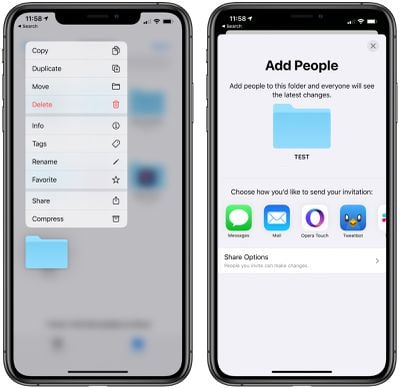
icloudfoldersharing
In iOS 13.4, iCloud Folder Sharing is finally available, allowing folders within the Files app to be shared with other people.

New Memoji Stickers

Apple in iOS 13 introduced Memoji stickers, which are emoji-style stickers that feature your Memoji and Animoji characters. In iOS 13.4, there are nine new sticker poses to choose from, including shocked face, face with hearts, eyes rolling, and more.
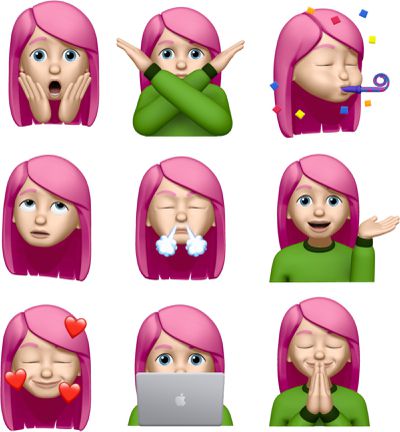
newmemojistickers

Universal macOS/iOS/tvOS Purchases

Apple has introduced new functionality that will allow developers to bundle iOS apps, tvOS apps, and macOS apps together for a single purchase price.

This will allow developers who make iOS and macOS apps to sell them in a single bundle, which is not a feature that's been available.

The change will be convenient for both developers and customers, as iOS and macOS users will be able to make one purchase for a cross-platform app. Developers will also be able to create discounted Mac and iOS bundles for the first time.

CarPlay

There are new call controls and third-party navigation controls in CarPlay, according to iMore's Rene Ritchie.

CarKey API

There appears to be a new API in iOS 13.4 called CarKey that is designed to allow the iPhone and the Apple Watch to unlock, lock, and start a compatible car, according to 9to5Mac.

Users will be able to use CarKey in vehicles that have NFC capabilities, with the iPhone or Apple Watch unlocking the car when held nearby. Authentication via Face ID will not be required, and the initial pairing process will be done through the Wallet app.

CarKey can be shared with other people, like family members, with drivers able to invite them through the Wallet app to have access to the key on their Apple devices. Based on signs in the code, Apple is working with some car manufacturers to implement the feature in the iOS 13.4 update.

Location Services

According to Apple's release notes for the iOS 13.4 and iPadOS 13.4 updates, when an app requests the Always location services authorization for the first time after being authorized for While Using the App, the user's iPhone or iPad will immediately show the authorization prompt.

It's not yet quite clear what this change means, but some apps that want always on access to a user's location have been upset with the location services changes that Apple introduced in iOS 13 limiting that access.

Some apps, like Tile, want always on access to provide full tracking functionality.

Keyboard Shortcuts on iPad

For the iPad, there are new keyboard shortcuts in the Photos app for navigating between tabs, search, and create albums. In full screen mode, there are also keyboard shortcuts for deleting photos, duplicating photos, and entering Edit mode.

Shazam Shortcuts Action

There's a new Shortcuts option to "Shazam It" when creating a shortcut in the Shortcuts app.
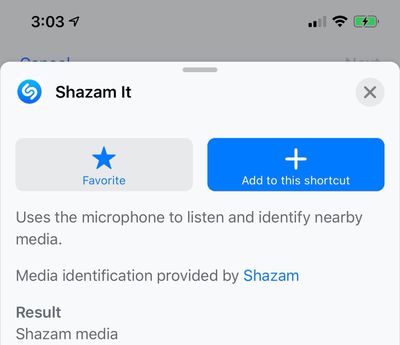
shazamshortcut

iPadOS Hardware Key Remapping

As noted by developer Steve Troughton-Smith, there appears to be a new option for remapping hardware keys on a keyboard that's connected to an iPad.
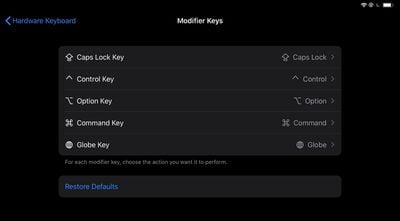
ipadhardwarekeyremapping

Other Features

See a feature we missed? Let us know in the comments and we'll add it to the list.

Popular Stories

iOS 26

iOS 26.2 Coming Soon With These 8 New Features on Your iPhone

Thursday December 11, 2025 8:49 am PST by
Apple seeded the second iOS 26.2 Release Candidate to developers earlier this week, meaning the update will be released to the general public very soon. Apple confirmed iOS 26.2 would be released in December, but it did not provide a specific date. We expect the update to be released by early next week. iOS 26.2 includes a handful of new features and changes on the iPhone, such as a new...
iOS 26

iOS 26.4 and iOS 27 Features Revealed in New Leak

Friday December 12, 2025 10:56 am PST by
Macworld's Filipe Espósito today revealed a handful of features that Apple is allegedly planning for iOS 26.4, iOS 27, and even iOS 28. The report said the features are referenced within the code for a leaked internal build of iOS 26 that is not meant to be seen by the public. However, it appears that Espósito and/or his sources managed to gain access to it, providing us with a sneak peek...
AirPods Pro Firmware Feature

Apple Releases New Firmware for AirPods Pro 2 and AirPods Pro 3

Thursday December 11, 2025 11:28 am PST by
Apple today released new firmware designed for the AirPods Pro 3 and the prior-generation AirPods Pro 2. The AirPods Pro 3 firmware is 8B30, up from 8B25, while the AirPods Pro 2 firmware is 8B28, up from 8B21. There's no word on what's include in the updated firmware, but the AirPods Pro 2 and AirPods Pro 3 are getting expanded support for Live Translation in the European Union in iOS...
iOS 26

Apple Releases iOS 26.2 With Alarms for Reminders, Lock Screen Changes, Enhanced Safety Alerts and More

Friday December 12, 2025 10:10 am PST by
Apple today released iOS 26.2, the second major update to the iOS 26 operating system that came out in September, iOS 26.2 comes a little over a month after iOS 26.1 launched. ‌iOS 26‌.2 is compatible with the ‌iPhone‌ 11 series and later, as well as the second-generation ‌iPhone‌ SE. The new software can be downloaded on eligible iPhones over-the-air by going to Settings >...
Google maps feaure

Google Maps Quietly Added This Long-Overdue Feature for Drivers

Wednesday December 10, 2025 2:52 am PST by
Google Maps on iOS quietly gained a new feature recently that automatically recognizes where you've parked your vehicle and saves the location for you. Announced on LinkedIn by Rio Akasaka, Google Maps' senior product manager, the new feature auto-detects your parked location even if you don't use the parking pin function, saves it for up to 48 hours, and then automatically removes it once...
AirTag 2 Mock Feature

Apple AirTag 2: Four New Features Found in iOS 26 Code

Thursday December 11, 2025 10:31 am PST by
The AirTag 2 will include a handful of new features that will improve tracking capabilities, according to a new report from Macworld. The site says that it was able to access an internal build of iOS 26, which includes references to multiple unreleased products. Here's what's supposedly coming: An improved pairing process, though no details were provided. AirTag pairing is already...
macOS Tahoe 26 Thumb

Apple Releases macOS Tahoe 26.2 With Edge Light

Friday December 12, 2025 10:08 am PST by
Apple today released macOS Tahoe 26.2, the second major update to the macOS Tahoe operating system that came out in September. macOS Tahoe 26.2 comes five weeks after Apple released macOS Tahoe 26.1. Mac users can download the macOS Tahoe update by using the Software Update section of System Settings. macOS Tahoe 26.2 includes Edge Light, a feature that illuminates your face with soft...
iOS 26

15 New Things Your iPhone Can Do in iOS 26.2

Friday December 5, 2025 9:40 am PST by
Apple is about to release iOS 26.2, the second major point update for iPhones since iOS 26 was rolled out in September, and there are at least 15 notable changes and improvements worth checking out. We've rounded them up below. Apple is expected to roll out iOS 26.2 to compatible devices sometime between December 8 and December 16. When the update drops, you can check Apple's servers for the ...

Top Rated Comments

baryon Avatar
77 months ago
I wonder if Mail can now... you know, get mail automatically again?

Edit: Seems like it can! Looks like they fixed it!
Score: 19 Votes (Like | Disagree)
subjonas Avatar
77 months ago
Wow carkey is a big deal. That should have its own article.
I’ve been waiting for that feature for a long time. Now we just need car companies to implement it.
Score: 12 Votes (Like | Disagree)
MacsRgr8 Avatar
77 months ago
Finally iCloud folder sharing!
Now.. if only iCloud Drive would let me pick which folders are synced to my Mac(s) and which are just online storage...
Score: 8 Votes (Like | Disagree)
randyhudson Avatar
77 months ago
Some apps, like Tile, want always on access to [S]provide full tracking functionality[/S] use your phone's battery and location to sell services to other Tile customers.

FTFY
Score: 7 Votes (Like | Disagree)
HouseofG Avatar
77 months ago

I wonder if Mail can now... you know, get mail automatically again?
Amen. And the new mail without new emails actually showing has been driving me nuts since the first iOS 13 beta.


This. And great, I have to train my muscle memory again. And why has the trash can have to be all over to the left? Bad for one handed operation.
Here’s a crazy idea... let US choose what is in that bar and where.
Score: 7 Votes (Like | Disagree)
Gsmaniac Avatar
77 months ago
I’m most excited about CarKey. My dreams of only ever having to carry around my phone in my pocket is nearly complete.
Score: 6 Votes (Like | Disagree)