

macOS Catalina Brings Back Expansion Slot Utility App Ahead of Mac Pro Launch - MacRumors
Skip to Content

macOS Catalina Brings Back Expansion Slot Utility App Ahead of Mac Pro Launch

macOS Catalina, currently available to developers and public beta testers in a beta capacity, revives the defunct Expansion Slot Utility app ahead of the launch of the Mac Pro.

The Expansion Slot Utility app is designed for managing and configuring PCI cards, and its return is clearly meant for the Mac Pro, which has a total of eight PCIe expansion slots that Mac users can work with.
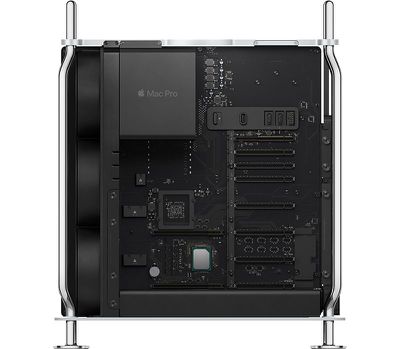
macprointernalsnomodules
The Expansion Slot Utility app was discontinued years ago following the launch of the 2008 Mac Pro but the new 2.0 version is back for the modular Mac Pro.


Signs of the Expansion Slot Utility app are hidden in the second macOS Catalina beta, and when the Mac Pro becomes available at some point this fall, Mac Pro users will be able to take advantage of the utility.


Buyer's Guide: Mac Pro (Don't Buy)
Related Forum: Mac Pro

Popular Stories

iOS 26

iOS 26.4 Adds Two New Features to CarPlay

Tuesday March 24, 2026 1:55 pm PDT by
iOS 26.4 was released today, and it includes a couple of new features for CarPlay: an Ambient Music widget and support for voice-based chatbot apps. To update your iPhone 11 or newer to iOS 26.4, open the Settings app and tap on General → Software Update. CarPlay will automatically offer the new features so long as the iPhone connected to your vehicle is running iOS 26.4 or later....
AirPods Pro Firmware Feature

Apple Releases New Firmware for AirPods Pro 3, AirPods Pro 2 and AirPods 4

Tuesday March 24, 2026 12:31 pm PDT by
Apple today released new firmware for the AirPods Pro 2, AirPods Pro 3, and the AirPods 4. The firmware has a version number of 8B39, up from 8B34 on the AirPods Pro 3, 8B28 on the AirPods Pro 2, and 8B21 on the AirPods 4. There is no word on what's included in the firmware, but Apple has a support document with limited notes. Most updates are limited to bug fixes and performance...
apple tv 4k new orange

tvOS 26.4 Adds These New Features to Your Apple TV

Wednesday March 25, 2026 3:33 pm PDT by
Apple this week released tvOS 26.4, and the software update includes a handful of new features and changes for the Apple TV. tvOS 26.4 is compatible with all Apple TV 4K and Apple TV HD models released since 2015. To update your Apple TV, open the Settings app on the device, navigate to System → Software Updates, and select Update Software. Below, we have recapped what is new in tvOS...

Top Rated Comments

Darth Tulhu Avatar
88 months ago
Damn you Apple for pricing this thing out of my budget.

I love you Apple for building this thing and I want it bad.

Such is the war inside my head. The conflict. I am a Sith Lord after all. :p
Score: 12 Votes (Like | Disagree)
casperes1996 Avatar
88 months ago
I've been using Macs for 2 decades now, never heard of this utility, tried to search on Youtube, nothing, it's says it's for configuring PCI cards, can someone tell me what to configure, I thought they were plug and play on a mac (after installing kexts).
The screenshots show it all. It's for allocating bandwidth. Seeing if your cards are getting the bandwidth they need, and managing what slots get how much bandwidth to the CPU/chipset.
It's very cool it can even be adjusted like this.
Score: 8 Votes (Like | Disagree)
BarredOwl Avatar
88 months ago
This machine is a day-one purchase for me. I really can't wait.
Score: 6 Votes (Like | Disagree)
Zdigital2015 Avatar
88 months ago
I think the real baffling part is that you associate piracy with Hackintoshes. How does that work?

And I don't understand how you think Apple takes a financial hit when people build Hackintoshes. Next you'll be telling me that building your own Windows PC, or buying one, is a hit on Apple
Someone using macOS on non-Apple hardware is a clear violation of Apple's EULA, no matter how noble some thinks the cause.

People not buying a Mac, but instead building a PC and then installing macOS on it means that a potential sale of an Apple computer is lost.

Apple does not sell a license for its operating system for use on a PC the way that Microsoft does with Windows, that's the difference.
[doublepost=1562017421][/doublepost]
I guess this confirms for sure (as if it wasn't already obvious) that the new Mac Pro will not be able to run Mojave (and therefore legacy 32-bit apps).
Nope, of course that won't stop someone from trying to run some old 32-bit app that has never been updated, been abandoned or a newer version exists (with associated upgrade cost or subscription fee).

EDIT: And then getting on this site to bitch about it as if it is Apple personally screwing them over, but I digress.
Score: 5 Votes (Like | Disagree)
88 months ago
I've been using Macs for 2 decades now, never heard of this utility, tried to search on Youtube, nothing, it's says it's for configuring PCI cards, can someone tell me what to configure, I thought they were plug and play on a mac (after installing kexts).
It's something you don't want. Legacy Mac Pros didn't have enough PCI-E lanes for all the slots. The old utility allowed you to switch between different lane configurations, for example x16/x8/x1/x1 if you had one graphics card, or x8/x8/x8/x1 if you had 3. This was common on PCs too, sometimes software but other times via a bunch of jumpers.
Score: 4 Votes (Like | Disagree)
casperes1996 Avatar
88 months ago
Maybe the ability to use nvidia rtx cards etc?
No, no. This tool has nothing to do with support for the cards you might plug in. That's a matter of drivers.
This tool is just about bandwidth distribution. Making sure the cards you do plug in have the bandwidth to run at their best speeds.

But frankly I don't see this helping Hackintoshes at all. This is a tool that communicates with hardware, specifically the motherboard and its PCIe lane distribution chips. I find it hard to believe it'd work with any motherboard out there. Most motherboards don't even support distributing PCIe bandwidth like this, and have the lanes fixed to certain slots.
Score: 4 Votes (Like | Disagree)














