

At WWDC today, Apple announced a new Swift UI framework that allows developers to build their app interfaces using much less code.
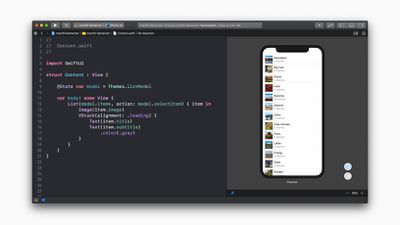
Apple dev tools swift UI screen 06032019

"The new app development technologies unveiled today make app development faster, easier and more fun for developers, and represent the future of app creation across all Apple platforms," said Craig Federighi, Apple’s senior vice president of Software Engineering. "SwiftUI truly transforms user interface creation by automating large portions of the process and providing real-time previews of how UI code looks and behaves in-app. We think developers are going to love it."

Using SwiftUI's easy-to-understand declarative code, developers can create full-featured user interfaces complete with smooth animations.

SwiftUI should also save developers time by providing several automatic functions including interface layout, Dark Mode, Accessibility, right-to-left language support and internationalization.

In addition, a new graphical UI design tool built into Xcode 11 makes it easier for UI designers to quickly assemble a user interface with SwiftUI without having to write any code. Swift code is automatically generated and when this code is modified, the changes to the UI instantly appear in the visual design tool, allowing developers to see automatic, real-time previews of how the UI will look and behave as they refine and test their code.

The new Swift API is universal, meaning it can be used to build app UIs for Apple Watch, Apple TV, Mac, iPad, iPhone, and Apple Watch.


Top Rated Comments

okwhatev Avatar
86 months ago
They’ve actually built a WYSIWYG editor for swift code. A WYSIWYG editor for creating actual apps. I mean holy **** this is the groundbreaking stuff Apple used to be known for.

This is absolutely incredible.

I’m actually proud to be an Apple fan today, and I never thought I’d say those words again!
Score: 10 Votes (Like | Disagree)
vmachiel Avatar
86 months ago
This is huge. The room had so much energy when this was shown in a demo
Score: 6 Votes (Like | Disagree)
Jyby Avatar
86 months ago
Science Rules!
Score: 5 Votes (Like | Disagree)
MisterSavage Avatar
86 months ago
I actually like digging around in code but getting interfaces to interact properly with auto layout has been something I struggle with. I'm interested to start playing around with this.


Score: 2 Votes (Like | Disagree)
Mascots Avatar
86 months ago
Glad to see they're finally addressing the lack of Cocoa Bindings on iOS...

gd one of the most painful parts of the SDK was view-controller interactions.
Score: 1 Votes (Like | Disagree)
Gorms Avatar
86 months ago
I, for one, am into this.
Score: 1 Votes (Like | Disagree)

Popular Stories

apple music chatgpt

ChatGPT's Apple Music Integration Is Now Live

Wednesday December 17, 2025 3:50 pm PST by
There's now a dedicated Apple Music app for ChatGPT, which allows ChatGPT to make music recommendations and build playlists. Apple Music can be added to ChatGPT through the Settings section in the Mac app, website, or iOS app. Apple Music is listed under the apps option, and connecting to it requires signing in with your Apple Account for authorization purposes. ChatGPT can be used to...
iPhone Top Left Hole Punch Face ID Feature Purple

iPhone 18 Pro Features Leaked in New Report, Including Under-Screen Face ID

Tuesday December 16, 2025 8:44 am PST by
Next year's iPhone 18 Pro and iPhone 18 Pro Max will be equipped with under-screen Face ID, and the front camera will be moved to the top-left corner of the screen, according to a new report from The Information's Wayne Ma and Qianer Liu. As a result of these changes, the report said the iPhone 18 Pro models will not have a pill-shaped Dynamic Island cutout at the top of the screen....
airpods pro 3 new blue

AirPods Pro 3's Static and Noise Issues Haven't Been Resolved

Thursday December 18, 2025 3:44 pm PST by
Since the AirPods Pro 3 launched, there have been complaints from users who have noticed a static-like sound or a crackling issue when using the earbuds, particularly when Active Noise Cancellation is on but no media is playing. Users have also run into strange high-pitched whistling sounds that happen intermittently. We shared the issues back in late October, and despite two subsequent...
iOS 26 Maps Glass

Apple Quietly Discontinued Flyover City Tours in Apple Maps

Thursday December 18, 2025 1:31 pm PST by
Apple Maps no longer offers a Flyover feature that provides users with automated tours of notable landmarks in major cities. The Flyover option appears to have been nixed around when iOS 26 launched, but its removal went largely unnoticed. Flyover city tours were introduced in 2014 with iOS 8 and OS X Yosemite, using Flyover imagery to generate an aerial tour. Most cities with Flyover...
apple beta 26 lineup

Apple's 2026 and 2027 Product Roadmap: Foldable iPhone, iPhone 18 Pro, M5 Macs, and More

Tuesday December 16, 2025 4:42 pm PST by
There has been a whirlwind of rumors over the last few days, sourced from leaked internal software designed for the iPhone and the Mac, and news sites like The Information. Below, we have a quick recap of everything we've heard this week, which serves as a guide to Apple's product plans in 2026 and beyond. We've organized the info by likely release date, though there are some products that...
top stories 2025 12 20

Top Stories: iOS 26.3 Beta, Major Apple Leaks, and More

Saturday December 20, 2025 6:00 am PST by
You'd think things would be slowing down heading into the holidays, but this week saw a whirlwind of Apple leaks and rumors while Apple started its next cycle of betas following last week's release of iOS 26.2 and related updates. This week also saw the release of a new Apple Music integration with ChatGPT, so read on below for all the details on this week's biggest stories! Top Stories i...
iOS 26

Apple Releases First iOS 26.3 and iPadOS 26.3 Public Betas

Wednesday December 17, 2025 10:06 am PST by
Apple today provided beta testers with the first releases of upcoming iOS 26.3, iPadOS 26.3, tvOS 26.3, and watchOS 26.3 updates for testing purposes. The public betas come a couple of days after Apple provided the betas to developers. Anyone can download and install public betas, and all that's required is to sign up on Apple's beta site. Once you've opted in, the software can be...







































