Ulysses Gains Native iPad Editor Split View and Ghost Publishing Support - MacRumors
Skip to Content

Ulysses Gains Native iPad Editor Split View and Ghost Publishing Support

by

Ulysses is due to receive an update today that brings two key features to the popular universal app for writers – Ghost publishing support and a native split view on iPad.
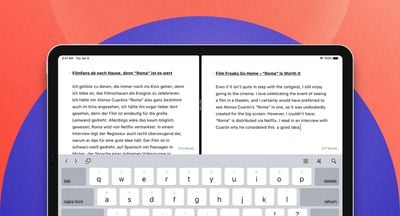
Split View iPad
The ability to display two texts next to each other is handy when comparing two versions of a document or keeping an eye on your reference notes while writing, and Ulysses recently improved the experience on Mac by introducing its own native split view function with the ability to view two sheets in the writing window.

With this version, split view editing comes to ‌iPad‌, enabling Ulysses users to not just display and edit two texts at a time, scroll both texts simultaneously, and apportion the available screen space between the two editors. With a split view containing two app windows, they can also navigate and show an export preview next to an editor, to see what the finished article is going to look like when they write.
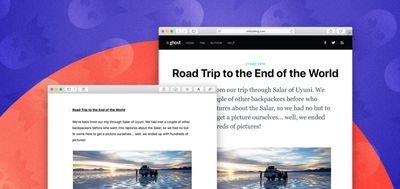
Ghost 1
Today's other big addition to Ulysses is in its publishing function. To date, Ulysses has offered users direct uploading of texts – including images, links, tags, and so on – to WordPress and Medium. With this new release, writers can also upload their work straight to the Ghost platform, which specializes in blogs and online publications.

Elsewhere in this release, the developers have added syntax highlighting for more programming languages, including Mathematica, Vimscript, Smalltalk, GraphQL, and Handlebars. Shared sheets are also now exported in a compressed format, which fixes a multitude of sharing issues, while the first launch experience has been updated to make it easier for new users to get to know the app. Lastly, this version brings a number of performance improvements and bug fixes for both iOS and Mac apps.

Ulysses can be downloaded for free on the App Store and the Mac App Store, with version 16 rolling out to users on Monday. After a 14-day trial period, a subscription is required to unlock the app on all devices. A monthly subscription costs $4.99, while a yearly subscription is $39.99. Students can use Ulysses at a discounted price of $11.99 per six months. The discount is granted from within the app.


Tag: Ulysses

Top Rated Comments

-DMN- Avatar
95 months ago
Not a big fan of subscription models... Hard Pass
Score: 9 Votes (Like | Disagree)
Wildkraut Avatar
95 months ago
Ulysses is the App of a german Company which most disgustingly adopted apples rip off scheme.
I even dumped my bought version of it!
Yeah same here... I’m not going to continue supporting these greedy <insert_here> , using iA Writer now. Works like a charm, does all what I need.
Score: 6 Votes (Like | Disagree)
T-Bob Avatar
95 months ago
It's too cheap. My coffees cost at least $5 now, so I expect my subscriptions to keep pace.


Score: 3 Votes (Like | Disagree)
Traverse Avatar
95 months ago
I've grown very fond of Ulysses over the years. Simple UI, fast sync via iCloud (so I don't have to manage folders on Dropbox), and most importantly: extensive Shortcut support. I have various shortcuts such as a journaling one that in one tap creates a new sheet in the whatever group the current month is (May, June, etc.) with a pre-created title and a small text at the bottom that has a summary of that day's weather. With one tap of a button in the widget I have an entry ready to go.

I'm not a fan of subscriptions, but mine is only $30 a year and given the hundreds of entries I've made I don't mind paying that. Heck, I pay $15 a month for Netflix and haven't opened Netflix in like 3 months.
Score: 3 Votes (Like | Disagree)
Romeo_Nightfall Avatar
95 months ago
Ulysses is the App of a german Company which most disgustingly adopted apples rip off scheme.
I even dumped my bought version of it!
Score: 2 Votes (Like | Disagree)
drumcat Avatar
95 months ago
I hate the subscription method like everyone else and I hate the commitment, but in the constant update world, the developers got to eat they can't make a product and sell it once. One suggested method was for the user to keep the latest version he paid for on subscription and not receive further updates once the subscription is turned off.

Or maybe offer 1 low subscription and 1 higher priced pay once option, 1password does this. Choose whatever pleases you. I am not sure how many license app developers sell so I don't know if the pay-once method is enough for them.
Agenda does this. You pay *once*, and you get the software, and updates a year. You keep those features permanently. If you want new features later, you pay again, but only if you want to. THAT is a subscription. This per month or lose it is RENTING.

I don't rent software.

I fired this off, and didn't even see @T-Bob. Exactly.
Score: 1 Votes (Like | Disagree)

Popular Stories

Foldable iPhone 2023 Feature 1

Gurman: iPhone Ultra Wows Early Testers, Except for Its Camera

Sunday August 23, 2026 11:19 am PDT by
Apple's upcoming foldable iPhone Ultra is winning over the few people who have had hands-on time with the device, though the camera setup may leave some users wanting, according to Bloomberg's Mark Gurman. Writing in his latest Power On newsletter, Gurman says people who have used the device – which is reportedly referred to internally as the iPhone Ultra – like how it fits in your...
iPhone 18 Pro Dark Cherry Feature

iPhone 18 Pro and iPhone Ultra: When Will Apple Event Be Announced?

Monday August 24, 2026 6:45 am PDT by
It is now late August, meaning that Apple's annual iPhone event is just around the corner. Below, we take a look at when the event might be held this year. This September, Apple is expected to unveil the iPhone 18 Pro, iPhone 18 Pro Max, and an all-new foldable iPhone that will reportedly be named the iPhone Ultra. The regular iPhone 18, a lower-end iPhone 18e, and the iPhone Air 2 are not...
apple magic keyboard with glyphs 2026 refresh

Apple Quietly Refreshes Magic Keyboards

Tuesday August 25, 2026 7:22 am PDT by
Apple today quietly introduced updated Magic Keyboard models with revised U.S. English key labeling. On the new keyboards, the tab, caps lock, shift, return, and delete keycaps are labeled with glyphs rather than edge text. On the full-size models with a numeric keypad, the change goes further, with the home, page up, page down, end, clear, and enter keys also swapping their text labels for...