

Apple Releases Updated Version of Shortcuts With New Notes-Related Actions - MacRumors
Skip to Content

Apple Releases Updated Version of Shortcuts With New Notes-Related Actions

by

Apple today released an updated version of Shortcuts, introducing support for several new actions related to the Notes app. There are options for Create Note, Append to Note, Find Notes, and Show Notes, all of which can be incorporated into your shortcuts.

There's also a new Get Numbers input action for pulling numbers from text, and Get Time Travel includes more details like route name, arrival time, and distance. You can also now tap on the Library tab to get to the bottom of the shortcuts list more quickly.
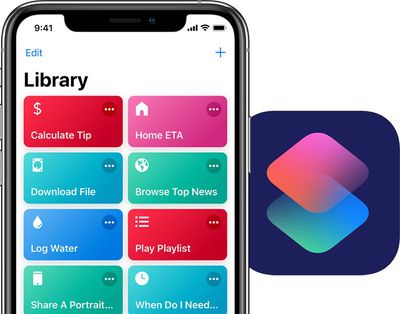
siri shortcuts duo
Apple's full release notes for the new 2.2 Shortcuts update are below:

- Create and access Notes in your shortcuts with the new Create Note, Append to Note, Find Notes, and Show Note actions
- Pull out numbers from text using the new Get Numbers from Input action
- Tapping on the Library tab will now scroll to the bottom of your shortcuts list
- Get Travel Time now returns more details, including route name, arrival time, and distance
- Bug fixes and improvements

The Shortcuts app, introduced in iOS 12, is designed to allow iOS users to create multi-step shortcuts and automations using both first and third-party apps, with the shortcuts able to be activated using Siri commands.

Through Shortcuts, for example, you can create an automation to do something like turn on the thermostat at home using the Nest app, text your roommate that you're on the way with Messages, and open up the Maps app with directions home all with a single "I'm going home" ‌Siri‌ command spoken when leaving work.

Shortcuts are deeply customizable, with Apple's Shortcuts app providing a gallery of Shortcut suggestions along with the tools to create your own.

Top Rated Comments

gwhizkids Avatar
98 months ago
Have never used the shortcuts app and never will.Have never used Siri either in the 8 years it’s been around.

Good for you! Keep it up!
Score: 12 Votes (Like | Disagree)
98 months ago
I gave up on shortcuts the app is confusing and it’s complicated
Score: 10 Votes (Like | Disagree)
98 months ago
Very complicated to use and most people I work with and associate with do not use it

What was Apple thinking when they developed this. The public are not programmers
It isn't as if iOS boots up into Shortcuts and you have to use it.

I welcome more powerful tools like this in iOS. Just don't download it if it's not for your use case.
Score: 9 Votes (Like | Disagree)
98 months ago
Very complicated to use and most people I work with and associate with do not use it

What was Apple thinking when they developed this. The public are not programmers
Score: 8 Votes (Like | Disagree)
burgman Avatar
98 months ago
Have never used the shortcuts app and never will.Have never used Siri either in the 8 years it’s been around.
Congratulations cookie time ;)
Score: 5 Votes (Like | Disagree)
ipedro Avatar
98 months ago
I gave up on shortcuts the app is confusing and it’s complicated
It’s an advanced user feature. It’s not for you. Luckily however, you can still benefit from Shortcuts from within apps where developers did the work for you and created their own Shortcuts. All you have to do is tap “Add Shortcut”.

Tons of Mac users never used AppleScript or Automator but a good number of those still got to benefit from pre-made scripts and automations. Shortcuts is just the iOS version of that dynamic.
Score: 4 Votes (Like | Disagree)

Popular Stories

8 CarPlay Features in iOS 27 Feature

Which iOS 27 CarPlay Features Actually Work in Your Car?

Thursday September 17, 2026 4:17 am PDT by
In iOS 27, available now, CarPlay gets its biggest update in years, but some features depend on what type of car you have rather than your iPhone model. Some of the biggest additions won't do anything in the vast majority of vehicles on the road today. Here's how the new features pan out. Works in Any CarPlay Vehicle Custom widgets: In iOS 27, CarPlay is no longer limited to Apple's handful ...
Apple Watch New Charging Puck

Here's Why a New Apple Watch Charging Puck Was Just Released

Wednesday September 16, 2026 8:53 am PDT by
The new Apple Watch Series 12 and Apple Watch Ultra 4 have hardware changes that allow for faster charging, but you will need to use the new version of the Apple Watch Magnetic Fast Charger included in the box in order to achieve this boost. If you need extra ones for your own charging stands or travel or so forth, Apple released the new version of the charger on its online store last week, with...
ios272anniversary

iOS 27.2 Could Save Your Marriage

Wednesday September 16, 2026 1:32 pm PDT by
The iOS 27.2 beta that Apple released today adds a feature that reminds you it's your anniversary when you call someone, as long as you've added the date in the Contacts app. On the date of your anniversary, when you go to call the person, you'll see a reminder that it's an important day so you don't forget to say something. The anniversary alert uses Call Context, a feature Apple added in...











































