

Pixelmator Pro Introduces Support for Portrait Mode Depth Masks for Easy Background Swapping - MacRumors
Skip to Content

Pixelmator Pro Introduces Support for Portrait Mode Depth Masks for Easy Background Swapping

by

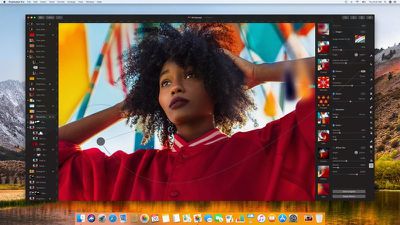
Pixelmator Pro for Mac, Pixelmator's higher-end editing software, was today updated with support for masks from Portrait Mode photos.

When you open up a photo taken with an iPhone that offers Portrait Mode, Pixelmator Pro will open the photo itself along with a useful layer mask for doing things like swapping out the background in just a few minutes.
pixelmatorpro
The portrait mask uses the depth information from the iPhone to isolate the subject of a photo, making it easy to remove background elements with little effort.

The Portrait mask feature is limited to the Pixelmator Pro software, and it is not available on the standard version of Pixelmator or the Pixelmator app for iOS devices.




Pixelmator Pro has been around since late 2017 and it has seen several major updates since then with the Pixelmator team introducing useful new functionality on a regular basis. Pixelmator Pro can be downloaded from the Mac App Store for $39.99, and there is a free trial available on the Pixelmator website. [Direct Link]




Top Rated Comments

Kabeyun Avatar
96 months ago
Genius feature. Hope they find a way to bring it to iOS.
This is huge. Masking, at least for me, is a real pain. Many pro masking apps require lots of training and experience for any kind of decent result, and I have yet to find a single consumer solution that’s reliable. Price is right, too.
Score: 4 Votes (Like | Disagree)
Weaselboy Avatar
96 months ago
Does it support raw yet?
https://www.pixelmator.com/pro/tech-specs/


Looks like it does.

Attachment Image
Score: 4 Votes (Like | Disagree)
96 months ago
Pixelmator Pro does support RAW.

https://www.pixelmator.com/community/viewtopic.php?f=15&t=15057
Score: 4 Votes (Like | Disagree)
96 months ago
great tool although yet again "PRO" software focusing on iToys and still missing things like colour overlay.

Don't get me wrong, this feature is cool but I would like to see other things first
Score: 3 Votes (Like | Disagree)
96 months ago
Genius feature. Hope they find a way to bring it to iOS.
Score: 1 Votes (Like | Disagree)
GubbyMan Avatar
96 months ago
I use Focos on my iPhone to mask out the background and then transfer the photo to mobile Pixelmator so I can add another photo as a background.

Score: 1 Votes (Like | Disagree)

Popular Stories

American Express Gold Apple Pay Feature

American Express Announces New Apple Pay Feature

Tuesday June 30, 2026 10:27 am PDT by
American Express today announced that you can now redeem Membership Rewards points when checking out with Apple Pay on the web and in apps on the iPhone and iPad. When checking out with Apple Pay on iOS 18 or iPadOS 18 or later, tap on your eligible American Express card (Platinum, Gold, Green, and others) and select the Membership Rewards points option. You can use points to cover all or...


Apple Acquires Award Winning App Play Feature

Apple Acquires Award-Winning App 'Play'

Monday June 29, 2026 7:39 am PDT by
In February, Apple notified the European Commission that it would be acquiring certain assets from and have the right to hire certain employees from Rabbit 3 Times, the company behind the award-winning app design tool Play. The notification was published on the European Commission's website this week, following a four-month waiting period. Play was a Mac and iPhone app that allowed designers ...
series 10 apple watch titanium digital crown

Report: Apple Watch Redesign Coming Next Year With New Band System

Tuesday June 30, 2026 8:45 am PDT by
A "major overhaul" of the Apple Watch's design is due to arrive next year with a new system for connecting bands, according to a known Weibo leaker. In a set of recent posts, the leaker known as "Instant Digital" linked the new claim to older rumors about an "Apple Watch X" model, which was said to introduce a fresh design and break compatibility with the existing watch band system. Citing...

































