

Spotify Adding Feature That Lets You Block Artists From Playlists, Radio Stations, and More - MacRumors
Skip to Content

Spotify Adding Feature That Lets You Block Artists From Playlists, Radio Stations, and More

by

Spotify will soon launch a "don't play this artist" feature in its iOS app, which will allow subscribers to block an entire artist from playing across the app (via The Verge). This means that you won't hear their songs in your library, Spotify playlists, chart lists, and radio stations.
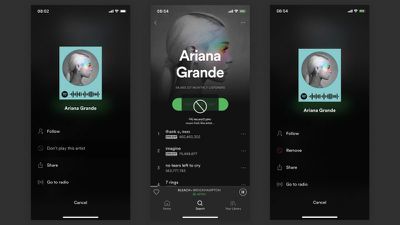
spotify 3


The feature is in testing right now, and it currently works on the artist's own songs but does not extend to collaborations. The feature is found in the ellipsis menu on an artist's page, and will sit alongside options like Follow, Share, and Go to radio.

A specific release date for the launch of the block feature has not yet been announced, but during its test of the update Spotify told The Verge it would be coming "soon." Artist and song blocking is a feature that many users have been asking for in both Spotify and Apple Music, and so far Apple has not yet announced a similar update for its streaming music service.

Tag: Spotify
Top Rated Comments

keysofanxiety Avatar
99 months ago
I'd be interested if Apple implemented this. "Hey Siri, block all R&B from Beats 1."

*static plays when turning on radio*
Score: 25 Votes (Like | Disagree)
99 months ago
Is this for R Kelly?
Score: 15 Votes (Like | Disagree)
bladerunner2000 Avatar
99 months ago
Every top 40 artist would end up in my blocked list starting with Justin Bieber.
Score: 11 Votes (Like | Disagree)
AlumaMac Avatar
99 months ago
I wish Apple Music would implement this considering as much as I tell them I 'dislike' a suggested artist they keep recommending them.
Score: 10 Votes (Like | Disagree)
TwoBytes Avatar
99 months ago
Why the HELL won't Apple do this? Their 'smart' and recommended playlists are full of hate. No matter how much I dislike a genre or artist it STILL appears in my new music mix.

While they are at it, I need a playlist that will give me new tracks from artists I added to my library..... like Spotify. I think I need to switch back..

WAIT!!

These features are coming in the Apple Music 2019 upgrade. ....they are only charging a premium tier of $9.99 extra a month for this feature.
Score: 7 Votes (Like | Disagree)
Mr. Donahue Avatar
99 months ago
This is game changing. I like this idea a lot. If Apple Music doesn’t implement this I miiiiiiiiiiight just switch to Spotify

Score: 5 Votes (Like | Disagree)

Popular Stories

General Spotify Feature

Spotify Adds Running Mode to iOS App With Tempo-Matched Music

Thursday July 30, 2026 8:49 am PDT by
Spotify today announced a new Running Mode that turns playlists into structured running sessions built around workout type, tempo, and listening habits. It's launching on iOS first. Located in the app's Fitness Hub, the feature lets runners choose from 25 presets that can be tweaked to fit workout type (interval, steady, or pyramid, for example), with options for duration, beats per minute,...


Four iPhone 18 Pro Colors Mock Feature

iPhone 18 Pro: Pre-Orders and Release Date

Sunday August 16, 2026 8:24 pm PDT by
Apple has yet to reveal when the iPhone 18 Pro and iPhone Ultra will be announced and released, but the dates usually follow a familiar pattern. As usual, the event is expected to take place in the first half of September. Labor Day falls on September 7 this year. The last time the holiday was on that day was in 2020, but the iPhone event that year was delayed until October due to the...
apple camera airpods

Apple's Camera-Equipped AirPods Confirmed: See Them in Action

Monday August 17, 2026 6:21 pm PDT by
Apple is working on camera-equipped AirPods that appear to be nearly ready to launch, based on a video MacRumors found in the macOS Tahoe 26.7 release candidate. In a short demo, a man holds a book up so the camera in the AirPods can see the title. "With Visual Intelligence, your world becomes savable. See something you like? Just ask me to save it for later," says the voiceover text. Here ...






































