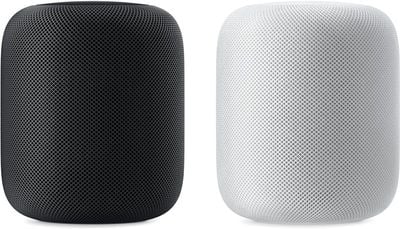
At today's "Gather Round" event at the Apple Park campus in Cupertino, California, Apple CEO Tim Cook highlighted some new features that are coming to the HomePod through a software update set to be released next Monday.
The HomePod will gain a number of new features with the software update, which is going to come alongside iOS 12, tvOS 12, and watchOS 5.
Search for your favorite songs by lyrics using Siri
Create multiple timers
Make and receive phone calls right from the HomePod
Ping your iPhone or any of your Apple devices to find them in your home
HomePod is also going to work with Siri Shortcuts, a feature coming in iOS 12. According to Cook, Siri Shortcuts will "open up a world of apps" for HomePod.
Many of these new features are additions that HomePod users have been hoping for. The HomePod has been the butt of jokes for not being able to support more than one timer at once, and while it could be used as a speakerphone previously, the new phone call functionality will expand its usefulness as a standalone communication device.
All of Apple's fall software updates are set to be released on Monday, September 17, with the exception of macOS Mojave, which will see a release on September 24.
Thursday December 11, 2025 8:49 am PST by Joe Rossignol
Apple seeded the second iOS 26.2 Release Candidate to developers earlier this week, meaning the update will be released to the general public very soon.
Apple confirmed iOS 26.2 would be released in December, but it did not provide a specific date. We expect the update to be released by early next week.
iOS 26.2 includes a handful of new features and changes on the iPhone, such as a new...
Wednesday December 10, 2025 2:52 am PST by Tim Hardwick
Google Maps on iOS quietly gained a new feature recently that automatically recognizes where you've parked your vehicle and saves the location for you.
Announced on LinkedIn by Rio Akasaka, Google Maps' senior product manager, the new feature auto-detects your parked location even if you don't use the parking pin function, saves it for up to 48 hours, and then automatically removes it once...
Apple has ordered 22 million OLED panels from Samsung Display for the first foldable iPhone, signaling a significantly larger production target than the display industry had previously anticipated, ET News reports.
In the now-seemingly deleted report, ET News claimed that Samsung plans to mass-produce 11 million inward-folding OLED displays for Apple next year, as well as 11 million...
Friday December 5, 2025 9:40 am PST by Tim Hardwick
Apple is about to release iOS 26.2, the second major point update for iPhones since iOS 26 was rolled out in September, and there are at least 15 notable changes and improvements worth checking out. We've rounded them up below.
Apple is expected to roll out iOS 26.2 to compatible devices sometime between December 8 and December 16. When the update drops, you can check Apple's servers for the ...
Thursday December 11, 2025 11:28 am PST by Juli Clover
Apple today released new firmware designed for the AirPods Pro 3 and the prior-generation AirPods Pro 2. The AirPods Pro 3 firmware is 8B30, up from 8B25, while the AirPods Pro 2 firmware is 8B28, up from 8B21.
There's no word on what's include in the updated firmware, but the AirPods Pro 2 and AirPods Pro 3 are getting expanded support for Live Translation in the European Union in iOS...
Thursday December 11, 2025 10:31 am PST by Juli Clover
The AirTag 2 will include a handful of new features that will improve tracking capabilities, according to a new report from Macworld. The site says that it was able to access an internal build of iOS 26, which includes references to multiple unreleased products.
Here's what's supposedly coming:
An improved pairing process, though no details were provided. AirTag pairing is already...
Monday December 8, 2025 10:18 am PST by Juli Clover
Apple today seeded the second release candidate version of iOS 26.2 to developers and public beta testers, with the software coming one week after Apple seeded the first RC. The release candidate represents the final version iOS 26.2 that will be provided to the public if no further bugs are found.
Registered developers and public beta testers can download the betas from the Settings app on...
Monday December 8, 2025 4:54 am PST by Tim Hardwick
Apple is actively testing under-screen Face ID for next year's iPhone 18 Pro models using a special "spliced micro-transparent glass" window built into the display, claims a Chinese leaker.
According to "Smart Pikachu," a Weibo account that has previously shared accurate supply-chain details on Chinese Android hardware, Apple is testing the special glass as a way to let the TrueDepth...
Wednesday December 10, 2025 12:22 pm PST by Juli Clover
The next-generation low-cost iPad will use Apple's A19 chip, according to a report from Macworld. Macworld claims to have seen an "internal Apple code document" with information about the 2026 iPad lineup.
Prior documentation discovered by MacRumors suggested that the iPad 12 would be equipped with an A18 chip, not an A19 chip. The A19 chip was just released this year in the iPhone 17, and...
Thursday December 11, 2025 4:19 am PST by Tim Hardwick
Apple's next-generation Studio Display is expected to arrive early next year, and a new report allegedly provides a couple more details on the external monitor's capabilities.
According to internal Apple code seen by Macworld, the new external display will feature a variable refresh rate capable of up to 120Hz – aka ProMotion – as well as support for HDR content. The current Studio...
just make a homepod without siri. I just want a nice Apple AirPlay2 speaker
You know you don't have to use it, right? You can simply use it as a speaker system if you like.
Using your voice:
[LIST=1] * Say "Hey Siri, stop listening."" * When Siri asks you to confirm, say ""Yes.".
Using the Home app:
[LIST=1] * Launch the Home app on your iPhone or iPad Home screen. * Tap on the Rooms tab, bottom middle. * Swipe to the Room that contains your HomePod. * Long press (or firmly press) on your HomePod. * Tap Details. * Toggle Listen for "Hey Siri" off.