

Kévin Eugène, a web developer and UI/UX designer, this week shared a new iOS concept that he calls "iOS Mogi," with the aim of improving the look and functionality of Apple's AI assistant Siri (via Reddit). As Eugène explains in his Medium post on iOS Mogi, his goal was "not to create new commands" or completely re-build Siri, but to display the voice assistant "in a different way" that is "more useful to the user."

This led to iOS Mogi's main concept: Siri as a drop-down notification banner that Eugène describes as "parallel help." The non-intrusive banner doesn't take up the whole screen as Siri does today, allowing the assistant to perform contextually aware tasks in the background while the user does something else. As with all concepts, it's important to remember that Eugène's designs in no way indicate what we'll see with Siri in a future version of iOS.
iOS mogi 1

Images and GIFs via Kévin Eugène on Medium

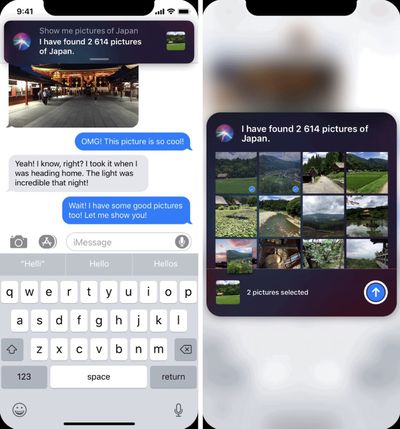
In Eugène's main example, he asks Siri to "Show me pictures of Japan" while texting a friend in Messages, and then he swipes down on the notification, scrolls until he finds the ones he wants to send and taps to select them all. Thanks to the contextual awareness of Siri in iOS Mogi, this drop-down notification also has a blue Messages "send" button, which Eugène taps to send all the photos directly to his contact.

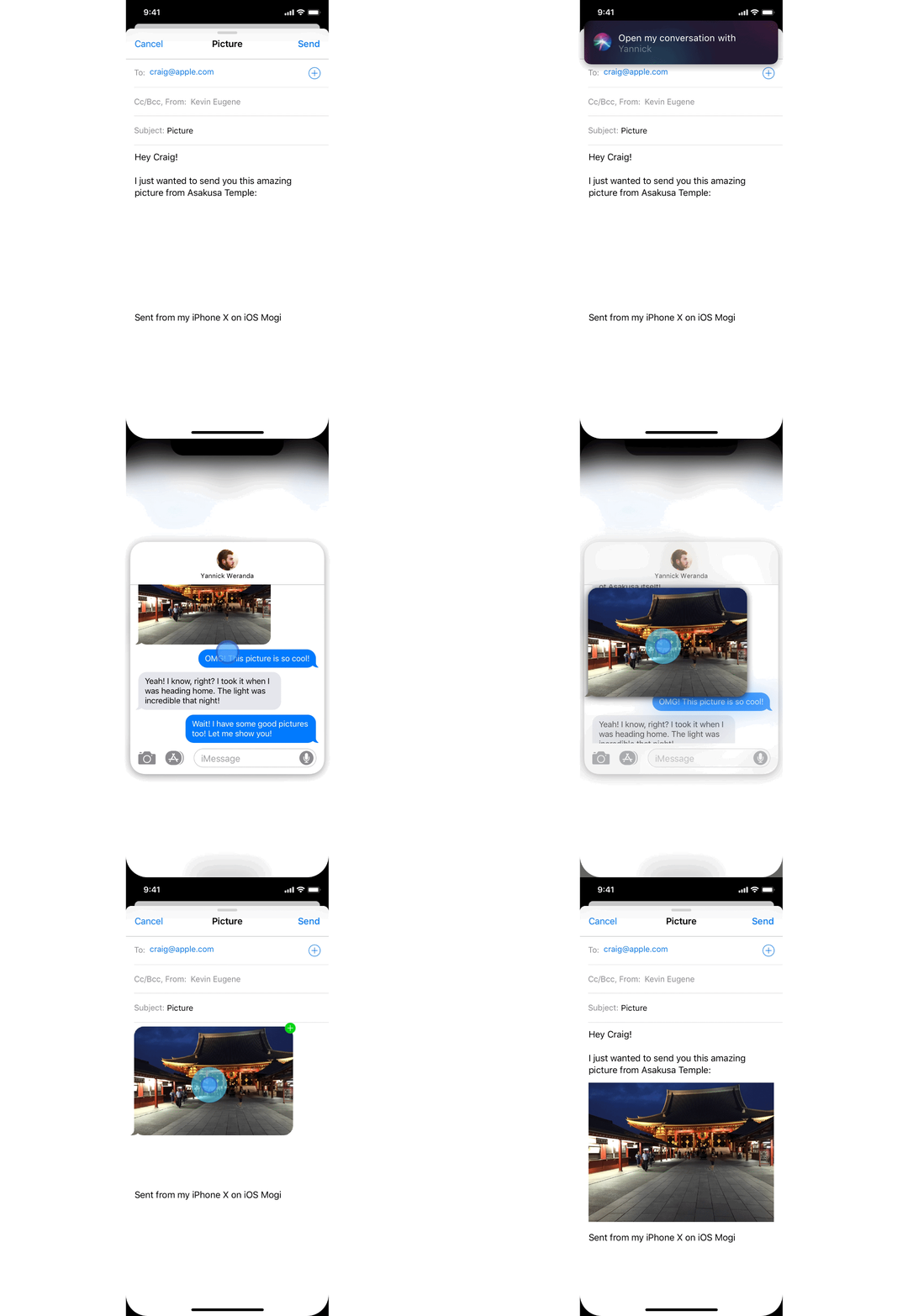
iOS Mogi also includes a multitasking feature where it's possible to ask Siri to open pages from an app while performing tasks in another app. Eugène gives the example of writing an email and asking Siri to open a conversation from Messages in a drop-down notification, scrolling to find a picture you need, and then dragging and dropping that image directly into the email.
1 hFgp5tZNfoilTSIeyIF PA
Eugène's version of Siri also allows for "Siri actions" that translate touch gestures into voice commands, like scrolling in Apple Music or editing an email's content in Mail. Without needing to physically interact with an iPhone, Eugène explains that this could be particularly useful for users with a disability, but believes such actions would be of benefit for all iOS users.

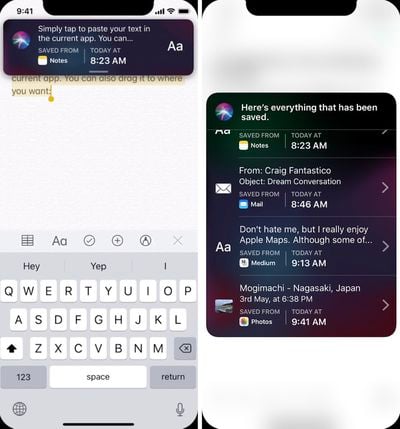
The last of Eugène's Siri concepts in iOS Mogi involves saving elements from anywhere in the OS to use in another app, including an improved copy/paste feature. In the concept, users can copy as normal and then Siri saves all items and text copied, which can be viewed by saying "Show me all my saved elements." From here, each element can be edited, copied again to paste in another app, or dragged and dropped into the open app.
ios mogi 2
The iOS Mogi concept is full of other ideas for Apple's mobile operating system, including updates to Apple Maps, "live notifications," multitasking, ARKit features, and more. Head over to Eugène's Medium post to see the full concept.

Prior to the unveiling of iOS 12 at WWDC in June, we saw a few concepts for future versions of iOS from other graphic designers, including one from Michael Calcada that focused on a "Siri Sight" augmented reality feature for navigating around cities. Another one shared by Álvaro Pabesio focused entirely on Apple Music -- which isn't a priority for Apple's iOS 12 update -- and beefed up the music streaming app with music history stats, a new UI, new profile pages, group playlists, and more.

Top Rated Comments

Fynd Avatar
96 months ago
I would use Siri alot more if it was like this. There's no need for it to be a full screen experience by default.
Score: 11 Votes (Like | Disagree)
newyorksole Avatar
96 months ago
Don't hold your breath. Apple has made the phone call interface as an intrusive full screen despite the existence of callbar.
It still baffles me that a phone call needs to take up the entire screen. Why is that? I hate it.
Score: 8 Votes (Like | Disagree)
Eorlas Avatar
96 months ago
Don't hold your breath. Apple has made the phone call interface as an intrusive full screen despite the existence of callbar.
Score: 3 Votes (Like | Disagree)
itsmilo Avatar
96 months ago
The whole UI of iOS is up for a overhaul of you ask me. Thought it would come with OLED but nope

Score: 3 Votes (Like | Disagree)
cBraunDesign Avatar
96 months ago
I like this a lot.

Score: 3 Votes (Like | Disagree)
Braderunner Avatar
96 months ago
Contextual awareness...:rolleyes:...that would be a dream come true.
Score: 2 Votes (Like | Disagree)

Popular Stories

iOS 26

iOS 26.2 Coming Soon With These 8 New Features on Your iPhone

Thursday December 11, 2025 8:49 am PST by
Apple seeded the second iOS 26.2 Release Candidate to developers earlier this week, meaning the update will be released to the general public very soon. Apple confirmed iOS 26.2 would be released in December, but it did not provide a specific date. We expect the update to be released by early next week. iOS 26.2 includes a handful of new features and changes on the iPhone, such as a new...
AirPods Pro Firmware Feature

Apple Releases New Firmware for AirPods Pro 2 and AirPods Pro 3

Thursday December 11, 2025 11:28 am PST by
Apple today released new firmware designed for the AirPods Pro 3 and the prior-generation AirPods Pro 2. The AirPods Pro 3 firmware is 8B30, up from 8B25, while the AirPods Pro 2 firmware is 8B28, up from 8B21. There's no word on what's include in the updated firmware, but the AirPods Pro 2 and AirPods Pro 3 are getting expanded support for Live Translation in the European Union in iOS...
Google maps feaure

Google Maps Quietly Added This Long-Overdue Feature for Drivers

Wednesday December 10, 2025 2:52 am PST by
Google Maps on iOS quietly gained a new feature recently that automatically recognizes where you've parked your vehicle and saves the location for you. Announced on LinkedIn by Rio Akasaka, Google Maps' senior product manager, the new feature auto-detects your parked location even if you don't use the parking pin function, saves it for up to 48 hours, and then automatically removes it once...
iOS 26

iOS 26.4 and iOS 27 Features Revealed in New Leak

Friday December 12, 2025 10:56 am PST by
Macworld's Filipe Espósito today revealed a handful of features that Apple is allegedly planning for iOS 26.4, iOS 27, and even iOS 28. The report said the features are referenced within the code for a leaked internal build of iOS 26 that is not meant to be seen by the public. However, it appears that Espósito and/or his sources managed to gain access to it, providing us with a sneak peek...
Foldable iPhone 2023 Feature 1

Apple to Make More Foldable iPhones Than Expected [Updated]

Tuesday December 9, 2025 9:59 am PST by
Apple has ordered 22 million OLED panels from Samsung Display for the first foldable iPhone, signaling a significantly larger production target than the display industry had previously anticipated, ET News reports. In the now-seemingly deleted report, ET News claimed that Samsung plans to mass-produce 11 million inward-folding OLED displays for Apple next year, as well as 11 million...
iOS 26

Apple Releases iOS 26.2 With Alarms for Reminders, Lock Screen Changes, Enhanced Safety Alerts and More

Friday December 12, 2025 10:10 am PST by
Apple today released iOS 26.2, the second major update to the iOS 26 operating system that came out in September, iOS 26.2 comes a little over a month after iOS 26.1 launched. ‌iOS 26‌.2 is compatible with the ‌iPhone‌ 11 series and later, as well as the second-generation ‌iPhone‌ SE. The new software can be downloaded on eligible iPhones over-the-air by going to Settings >...
AirTag 2 Mock Feature

Apple AirTag 2: Four New Features Found in iOS 26 Code

Thursday December 11, 2025 10:31 am PST by
The AirTag 2 will include a handful of new features that will improve tracking capabilities, according to a new report from Macworld. The site says that it was able to access an internal build of iOS 26, which includes references to multiple unreleased products. Here's what's supposedly coming: An improved pairing process, though no details were provided. AirTag pairing is already...
iOS 26

15 New Things Your iPhone Can Do in iOS 26.2

Friday December 5, 2025 9:40 am PST by
Apple is about to release iOS 26.2, the second major point update for iPhones since iOS 26 was rolled out in September, and there are at least 15 notable changes and improvements worth checking out. We've rounded them up below. Apple is expected to roll out iOS 26.2 to compatible devices sometime between December 8 and December 16. When the update drops, you can check Apple's servers for the ...
macOS Tahoe 26 Thumb

Apple Releases macOS Tahoe 26.2 With Edge Light

Friday December 12, 2025 10:08 am PST by
Apple today released macOS Tahoe 26.2, the second major update to the macOS Tahoe operating system that came out in September. macOS Tahoe 26.2 comes five weeks after Apple released macOS Tahoe 26.1. Mac users can download the macOS Tahoe update by using the Software Update section of System Settings. macOS Tahoe 26.2 includes Edge Light, a feature that illuminates your face with soft...





































