Camera+ App Update Adds Ability to Transfer Applied Edits Between Images - MacRumors
Skip to Content

Camera+ App Update Adds Ability to Transfer Applied Edits Between Images

by

Camera+ received an update on Friday that brings a handful of welcome UI and workflow improvements, while fixing a number of issues reported by users of the popular long-running photo app for iPhone and iPad.

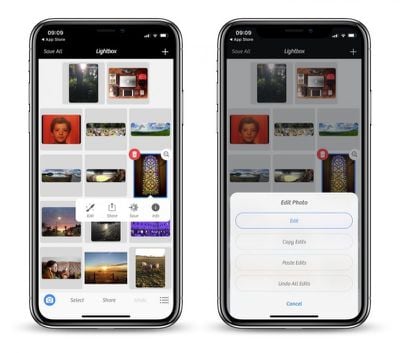
Although the latest v10.10.12 update of Camera+ focuses on enhancing reliability, there are a couple of notable additions to its feature set that are worth highlighting, the ability to copy and paste edits between images on the Lightbox being one of them.
camera 1
To transfer complex applied edits to another photo, select the image on the Lightbox, long-tap the edit button, and then select Copy Edits. With your adjustments in the memory, simply select your target photo, long-tap Edit, and then select Paste Edits to apply them.

Compatible edits will be automatically applied to images with no issues, but it's worth noting that things like Portrait mode will only make the jump if the destination photo was originally captured with depth information, which Camera+ has supported since October.

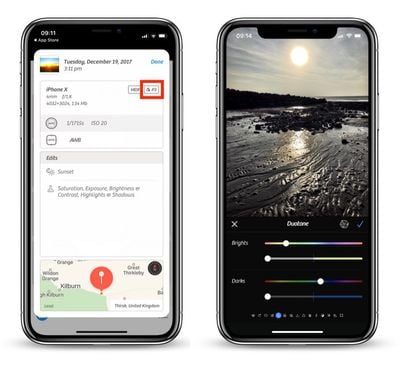
Meanwhile, long-time users of Camera+ may have noticed that the badge indicating the color space of a photo on the Info summary screen was missing for HEIF and TIFF formats. That's no longer the case, with wider color space tags like DCI/P3 now displaying on the relevant images.
camera 2
Additionally, users who like to shoot in RAW will be happy to learn that Camera+ now correctly honors the preference for saving the DNG representation independently of the JPEG/HEIF asset when exporting to Camera Roll, although bear in mind that the in-app Lightbox always uses the combined representation.

Elsewhere, the editing screen has been improved for iPhone X displays, while a couple of blips when sharing to the Files app or WhatsApp have been ironed out. The update also includes optimized memory usage on iPhone 6 devices, especially when shooting TIFF and macro, while a handful of crashes have also been fixed.

Camera+ costs $2.99 for iPhone and $4.99 for iPad, and can be downloaded from the App Store. [Direct Link]


Top Rated Comments

Avieshek Avatar
111 months ago
If only, Apple had ‘Horizontal Flip’ under their Photos’ edit or have ‘toggle-switch’ for Mirror-selfies on front camera.
Score: 1 Votes (Like | Disagree)
mhoutman Avatar
111 months ago
Interesting: did TapTaptap sell their apps to LateNiteSoft ? (I remember their Sketches as one of the first app in the App Store)
Score: 1 Votes (Like | Disagree)

Popular Stories

iphone 16 teal

'Siri AI' Lawsuit Update: Apple to Pay Owners of These iPhone Models

Thursday July 9, 2026 7:08 am PDT by
In May, Apple agreed to pay $250 million to settle a U.S. class action lawsuit over Siri AI's delayed launch, and eligible iPhone users could receive up to a $95 payout. This week, the California court overseeing the case held a hearing regarding preliminary approval of the settlement, but the judge has not yet issued a ruling. It will likely be at least a few more months before eligible...
Apple TV Thumb 3

Everything Coming in the 2026 Apple TV 4K

Wednesday July 8, 2026 4:51 pm PDT by
The Apple TV 4K hasn't been updated since 2022, and it's due for a refresh. An update is planned for 2026, but Apple is likely going to wait to launch it after Siri AI launches in iOS 27. Design Apple TV design updates don't happen often, and that's not changing. The next Apple TV is going to have the same squircle shape as the current model, and it'll continue to be made from a black...
apple wallet drivers license feature iPhone 15 pro

Apple Says iPhone Driver's Licenses Will Expand to These 6 U.S. States

Thursday July 9, 2026 7:29 am PDT by
In select U.S. states, residents can add their driver's license or state ID to the Apple Wallet app on the iPhone and Apple Watch, and then use it to display proof of identity or age at select airports and businesses, and in select apps. To set up the feature, open the Wallet app on the iPhone and tap on the plus sign in the top-right corner. Next, tap on Driver's License and ID Cards,...