iPhone X Owners Complain About Keyboard's 'Wasted Space'

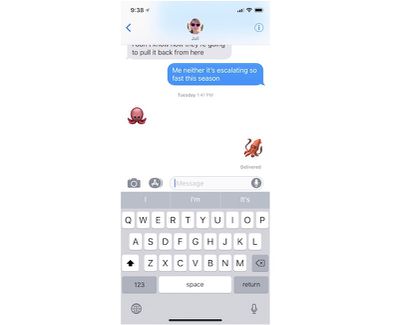
As early adopters began to experience the iPhone X for the first time this past weekend, many users took to the MacRumors forums, Reddit, and Twitter to discuss the gap that exists below the keyboard within iOS 11 on iPhone X. As some users pointed out, this space was likely meant as a way to more easily swipe up to go Home, and potentially for ergonomics reasons since a lower keyboard could be more difficult to type on, but many iPhone X owners are still getting used to the way the keyboard looks across all apps on the device.
iphone x keyboard image 3

The iOS keyboard on iPhone X

On the new keyboard, the Globe or Emoji icon and the Dictation icon both sit below the space bar at the very bottom of the screen. Between these two buttons is a wide, empty gray area that isn't sitting well with some iPhone X owners, and which some early reviews of the device pointed out last week.

BuzzFeed, for example, wondered why Apple didn't do more with this space, potentially including adding "common punctuation, frequently used emojis, or literally anything."

It’s when the keyboard, in any app, is on screen (which, for me, is most of the time): There’s all this dead space on the bottom, where Apple could have put common punctuation, frequently used emojis, or literally anything, but instead left it blank. Other full-screen apps on other phones put navigation or other design elements in that area, and it doesn’t look crowded or crammed. It looks fine. It’s puzzling why Apple didn’t put something more useful down at the bottom, or why it didn’t add a row of numbers or emojis up top and push down the keyboard to make it more thumb-accessible.

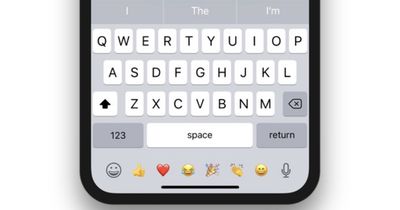
Alex Muench, a UI/UX designer for apps like Todoist and Twist, went a step further and created a mockup of how this could look on future versions of iOS on the iPhone X. Muench likened this space on iPhone X to be a potential area for recently used emojis, "like Touch bar on Mac."
iphone x keyboard mockup alex muench

Twitter user @Yespur asked third-party keyboard SwiftKey if the company will "fill the bottom part of the screen," to which SwiftKey responded: "We'll have to look into it. Nothing to comment on beyond that." It's unclear whether third parties will have any ability to design for this area of iOS on iPhone X. In the Human Interface Guidelines for the new smartphone, the only direct mention of the keyboard asks developers to not duplicate the Globe and Dictation keys.

Don't duplicate system-provided keyboard features. On iPhone X, the Emoji/Globe key and the Dictation key automatically appear beneath the keyboard—even when using custom keyboards. Your app can't affect these keys, so avoid causing confusion by repeating them in your keyboard

The iPhone X comes with a variety of new interface gestures, features, and interactions that take some time getting used to following years of the traditional iPhone experience. Without a Home Button, unlocking the iPhone X requires you to swipe up from the bottom edge of the device, and also rearranges some physical commands like taking a screenshot by pressing the Side Button and Volume Up Button. For more information on Apple's newest smartphone, check out our iPhone X Roundup.


Related Forum: iPhone

Popular Stories

iOS 26

iOS 26.2 Coming Soon With These 8 New Features on Your iPhone

Thursday December 11, 2025 8:49 am PST by
Apple seeded the second iOS 26.2 Release Candidate to developers earlier this week, meaning the update will be released to the general public very soon. Apple confirmed iOS 26.2 would be released in December, but it did not provide a specific date. We expect the update to be released by early next week. iOS 26.2 includes a handful of new features and changes on the iPhone, such as a new...
Google maps feaure

Google Maps Quietly Added This Long-Overdue Feature for Drivers

Wednesday December 10, 2025 2:52 am PST by
Google Maps on iOS quietly gained a new feature recently that automatically recognizes where you've parked your vehicle and saves the location for you. Announced on LinkedIn by Rio Akasaka, Google Maps' senior product manager, the new feature auto-detects your parked location even if you don't use the parking pin function, saves it for up to 48 hours, and then automatically removes it once...
Foldable iPhone 2023 Feature 1

Apple to Make More Foldable iPhones Than Expected [Updated]

Tuesday December 9, 2025 9:59 am PST by
Apple has ordered 22 million OLED panels from Samsung Display for the first foldable iPhone, signaling a significantly larger production target than the display industry had previously anticipated, ET News reports. In the now-seemingly deleted report, ET News claimed that Samsung plans to mass-produce 11 million inward-folding OLED displays for Apple next year, as well as 11 million...
AirPods Pro Firmware Feature

Apple Releases New Firmware for AirPods Pro 2 and AirPods Pro 3

Thursday December 11, 2025 11:28 am PST by
Apple today released new firmware designed for the AirPods Pro 3 and the prior-generation AirPods Pro 2. The AirPods Pro 3 firmware is 8B30, up from 8B25, while the AirPods Pro 2 firmware is 8B28, up from 8B21. There's no word on what's include in the updated firmware, but the AirPods Pro 2 and AirPods Pro 3 are getting expanded support for Live Translation in the European Union in iOS...
iOS 26

15 New Things Your iPhone Can Do in iOS 26.2

Friday December 5, 2025 9:40 am PST by
Apple is about to release iOS 26.2, the second major point update for iPhones since iOS 26 was rolled out in September, and there are at least 15 notable changes and improvements worth checking out. We've rounded them up below. Apple is expected to roll out iOS 26.2 to compatible devices sometime between December 8 and December 16. When the update drops, you can check Apple's servers for the ...
AirTag 2 Mock Feature

Apple AirTag 2: Four New Features Found in iOS 26 Code

Thursday December 11, 2025 10:31 am PST by
The AirTag 2 will include a handful of new features that will improve tracking capabilities, according to a new report from Macworld. The site says that it was able to access an internal build of iOS 26, which includes references to multiple unreleased products. Here's what's supposedly coming: An improved pairing process, though no details were provided. AirTag pairing is already...
iOS 26

Apple Seeds Second iOS 26.2 Release Candidate to Developers and Public Beta Testers

Monday December 8, 2025 10:18 am PST by
Apple today seeded the second release candidate version of iOS 26.2 to developers and public beta testers, with the software coming one week after Apple seeded the first RC. The release candidate represents the final version iOS 26.2 that will be provided to the public if no further bugs are found. Registered developers and public beta testers can download the betas from the Settings app on...
iPhone 14 Pro Dynamic Island

iPhone 18 Pro Leak Adds New Evidence for Under-Display Face ID

Monday December 8, 2025 4:54 am PST by
Apple is actively testing under-screen Face ID for next year's iPhone 18 Pro models using a special "spliced micro-transparent glass" window built into the display, claims a Chinese leaker. According to "Smart Pikachu," a Weibo account that has previously shared accurate supply-chain details on Chinese Android hardware, Apple is testing the special glass as a way to let the TrueDepth...
ipad blue prime day

iPad 12 Rumored to Get iPhone 17's A19 Chip, Breaking Apple Tradition

Wednesday December 10, 2025 12:22 pm PST by
The next-generation low-cost iPad will use Apple's A19 chip, according to a report from Macworld. Macworld claims to have seen an "internal Apple code document" with information about the 2026 iPad lineup. Prior documentation discovered by MacRumors suggested that the iPad 12 would be equipped with an A18 chip, not an A19 chip. The A19 chip was just released this year in the iPhone 17, and...
studio display purple

Apple Studio Display 2 Code Hints at 120Hz ProMotion, HDR, A19 Chip

Thursday December 11, 2025 4:19 am PST by
Apple's next-generation Studio Display is expected to arrive early next year, and a new report allegedly provides a couple more details on the external monitor's capabilities. According to internal Apple code seen by Macworld, the new external display will feature a variable refresh rate capable of up to 120Hz – aka ProMotion – as well as support for HDR content. The current Studio...

Top Rated Comments

djcerla Avatar
106 months ago
Alternate universe headline: “iPhone X users complain about inadvertently entering symbols while using home gesture”.
Score: 54 Votes (Like | Disagree)
PastaPrimav Avatar
106 months ago
Apple is really slipping in the quality control department recently...
Totally irrelevant, uninformed comment. That would imply Apple just didn't know it looked like this. They know. And its on purpose. Try reading their Human Interface Guidelines. You're not supposed to crowd content close to the Home Bar, and precisely zero users would want them (or other devs) to do so.

Unfortunately, most "users" don't know what they want until they see it and try it. But, Apple isn't going to give you something bad just so you can decide for yourself that it was right the first time.
Score: 33 Votes (Like | Disagree)
joshwenke Avatar
106 months ago
Apple is really slipping in the quality control department recently...
Score: 19 Votes (Like | Disagree)
PastaPrimav Avatar
106 months ago
Why do we have to shove things in there? I really don't want stuff in that close proximity to the Home Bar. There's enough screen in use already.
Score: 18 Votes (Like | Disagree)
randymac09 Avatar
106 months ago
I saw somewhere else someone mentioned that iOS 11 is really like iOS 1 for the X. It’s a completely new device and needs a different OS than the others. These things will get worked out. I’m not taking the blame away from Apple, but I think come iOS 2 for the X (i.e. iOS 12) we will see a much improved UI.
Score: 15 Votes (Like | Disagree)
Nick A Avatar
106 months ago
I think it’s fine the way it is. It’s neat and clean and doesn’t look cluttered like it does in that mock-up pic with the emojis.

The keyboard on the X is also sits in the natural position your thumbs go when holding the phone.

I do wish Apple would fix the bug that keeps changing my “I” to an A with a question mark though!!
Score: 12 Votes (Like | Disagree)