Pioneer Working to Resolve iOS 11 Compatibility Issue With Select Receivers
Pioneer has informed customers it has discovered an incompatibility between iOS 11 and AppRadio Mode on certain in-dash receivers it sells.
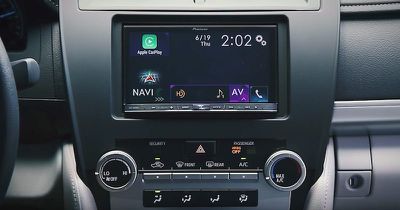
If you connect an iPhone or iPod touch that has been updated to iOS 11 and launch AppRadio Mode, you will experience a blank screen or other display malfunction that disables AppRadio Mode, according to the company.
Pioneer said it is working to resolve the issue and will update a notice posted on its website once firmware updates for the receivers are available. For now, the only solution to maintain compatibility is to remain on iOS 10.
AppRadio Mode is Pioneer's own interface for running over 30 compatible smartphone apps, browsing the web, navigating, and listening to music, podcasts, and internet radio through your car's speakers.
Pioneer's list of affected models include many AVH, AVIC, and SPH receivers, some of which double as aftermarket CarPlay systems.
(Thanks, Lawrence!)
Popular Stories
iOS 26.4 was released today, and it includes a couple of new features for CarPlay: an Ambient Music widget and support for voice-based chatbot apps.
To update your iPhone 11 or newer to iOS 26.4, open the Settings app and tap on General → Software Update. CarPlay will automatically offer the new features so long as the iPhone connected to your vehicle is running iOS 26.4 or later....
Apple today released new firmware for the AirPods Pro 2, AirPods Pro 3, and the AirPods 4. The firmware has a version number of 8B39, up from 8B34 on the AirPods Pro 3, 8B28 on the AirPods Pro 2, and 8B21 on the AirPods 4.
There is no word on what's included in the firmware, but Apple has a support document with limited notes. Most updates are limited to bug fixes and performance...
Apple this week released tvOS 26.4, and the software update includes a handful of new features and changes for the Apple TV.
tvOS 26.4 is compatible with all Apple TV 4K and Apple TV HD models released since 2015. To update your Apple TV, open the Settings app on the device, navigate to System → Software Updates, and select Update Software.
Below, we have recapped what is new in tvOS...























