'Google Keep' iOS Notes Now Integrate With Google Docs on the Web - MacRumors
Skip to Content

'Google Keep' iOS Notes Now Integrate With Google Docs on the Web

by

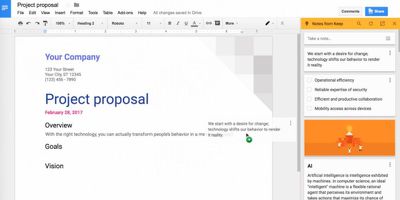
Google has integrated Google Keep notes into Google Docs, allowing users of the Google Keep iOS app to drag-and-drop their notes directly into online documents.

With Google Keep for iOS, users can input notes, lists, photos, and voice memos, set reminders about notes, and organize their note collections with labels and colors.
Screen Shot 2
While in Docs on the web, users can now access the Keep notepad via the Tools menu. The new integration means users can copy their Keep notes into Docs and create new Keep notes right from inside Docs (accessed via the web, not through the Docs app), after which they will sync back to the Keep iOS app.

Google has offered some tips on making the most of the new feature:

Here are a few ways you can now work better with the integration between Keep and Docs:

  • Drag your notes from Keep directly into your work documents
  • Easily search your notes in Keep while in Docs to find the information you need to complete your project
  • Add a new note in the Keep notepad or select text from inside of your document and easily add it to a new note (just right click and select “Save to Keep notepad”). When you open that note in Keep, we’ll include a link back to the source document so you can always refer back to it.

Google Keep is a free download for iPhone and iPad available from the App Store. [Direct Link]

Top Rated Comments

sracer Avatar
125 months ago
Finally! This is fantastic.
Wait. Next month Google will announce that they are discontinuing Keep. ;)
Score: 3 Votes (Like | Disagree)
mattopotamus Avatar
125 months ago
I think I use more google apps on my iPhone than stock apps :/
Score: 3 Votes (Like | Disagree)
125 months ago
Didn't see it mentioned in the article but this is only available as part of GSuite. Regular Google accounts won't have this capability.
Score: 2 Votes (Like | Disagree)
B60boy Avatar
125 months ago
How come I have it then? I have a regular account with Google.
I just got home and tried it out and it works on a regular Google account. Just after fooling around with it this will be a killer feature. I now can move off of OneNote which I keep on a local work Win10 notebook which ties into the company MS license agreements. If I can use this new combo instead and have it on my Google account via the web, that data tie to me. Being in sales, this is a great new feature. I will test it out tonight, but it looks promising.

However, I do have a bitch about Google and privacy overall and prefer my data tied into my iCloud account. Hopefully Apple will make the improved notes app have a reminders function with the share sheets or embedded in the app itself. Even better yet is to add a tagging feature that is iOS feature. More thoughts later.
Score: 1 Votes (Like | Disagree)
B60boy Avatar
125 months ago
Didn't see it mentioned in the article but this is only available as part of GSuite. Regular Google accounts won't have this capability.
Well that sucks....
Score: 1 Votes (Like | Disagree)
125 months ago
I think I use more google apps on my iPhone than stock apps :/
Nothing wrong with that. Google makes some great apps and their services are some of the best.
Score: 1 Votes (Like | Disagree)

Popular Stories

8 CarPlay Features in iOS 27 Feature

Which iOS 27 CarPlay Features Actually Work in Your Car?

Thursday September 17, 2026 4:17 am PDT by
In iOS 27, available now, CarPlay gets its biggest update in years, but some features depend on what type of car you have rather than your iPhone model. Some of the biggest additions won't do anything in the vast majority of vehicles on the road today. Here's how the new features pan out. Works in Any CarPlay Vehicle Custom widgets: In iOS 27, CarPlay is no longer limited to Apple's handful ...
Apple Watch New Charging Puck

Here's Why a New Apple Watch Charging Puck Was Just Released

Wednesday September 16, 2026 8:53 am PDT by
The new Apple Watch Series 12 and Apple Watch Ultra 4 have hardware changes that allow for faster charging, but you will need to use the new version of the Apple Watch Magnetic Fast Charger included in the box in order to achieve this boost. If you need extra ones for your own charging stands or travel or so forth, Apple released the new version of the charger on its online store last week, with...
ios272anniversary

iOS 27.2 Could Save Your Marriage

Wednesday September 16, 2026 1:32 pm PDT by
The iOS 27.2 beta that Apple released today adds a feature that reminds you it's your anniversary when you call someone, as long as you've added the date in the Contacts app. On the date of your anniversary, when you go to call the person, you'll see a reminder that it's an important day so you don't forget to say something. The anniversary alert uses Call Context, a feature Apple added in...