Apple Maps Now Supports Transit Directions in Salt Lake City - MacRumors
Skip to Content

Apple Maps Now Supports Transit Directions in Salt Lake City

by

Apple Maps has been updated with comprehensive transit data for Salt Lake City, Utah, enabling iPhone users in the city and certain suburbs to navigate using Utah Transit Authority public transportation, including the TRAX light rail system, FrontRunner commuter train, S-Line streetcar, and buses.
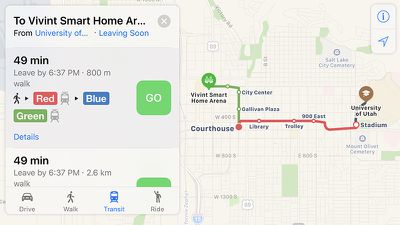
apple-maps-salt-lake-city-transit-2
Apple introduced Transit in Maps as part of iOS 9 in select cities around the world, including Baltimore, Berlin, Boston, Chicago, London, Los Angeles, Mexico City, New York, Philadelphia, San Francisco, Sydney, Toronto, and over 300 cities in China. The feature has its own tab in Apple Maps on iOS 10 when entering directions.

apple-maps-transit-salt-lake-city-1
Transit routing is now available in several other cities around the world, including Atlanta, Columbus, Dallas-Fort Worth, Denver, Honolulu, Kansas City, Melbourne, Miami, Minneapolis–Saint Paul, Montréal, Pittsburgh, Portland, Prague, Rio de Janeiro, Sacramento, San Antonio, San Diego, and Seattle.

(Thanks, Bernd!)
Top Rated Comments

124 months ago
To be accurate, shouldn't keep referring to these as cities as it grossly distorts the coverage of Apple Maps transit coverage. These are large regions covering huge areas with anywhere from dozens to hundreds of cities in each and millions of people in each. It's also good to periodically remember why Apple doesn't simply roll out transit directions to all areas at once, as they could easily do. That's what Google did and they have had lots of criticism about the accuracy of their transit. Apple is taking a different path and customizing transit for each region. This article lays the Apple approach out very well.

http://appleinsider.com/articles/16/07/07/why-apples-transit-maps-are-rolling-out-so-slowly
Score: 2 Votes (Like | Disagree)
Stenar Avatar
124 months ago
HURRAH for SLC. Finally!
[doublepost=1481674780][/doublepost]
What a courageous city to choose! Apple these days; sheesh.
WTH are you talking about?
Score: 1 Votes (Like | Disagree)
wevrem Avatar
124 months ago
I live in the area and this is great. Can't wait to try it out.
Score: 1 Votes (Like | Disagree)
124 months ago
Meanwhile the Mac languishes almost forgotten...
Better reassign those cartographers to working on the Mac, then. I bet if they brought in their cafeteria staff to work on it, they could release new Macs even faster.
Score: 1 Votes (Like | Disagree)
124 months ago
What a courageous city to choose! Apple these days; sheesh.
Well to be fair, Apple Maps has improved dramatically recently.
Score: 1 Votes (Like | Disagree)

Popular Stories

Ads Are Coming to Apple Maps Feature

Ads Aren't in the Apple Maps App Yet, But They're Coming Soon

Wednesday May 13, 2026 4:15 pm PDT by
Apple released iOS 26.5 yesterday with a new Suggested Places feature in the Apple Maps app, which is a precursor to the ads that Apple plans to start showing later this year. There was some confusion over whether ads are live, but as of now, the Apple Maps app still doesn't have ads. Apple did start laying the groundwork for ads in iOS 26.5 and tested a splash screen, but no ads appeared...
Aston Martin CarPlay Ultra Screen

Apple Says CarPlay Ultra is Coming to These Vehicle Brands

Thursday May 21, 2026 11:53 am PDT by
Last year, Apple launched CarPlay Ultra, the long-awaited next-generation version of its CarPlay software system for vehicles. Nearly a year later, CarPlay Ultra is still limited to Aston Martin's latest luxury vehicles, but that should change fairly soon. In May 2025, Apple said many other vehicle brands planned to offer CarPlay Ultra, including Hyundai, Kia, and Genesis. CarPlay Ultra...
ios 26 iphone 16 pro lock screen notifications feature 1

iOS 27 Notifications Will Slide in From Left Side of Your iPhone's Screen

Friday June 5, 2026 7:24 am PDT by
Bloomberg's Mark Gurman today revealed another iOS 27 change: notifications will slide in from the left side of the screen instead of from the top. In addition, accessing Notification Center on iOS 27 will require swiping down on the top-left corner of the screen. If you swipe down on the Dynamic Island area, a new "Search or Ask" interface tied to the revamped Siri will appear, instead of...