Skip to Content

Amazon Debuts Book-Skimming 'Page Flip' Feature for Kindle Devices and Apps

by

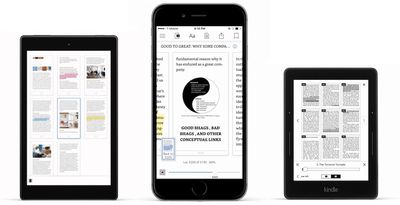
Amazon has announced that a new feature called "Page Flip" will be rolling out to its iOS and Android apps, Fire tablets, and Kindle e-readers as a free, over-the-air update beginning today. The feature gives users a digital approximation of skimming through a book, making "it easy to explore books while always saving your place."
kindle page flip update
When activated, Page Flip pins the current page to the bottom left of the screen to remember your current reading spot, allowing you to skim through the rest of the book to find a specific passage, map, or simply peek ahead at what's next. A new "bird's eye view" feature truncates an entire book into a scrollable column of pages, making it easier to find highlighted passages from previous pages.

Page Flip is a reimagined Kindle navigation experience that makes it easy to explore books while always saving your place

At a glance, easily recognize specific pages as you jump around. Pictures, charts, your highlights, and the layout of each page are easy to see with Page Flip’s pixel-accurate thumbnails that automatically adjust as you change your font and margin settings.

At launch, Amazon says PageFlip is available "on millions of books," with plans to continuously add new entries "every day." Similar to Kindle's X-Ray feature, supported books will be identified on their eBook store page with a "Page Flip: enabled" marker in the feature list.


The Amazon Kindle app is available from the App Store for free. [Direct Link]


Tags: Amazon, Kindle

Top Rated Comments

Porco Avatar
126 months ago
Looks flipping great.
Score: 3 Votes (Like | Disagree)
alfonsog Avatar
126 months ago
That could be useful... I wonder what took them so long to figure out how to implement this feature... Maybe because they wasted so much r&d on the phone
Score: 1 Votes (Like | Disagree)
Daws001 Avatar
126 months ago
How about add split screen support for iOS.
Score: 1 Votes (Like | Disagree)
126 months ago
When I flip pages on iBooks, there is a link on the bottom left where it says `go back to page XX`. XX is the page you were on. Is this any different that making it visual?
I don't know how iBooks works but going back to previous points is not the issue: this is already possible on Kindle apps and devices. The problem is easily and quickly "exploring" a book's contents to look for something specific, e.g. a passage.

Search doesn't solve this very well since you might not recall exactly the words you are looking for or you might get many "false positive" results. Flipping pages the "usual" way is not very helpful either since it's pretty cumbersome for "exploring".

Kindle introduced xRay which partially solves the issue for ebooks featuring it, but not nearly all do.
Score: 1 Votes (Like | Disagree)

Popular Stories

imac video apple feature

Apple Unveils Two New Products

Monday March 2, 2026 7:49 am PST by
Apple today introduced two new devices, including the iPhone 17e and an updated iPad Air. iPhone 17e features the same overall design as the iPhone 16e, but it gains Apple's A19 chip, MagSafe for magnetic wireless charging and magnetic accessories, Apple's second-generation C1X modem for faster 5G, and a doubled 256GB of base storage. In the U.S., the iPhone 17e starts at $599, just like the ...
Apple iPhone 17e feature

Apple Announces iPhone 17e With A19 Chip, MagSafe, and More

Monday March 2, 2026 6:07 am PST by
Apple today announced the iPhone 17e, featuring the A19 chip, MagSafe connectivity, faster charging, and more. The iPhone 17e contains the A19 chip introduced in iPhone 17. It features a 6-core GPU and a 4-core GPU. Apple pointed out that this makes it up to 2x faster than the iPhone 11. The new 16-core Neural Engine is optimized for large generative models. The iPhone 17e also contains...
iPad Air M4 Chip 1

Apple Unveils iPad Air With M4 Chip, Increased RAM, Wi-Fi 7, and More

Monday March 2, 2026 6:05 am PST by
Apple today introduced a new iPad Air, with key upgrades including Apple's M4 chip for faster performance, an increased 12GB of RAM, Apple's N1 wireless networking chip with Wi-Fi 7 support, and Apple's custom C1X modem in cellular models. The new iPad Air has the same overall design as the previous-generation model, which is equipped with the M3 chip, 8GB of RAM, and Wi-Fi 6E support....