Apple previewed iOS 10 earlier this week with new rich notifications that enable iPhone users to view photos and videos, listen to audio, or respond to messages directly within notification bubbles. If you receive an iMessage, for example, you will be able to reply to the conversation without leaving the Lock screen.
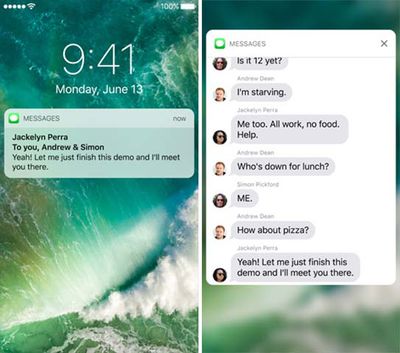
iOS_10_rich_notifications_duo
Apple has also provided developers with the ability to update existing notifications with new information, or delete them, which should help declutter the Lock screen and Notification Center. But many apps still generate multiple notifications, such as every photo, video, or message you receive on Snapchat.

MacRumors forum member chrf097 explains:

The problem with this current system is that notifications become easily cluttered. An active group chat can result in hundreds of individual notifications. For example I'm in a group chat of friends with about 12 active people, and I have to leave it muted anytime I choose not to participate, due to the amount of notifications that collect. In addition, this means that important information can get lost in the sea of notifications.

The solution, as seen in his concept below, could be to follow in Android's footsteps by collapsing notifications on a per-app basis.
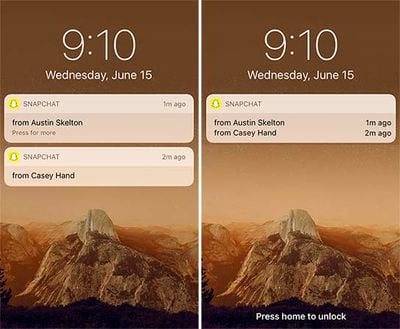
iOS_10_collapsed_notification_concept
The new design would save valuable screen space and allow you to glance at your Lock screen or Notification Center notifications much quicker. But collapsed notifications could inhibit the rich notification experience, so it would work best if collapsed notifications could be toggled on or off on a per-app basis in Settings.

Apple seeded the first beta of iOS 10 to developers earlier this week, and a public beta will be available in July. The free software update will officially be released in the fall for most devices compatible with iOS 9, excluding the iPhone 4s, iPad 2 and 3, original iPad mini, and fifth-generation iPod touch.

Apple could introduce collapsible notifications in a future iOS 10 beta, although changes will more likely be limited to minor tweaks and enhancements.


Top Rated Comments

dlewis23 Avatar
124 months ago
The notifications should be grouped when they are the same app. I understand why they are not and they should not be grouped like this concept shows because its too hard to get a specific one.

They need a divider between them.
Score: 8 Votes (Like | Disagree)
tomaustin44 Avatar
124 months ago
I'm really happy Apple have made an effort to redesign iOS 10 but wasn't particularly impressed when I first saw these notification boxes (and the similar widget ones). The iOS 9 ones were far more unassuming and didn't detract from the lock screen image at all. These ones feel quite blocky and white.
Score: 6 Votes (Like | Disagree)
theelysium Avatar
124 months ago
I think the new notifications looks cheap. I'm sick of this white on white minimal crap.
Score: 5 Votes (Like | Disagree)
Elbon Avatar
124 months ago
I'm really happy Apple have made an effort to redesign iOS 10 but...these notification boxes...feel quite blocky and white.
I had the same reaction. Overall, I like the new direction, but the design doesn't seem particularly elegant.
Score: 5 Votes (Like | Disagree)
rggbv Avatar
124 months ago
May come on later betas. I read an article that iOS 10 allows developers to update existing notification rather then send new ones so example with MLB at bat if I'm not checking my phone during the game once I finally pick it up I'd only see the most recent score notification not every on the app has sent out.
Score: 2 Votes (Like | Disagree)
matr1x Avatar
124 months ago
It is possible in beta 1, apps can update existing notifications.
Score: 2 Votes (Like | Disagree)

Popular Stories

iOS 26

iOS 26.4 and iOS 27 Features Revealed in New Leak

Friday December 12, 2025 10:56 am PST by
Macworld's Filipe Espósito today revealed a handful of features that Apple is allegedly planning for iOS 26.4, iOS 27, and even iOS 28. The report said the features are referenced within the code for a leaked internal build of iOS 26 that is not meant to be seen by the public. However, it appears that Espósito and/or his sources managed to gain access to it, providing us with a sneak peek...
iOS 26

iOS 26.2 Coming Soon With These 8 New Features on Your iPhone

Thursday December 11, 2025 8:49 am PST by
Apple seeded the second iOS 26.2 Release Candidate to developers earlier this week, meaning the update will be released to the general public very soon. Apple confirmed iOS 26.2 would be released in December, but it did not provide a specific date. We expect the update to be released by early next week. iOS 26.2 includes a handful of new features and changes on the iPhone, such as a new...
iOS 26

Apple Releases iOS 26.2 With Alarms for Reminders, Lock Screen Changes, Enhanced Safety Alerts and More

Friday December 12, 2025 10:10 am PST by
Apple today released iOS 26.2, the second major update to the iOS 26 operating system that came out in September, iOS 26.2 comes a little over a month after iOS 26.1 launched. ‌iOS 26‌.2 is compatible with the ‌iPhone‌ 11 series and later, as well as the second-generation ‌iPhone‌ SE. The new software can be downloaded on eligible iPhones over-the-air by going to Settings >...
AirPods Pro Firmware Feature

Apple Releases New Firmware for AirPods Pro 2 and AirPods Pro 3

Thursday December 11, 2025 11:28 am PST by
Apple today released new firmware designed for the AirPods Pro 3 and the prior-generation AirPods Pro 2. The AirPods Pro 3 firmware is 8B30, up from 8B25, while the AirPods Pro 2 firmware is 8B28, up from 8B21. There's no word on what's include in the updated firmware, but the AirPods Pro 2 and AirPods Pro 3 are getting expanded support for Live Translation in the European Union in iOS...
macOS Tahoe 26 Thumb

Apple Releases macOS Tahoe 26.2 With Edge Light

Friday December 12, 2025 10:08 am PST by
Apple today released macOS Tahoe 26.2, the second major update to the macOS Tahoe operating system that came out in September. macOS Tahoe 26.2 comes five weeks after Apple released macOS Tahoe 26.1. Mac users can download the macOS Tahoe update by using the Software Update section of System Settings. macOS Tahoe 26.2 includes Edge Light, a feature that illuminates your face with soft...
AirTag 2 Mock Feature

Apple AirTag 2: Four New Features Found in iOS 26 Code

Thursday December 11, 2025 10:31 am PST by
The AirTag 2 will include a handful of new features that will improve tracking capabilities, according to a new report from Macworld. The site says that it was able to access an internal build of iOS 26, which includes references to multiple unreleased products. Here's what's supposedly coming: An improved pairing process, though no details were provided. AirTag pairing is already...
ipados 26 1 slide over

Apple Releases iPadOS 26.2 With Multitasking Improvements

Friday December 12, 2025 10:09 am PST by
Apple today released iPadOS 26.2, the second major update to the iPadOS 26 operating system released in September. iPadOS 26.2 comes a month after iPadOS 26.1. The new software can be downloaded on eligible iPads over-the-air by going to Settings > General > Software Update. iPadOS 26.2 continues with the multitasking improvements that were added with iPadOS 26.1. You can now drag and...
bug security vulnerability issue fix larry

Update Now: iOS 26.2 Fixes 20+ Security Vulnerabilities

Friday December 12, 2025 11:11 am PST by
Apple today released iOS 26.2, iPadOS 26.2, and macOS 26.2, all of which introduce new features, bug fixes, and security improvements. Apple says that the updates address over 20 vulnerabilities, including two bugs that are known to have been actively exploited. There are a pair of WebKit vulnerabilities that could allow maliciously crafted web content to execute code or cause memory...