

Apple News Gains 'Native Banner' Ad Format for Sponsored Posts - MacRumors
Skip to Content

Apple News Gains 'Native Banner' Ad Format for Sponsored Posts

by

Apple recently added a new ad format designed to allow publishers to share sponsored posts alongside regular news content in Apple News, according to developer specification document [PDF] that was shared by Business Insider.

The document features all of the different ad types available within Apple News, including a new "Native Banners" feature. With Native Banners, which are meant to blend in with standard content, ads can be displayed right in the news feed with regular Apple News articles.

Native ads display directly in the content feeds, inline with News articles, and are intended to blend in with their surrounding. They will be set in the default font used in News.

According to Apple, these native ads include a title, text excerpt, and a small image, and in an example image provided, the format looks quite similar to the standard article list format in the Apple News app. Sponsored posts will, however, be denoted by text that lets readers know the content is sponsored.
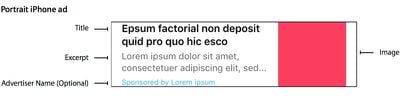
appleadformat

Each ad includes a title, text excerpt and a small image, and is distinguished by a 'Sponsored' callout. The sponsored advertiser name is optional. If an advertiser name is not provided, the reader will see 'Sponsored' in the banner.

As Business Insider points out, publishers can share sponsored news posts on Apple News at the current time as long as content is marked as sponsored in metadata, but this new ad format will give publishers a clear way to monetize sponsored content and it adds tools for explicitly branding sponsored content.

Apple is also rumored to be adding support for subscription content from publishers with paywalls to the Apple News app in the future.


Top Rated Comments

robotica Avatar
134 months ago
Why would I want to even use the news app if it's full of adverts??
Come on.
Score: 10 Votes (Like | Disagree)
HiRez Avatar
134 months ago
I liked this app while it lasted.
Score: 2 Votes (Like | Disagree)
b1wils1 Avatar
134 months ago
I always wanted to use this app. I even put it in my launchbar, but the more it sat there, the more I ignored it until last night, I moved it to an app folder full of other broken dreams and unicorn tears.
Score: 1 Votes (Like | Disagree)
134 months ago
Well, looks like one app I'll delete.

Score: 1 Votes (Like | Disagree)
134 months ago
I wish there were a way to block a source from the News app. I get the need for a revenue stream but the choice of outlets isn't always great.

Can't you just long press and do mute? Is that what you mean
Score: 1 Votes (Like | Disagree)

Popular Stories

after the whiste podcast

Apple's 'After the Whistle' Podcast to Return for World Cup

Wednesday May 27, 2026 3:39 am PDT by
Apple today announced that "After the Whistle with Brendan Hunt and Rebecca Lowe" will return on June 7 for a third season built around the 2026 FIFA World Cup. Hunt is an actor and cocreator of Apple TV's Ted Lasso. Lowe hosts NBC Sports' Premier League coverage and is cohosting FOX Sports' FIFA World Cup 2026 broadcast. The two will recap games as the tournament unfolds, with new episodes...
Aston Martin CarPlay Ultra Screen

Apple Says CarPlay Ultra is Coming to These Vehicle Brands

Thursday May 21, 2026 11:53 am PDT by
Last year, Apple launched CarPlay Ultra, the long-awaited next-generation version of its CarPlay software system for vehicles. Nearly a year later, CarPlay Ultra is still limited to Aston Martin's latest luxury vehicles, but that should change fairly soon. In May 2025, Apple said many other vehicle brands planned to offer CarPlay Ultra, including Hyundai, Kia, and Genesis. CarPlay Ultra...
ios 26 iphone 16 pro lock screen notifications feature 1

iOS 27 Notifications Will Slide in From Left Side of Your iPhone's Screen

Friday June 5, 2026 7:24 am PDT by
Bloomberg's Mark Gurman today revealed another iOS 27 change: notifications will slide in from the left side of the screen instead of from the top. In addition, accessing Notification Center on iOS 27 will require swiping down on the top-left corner of the screen. If you swipe down on the Dynamic Island area, a new "Search or Ask" interface tied to the revamped Siri will appear, instead of...








































